
🌀 A vue plugin that allows you to use vue3's CSSVars feature in css files
English | 中文
- 🧩 It is a function extension of vue
- 🌈 Compatible with multiple bundled platforms(vite、webpack)
- ⛰ Support css, sass, scss, less, stylus
- ⚡ Support hmr
1.When using the development server,
unplugin-vue-cssvars will analyze the referenced css file from the component,
and inject styles in the transformation code of @vitejs/plugin-vue
2.When building, unplugin-vue-cssvars will analyze the referenced css file from the component and inject it into
sfc, don't worry about generating redundant code, packaging tools (such as vite) will automatically handle it.
npm i unplugin-vue-cssvars -D
Or
yarn add unplugin-vue-cssvars -D
Or
pnpm add unplugin-vue-cssvars -D
- use plugin and set options
Vite
// vite.config.ts
import { defineConfig } from 'vite'
import { viteVueCSSVars } from 'unplugin-vue-cssvars'
import vue from '@vitejs/plugin-vue'
import type { PluginOption } from 'vite'
export default defineConfig({
  plugins: [
    vue(),
    viteVueCSSVars({
      include: [/.vue/],
      includeCompile: ['**/**.scss'],
      server: false,
    }) as PluginOption,
  ],
})
Rollup
// rollup.config.js
import { rollupVueCSSVars } from 'unplugin-vue-cssvars'
export default {
  plugins: [
    rollupVueCSSVars(/* options */),
  ],
}
Webpack
// webpack.config.js
module.exports = {
  /* ... */
  plugins: [
    require('unplugin-vue-cssvars').webpackVueCSSVars({ /* options */ }),
  ],
}
Vue CLI
// vue.config.js
module.exports = {
  configureWebpack: {
    plugins: [
      require('unplugin-vue-cssvars').webpackVueCSSVars({ /* options */ }),
    ],
  },
}
ESBuild
// esbuild.config.js
import { build } from 'esbuild'
import { esbuildVueCSSVars } from 'unplugin-vue-cssvars'

build({
  plugins: [esbuildVueCSSVars(/* options */)],
})
- use
v-bind-m
// foo.css
.foo{
   color: v-bind-m(fontColor)
}
- use alias
For example you have the following project structure:
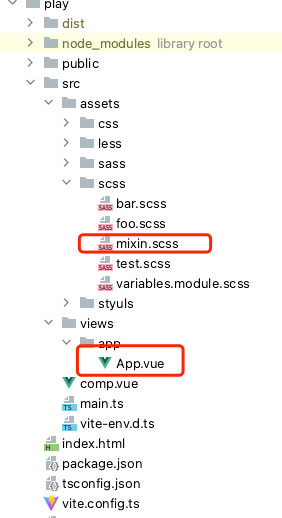
// App.vue
<template>
 <div class="scss">
   app
 </div>
</template>

<style lang="scss" scoped>
@import '@/assets/scss/mixin';
</style>
Then you can configure like this
// vite.config.ts
import { resolve } from 'path'
import { defineConfig } from 'vite'
import vue from '@vitejs/plugin-vue'
import { viteVueCSSVars } from '../dist'
export default defineConfig({
  resolve: {
    alias: {
      '@': resolve(__dirname, './src'),
    },
  },
  plugins: [
    vue(),
    viteVueCSSVars({
      include: [/.vue/],
      includeCompile: ['**/**.scss'],
      alias: {
        '@': resolve(__dirname, './src'),
      },
    }),
  ],
})
export interface Options {
   /**
    * Provide path which will be transformed
    * @default process.cwd()
    */
   rootDir?: string

   /**
    * RegExp or glob to match files to be transformed
    */
   include?: FilterPattern

   /**
    * RegExp or glob to match files to NOT be transformed
    */
   exclude?: FilterPattern

   /**
    * Specify the file to be compiled, for example,
    * if you want to compile scss, then you can pass in ['** /**.sass']
    * @property { ['** /**.css', '** /**.less', '** /**.scss', '** /**.sass', '** /**.styl'] }
    * @default ['** /**.css']
    */
   includeCompile?: Array<string>

   /**
    * Flag whether to start with server at development time,
    * because unplugin-vue-cssvars uses different strategies for building and server development
    * If it is not passed in vite, unplugin-vue-cssvars will automatically
    * recognize the command of config to determine the server value
    * @default true
    */
   server?: boolean

   /**
    * alias
    * @default undefined
    */
   alias?: Record<string, string>
}● Rules When Transforming Analysis
- In
sfc, if @import specifies a suffix, the conversion analysis will be performed according to the suffix file,
otherwise the conversion analysis will be performed according to the lang attribute of the current style tag (default css)
- Rules in
css: css files can only reference css files, and only files with css suffixes will be parsed.
- Rules in
scss, less, stylus: scss, less, stylus files can refer to css files, and corresponding scss or less files or stylus files,
Prioritize conversion analysis of files with preprocessor suffixes, if the file does not exist, analyze its css file
● Variable extraction rules in SFC
- For
script setup, unplugin-vue-cssvars will extract all variables to match.
<script setup>
    const color = 'red'
</script>
- For
composition api, unplugin-vue-cssvars will extract setup function return variables for matching.
<script>
 import { defineComponent } from 'vue'
 export default defineComponent( {
   setup(){
       const color = 'red'
       return {
          color
       }
   }
})
</script>
- For
options api, unplugin-vue-cssvars will extract data function return variables for matching.
<script>
 export default {
   data(){
       const color = 'red'
       return {
          color
       }
   }
}
</script>
- For normal
script, unplugin-vue-cssvars will extract all variables to match.
<script>
    const color = 'red'
</script>
● Variable conflict rules in SFC
- In sfc, there are options API and composition API, and all variables will be merged. If there are conflicts in variables,
the syntax that appears later will take precedence
(for example, if options API is written first and composition API is written later, composition API takes precedence).
- There are
script setup, options api and composition api in sfc, all variables will be merged,
if there is a variable conflict, script setup will take precedence
- Ordinary
script in sfc will not exist at the same time as options api and composition api
- If the normal
script exists in sfc, there must be script setup
- Common
script and script setup variables in sfc will be merged,
if there is a variable conflict, script setup will take precedence
● Priority after style injection
- Starting from
sfc, analyze the css files referenced in the style tag, and in accordance with the order of references in the css files, they will be promoted in depth-first order and injected into sfc.
- After being injected into
sfc, its priority is completely determined by the compiler of @vue/compiler-dom.


