

React-Grid-Layout is a grid layout system much like Packery or
Gridster, for React.
Unlike those systems, it is responsive and supports breakpoints. Breakpoint layouts can be provided by the user
or autogenerated.
RGL is React-only and does not require jQuery.
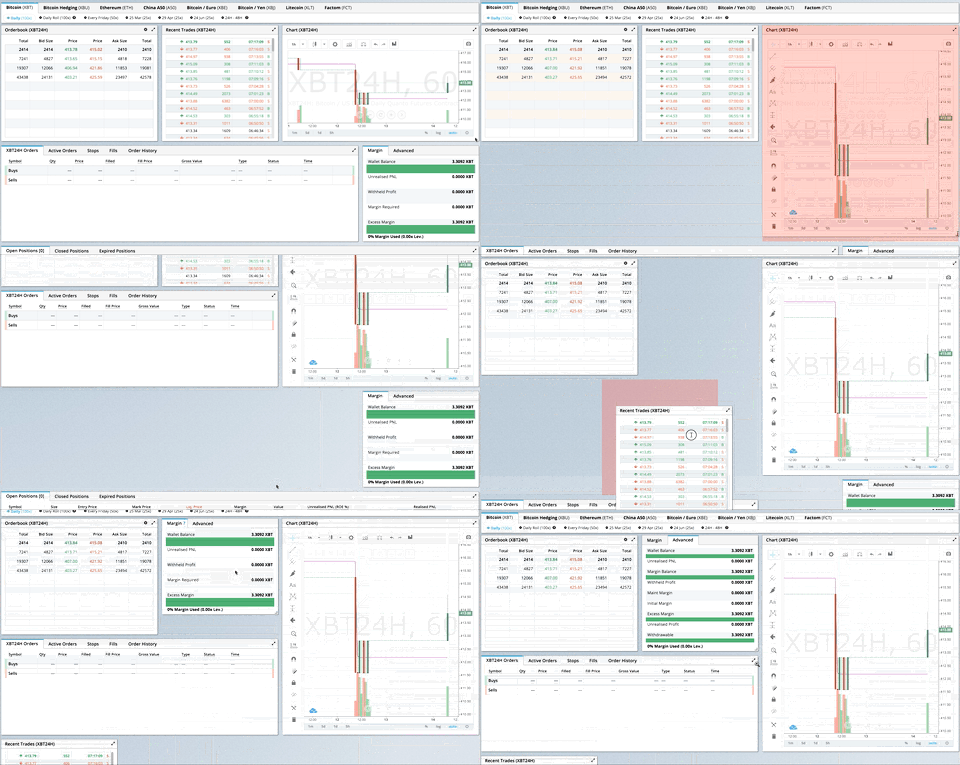
GIF from production usage on BitMEX.com
[Demo | Changelog | CodeSandbox Editable demo]
Version 2 is a complete TypeScript rewrite with a modernized API:
- Full TypeScript support - First-class types, no more
@types/react-grid-layout
- React Hooks - New
useContainerWidth, useGridLayout, and useResponsiveLayout hooks
- Composable Configuration - Group related props into focused interfaces:
gridConfig - cols, rowHeight, margin, paddingdragConfig - enable, handle, cancel, boundedresizeConfig - enable, handlespositionStrategy - transform vs absolute positioningcompactor - vertical, horizontal, or custom algorithms
- Modular architecture - Import only what you need:
react-grid-layout - React components and hooks (v2 API)react-grid-layout/core - Pure layout algorithms (framework-agnostic)react-grid-layout/legacy - v1 flat props API for migrationreact-grid-layout/extras - Optional components like GridBackground
- Smaller bundle - Tree-shakeable ESM and CJS builds
See the RFC for detailed migration examples.
| Change |
Description |
width prop required |
Use useContainerWidth hook or provide your own measurement |
onDragStart threshold |
Now fires after 3px movement, not on mousedown. Use onMouseDown for immediate response |
| Immutable callbacks |
Callback parameters are read-only. Use onLayoutChange or constraints instead of mutation |
data-grid in legacy only |
v2 requires explicit layout prop. Use legacy wrapper for data-grid |
| Pluggable compaction |
Compaction is now pluggable via Compactor interface. Optional fast O(n log n) algorithm in /extras |
| UMD bundle removed |
Use a bundler (Vite, webpack, esbuild) |
verticalCompact removed |
Use compactType={null} or compactor={noCompactor} |
Quick migration - change your import to use the legacy wrapper:
- import GridLayout, { Responsive, WidthProvider } from 'react-grid-layout';
+ import GridLayout, { Responsive, WidthProvider } from 'react-grid-layout/legacy';
This provides 100% runtime API compatibility with v1.
TypeScript users: If you were using @types/react-grid-layout, note that v2 includes its own types with some naming changes:
Old (@types/react-grid-layout) |
New (v2) |
Notes |
RGL.Layout |
LayoutItem |
Single grid item |
RGL.Layout[] |
Layout |
Array of items |
RGL.Layouts |
ResponsiveLayouts |
Breakpoint → layout map |
- import RGL from 'react-grid-layout';
- const item: RGL.Layout = { i: 'a', x: 0, y: 0, w: 1, h: 1 };
- const layouts: RGL.Layouts = { lg: [item] };
+ import { LayoutItem, ResponsiveLayouts } from 'react-grid-layout/legacy';
+ const item: LayoutItem = { i: 'a', x: 0, y: 0, w: 1, h: 1 };
+ const layouts: ResponsiveLayouts = { lg: [item] };
Full migration - adopt the v2 API for new features and better tree-shaking:
import ReactGridLayout, { useContainerWidth, verticalCompactor } from 'react-grid-layout';

function MyGrid() {
  const { width, containerRef, mounted } = useContainerWidth();

  return (
    <div ref={containerRef}>
      {mounted && (
        <ReactGridLayout
          width={width}
          layout={layout}
          gridConfig={{ cols: 12, rowHeight: 30 }}
          dragConfig={{ enabled: true, handle: '.handle' }}
          compactor={verticalCompactor}
        >
          {children}
        </ReactGridLayout>
      )}
    </div>
  );
}
| Use Case |
Recommendation |
| Existing v1 codebase |
react-grid-layout/legacy |
| New project |
v2 API with hooks |
| Custom compaction |
v2 with custom Compactor |
| SSR |
v2 with measureBeforeMount: true |
- Showcase
- Basic
- No Dragging/Resizing (Layout Only)
- Messy Layout Autocorrect
- Layout Defined on Children
- Static Elements
- Adding/Removing Elements
- Saving Layout to LocalStorage
- Saving a Responsive Layout to LocalStorage
- Minimum and Maximum Width/Height
- Dynamic Minimum and Maximum Width/Height
- Toolbox
- Drag From Outside
- Bounded Layout
- Responsive Bootstrap-style Layout
- Scaled Containers
- Allow Overlap
- All Resizable Handles
- Compactor Showcase
- Pluggable Constraints
- Aspect Ratio Constraints
- Custom Constraints
Projects Using React-Grid-Layout
Know of others? Create a PR to let me know!
- 100% React - no jQuery
- Full TypeScript support
- Compatible with server-rendered apps
- Draggable widgets
- Resizable widgets
- Static widgets
- Configurable packing: horizontal, vertical, or off
- Bounds checking for dragging and resizing
- Widgets may be added or removed without rebuilding grid
- Layout can be serialized and restored
- Responsive breakpoints
- Separate layouts per responsive breakpoint
- Grid Items placed using CSS Transforms
- Compatibility with
<React.StrictMode>
| Version |
Compatibility |
| >= 2.0.0 |
React 18+, TypeScript |
| >= 0.17.0 |
React 16 & 17 |
npm install react-grid-layout
Include the stylesheets in your application:
import "react-grid-layout/css/styles.css";
import "react-resizable/css/styles.css";
Or link them directly:
<link rel="stylesheet" href="/node_modules/react-grid-layout/css/styles.css" />
<link rel="stylesheet" href="/node_modules/react-resizable/css/styles.css" />
import ReactGridLayout, { useContainerWidth } from "react-grid-layout";
import "react-grid-layout/css/styles.css";
import "react-resizable/css/styles.css";

function MyGrid() {
  const { width, containerRef, mounted } = useContainerWidth();

  const layout = [
    { i: "a", x: 0, y: 0, w: 1, h: 2, static: true },
    { i: "b", x: 1, y: 0, w: 3, h: 2, minW: 2, maxW: 4 },
    { i: "c", x: 4, y: 0, w: 1, h: 2 }
  ];

  return (
    <div ref={containerRef}>
      {mounted && (
        <ReactGridLayout
          layout={layout}
          width={width}
          gridConfig={{ cols: 12, rowHeight: 30 }}
        >
          <div key="a">a</div>
          <div key="b">b</div>
          <div key="c">c</div>
        </ReactGridLayout>
      )}
    </div>
  );
}
You can also define layout on children using data-grid:
<ReactGridLayout width={width} gridConfig={{ cols: 12, rowHeight: 30 }}>
  <div key="a" data-grid={{ x: 0, y: 0, w: 1, h: 2, static: true }}>
    a
  </div>
  <div key="b" data-grid={{ x: 1, y: 0, w: 3, h: 2 }}>
    b
  </div>
  <div key="c" data-grid={{ x: 4, y: 0, w: 1, h: 2 }}>
    c
  </div>
</ReactGridLayout>Use Responsive for automatic breakpoint handling:
import { Responsive, useContainerWidth } from "react-grid-layout";

function MyResponsiveGrid() {
  const { width, containerRef, mounted } = useContainerWidth();

  const layouts = {
    lg: [{ i: "1", x: 0, y: 0, w: 2, h: 2 }],
    md: [{ i: "1", x: 0, y: 0, w: 2, h: 2 }]
  };

  return (
    <div ref={containerRef}>
      {mounted && (
        <Responsive
          layouts={layouts}
          breakpoints={{ lg: 1200, md: 996, sm: 768, xs: 480, xxs: 0 }}
          cols={{ lg: 12, md: 10, sm: 6, xs: 4, xxs: 2 }}
          width={width}
        >
          <div key="1">1</div>
          <div key="2">2</div>
          <div key="3">3</div>
        </Responsive>
      )}
    </div>
  );
}The width prop is required. You have several options:
Option 1: useContainerWidth Hook (Recommended)
import ReactGridLayout, { useContainerWidth } from "react-grid-layout";

function MyGrid() {
  const { width, containerRef, mounted } = useContainerWidth();

  return (
    <div ref={containerRef}>
      {mounted && <ReactGridLayout width={width}>...</ReactGridLayout>}
    </div>
  );
}<ReactGridLayout width={1200}>...</ReactGridLayout>Option 3: CSS Container Queries or ResizeObserver
Use any width measurement library like react-sizeme or your own ResizeObserver implementation.
Option 4: Legacy WidthProvider HOC
For backwards compatibility, you can still use WidthProvider:
import ReactGridLayout, { WidthProvider } from "react-grid-layout/legacy";

const GridLayoutWithWidth = WidthProvider(ReactGridLayout);

function MyGrid() {
  return <GridLayoutWithWidth>...</GridLayoutWithWidth>;
}The v2 API provides three hooks for different use cases. Choose based on your needs:
| Hook |
Use When |
useContainerWidth |
You need responsive width measurement (most common) |
useGridLayout |
You're building a custom grid component or need direct state control |
useResponsiveLayout |
You're building a custom responsive grid with breakpoint logic |
Observes container width using ResizeObserver and provides reactive width updates. This is the recommended way to provide width to the grid.
Why use it instead of WidthProvider?
- Hooks are more composable and easier to test
- No HOC wrapper means simpler component tree
- Explicit control over when to render (via
mounted)
- Works better with SSR
import { useContainerWidth } from "react-grid-layout";

function MyGrid() {
  const { width, containerRef, mounted, measureWidth } = useContainerWidth({
    measureBeforeMount: false, // Set true for SSR
    initialWidth: 1280 // Width before first measurement
  });

  return (
    <div ref={containerRef}>{mounted && <ReactGridLayout width={width} />}</div>
  );
}
Type Definitions:
interface UseContainerWidthOptions {
  /** Delay render until width is measured. Useful for SSR. Default: false */
  measureBeforeMount?: boolean;
  /** Initial width before measurement. Default: 1280 */
  initialWidth?: number;
}

interface UseContainerWidthResult {
  /** Current container width in pixels */
  width: number;
  /** Whether the container has been measured at least once */
  mounted: boolean;
  /** Ref to attach to the container element */
  containerRef: RefObject<HTMLDivElement | null>;
  /** Manually trigger a width measurement */
  measureWidth: () => void;
}Core layout state management hook. Use this when you need direct control over drag/resize/drop state, or when building a custom grid component.
Why use it instead of the component?
- Full control over layout state and updates
- Access to drag/resize/drop state for custom UIs
- Can integrate with external state management
- Build headless grid implementations
import { useGridLayout, horizontalCompactor } from "react-grid-layout";

function CustomGrid({ initialLayout }) {
  const {
    layout,
    setLayout,
    dragState,
    resizeState,
    onDragStart,
    onDrag,
    onDragStop,
    onResizeStart,
    onResize,
    onResizeStop,
    containerHeight,
    isInteracting,
    compactor
  } = useGridLayout({
    layout: initialLayout,
    cols: 12,
    compactor: horizontalCompactor, // default is verticalCompactor
    onLayoutChange: newLayout => console.log("Layout changed:", newLayout)
  });

  // Access drag state for custom placeholder rendering
  const placeholder = dragState.activeDrag;

  // Check if any interaction is happening
  if (isInteracting) {
    // Disable other UI during drag/resize
  }

  return (
    <div style={{ height: containerHeight * rowHeight }}>
      {layout.map(item => (
        <div
          key={item.i}
          onMouseDown={() => onDragStart(item.i, item.x, item.y)}
        >
          {item.i}
        </div>
      ))}
      {placeholder && <div className="placeholder" />}
    </div>
  );
}
Type Definitions:
interface UseGridLayoutOptions {
  /** Initial layout */
  layout: Layout;
  /** Number of columns */
  cols: number;
  /** Block movement into occupied space instead of pushing items */
  preventCollision?: boolean;
  /** Called when layout changes */
  onLayoutChange?: (layout: Layout) => void;
  /** Compactor for layout compaction (default: verticalCompactor) */
  compactor?: Compactor;
}

interface UseGridLayoutResult {
  /** Current layout */
  layout: Layout;
  /** Set layout directly */
  setLayout: (layout: Layout) => void;
  /** Current drag state (activeDrag, oldDragItem, oldLayout) */
  dragState: DragState;
  /** Current resize state (resizing, oldResizeItem, oldLayout) */
  resizeState: ResizeState;
  /** Current drop state (droppingDOMNode, droppingPosition) */
  dropState: DropState;
  /** Start dragging an item */
  onDragStart: (itemId: string, x: number, y: number) => LayoutItem | null;
  /** Update drag position */
  onDrag: (itemId: string, x: number, y: number) => void;
  /** Stop dragging */
  onDragStop: (itemId: string, x: number, y: number) => void;
  /** Start resizing an item */
  onResizeStart: (itemId: string) => LayoutItem | null;
  /** Update resize dimensions */
  onResize: (
    itemId: string,
    w: number,
    h: number,
    x?: number,
    y?: number
  ) => void;
  /** Stop resizing */
  onResizeStop: (itemId: string, w: number, h: number) => void;
  /** Handle external drag over */
  onDropDragOver: (
    droppingItem: LayoutItem,
    position: DroppingPosition
  ) => void;
  /** Handle external drag leave */
  onDropDragLeave: () => void;
  /** Complete external drop */
  onDrop: (droppingItem: LayoutItem) => void;
  /** Container height in grid rows */
  containerHeight: number;
  /** Whether any drag/resize/drop is active */
  isInteracting: boolean;
  /** The compactor being used */
  compactor: Compactor;
}Manages responsive breakpoints and generates layouts for different screen sizes. Use this when building a custom responsive grid.
Why use it instead of the Responsive component?
- Direct access to current breakpoint
- Control over layout generation for new breakpoints
- Can update layouts for specific breakpoints
- Build custom breakpoint UIs
import { useContainerWidth, useResponsiveLayout } from "react-grid-layout";

function CustomResponsiveGrid() {
  const { width, containerRef, mounted } = useContainerWidth();

  const {
    layout, // Current layout for active breakpoint
    layouts, // All layouts by breakpoint
    breakpoint, // Current active breakpoint ('lg', 'md', etc.)
    cols, // Column count for current breakpoint
    setLayoutForBreakpoint,
    setLayouts,
    sortedBreakpoints
  } = useResponsiveLayout({
    width,
    breakpoints: { lg: 1200, md: 996, sm: 768, xs: 480, xxs: 0 },
    cols: { lg: 12, md: 10, sm: 6, xs: 4, xxs: 2 },
    layouts: {
      lg: [{ i: "1", x: 0, y: 0, w: 2, h: 2 }],
      md: [{ i: "1", x: 0, y: 0, w: 3, h: 2 }]
    },
    // compactor: verticalCompactor (default)
    onBreakpointChange: (bp, cols) =>
      console.log(`Now at ${bp} (${cols} cols)`),
    onLayoutChange: (layout, allLayouts) => saveToServer(allLayouts)
  });

  // Show current breakpoint in UI
  return (
    <div ref={containerRef}>
      <div>
        Current breakpoint: {breakpoint} ({cols} columns)
      </div>
      {mounted && (
        <GridLayout width={width} cols={cols} layout={layout}>
          {/* children */}
        </GridLayout>
      )}
    </div>
  );
}
Type Definitions:
interface UseResponsiveLayoutOptions<B extends string = DefaultBreakpoints> {
  /** Current container width */
  width: number;
  /** Breakpoint definitions (name → min-width). Default: {lg: 1200, md: 996, sm: 768, xs: 480, xxs: 0} */
  breakpoints?: Record<B, number>;
  /** Column counts per breakpoint. Default: {lg: 12, md: 10, sm: 6, xs: 4, xxs: 2} */
  cols?: Record<B, number>;
  /** Layouts for each breakpoint */
  layouts?: Partial<Record<B, Layout>>;
  /** Compactor for layout compaction (default: verticalCompactor) */
  compactor?: Compactor;
  /** Called when breakpoint changes */
  onBreakpointChange?: (newBreakpoint: B, cols: number) => void;
  /** Called when layout changes */
  onLayoutChange?: (layout: Layout, layouts: Record<B, Layout>) => void;
  /** Called when width changes */
  onWidthChange?: (
    width: number,
    margin: [number, number],
    cols: number,
    padding: [number, number] | null
  ) => void;
}

interface UseResponsiveLayoutResult<B extends string = DefaultBreakpoints> {
  /** Current layout for the active breakpoint */
  layout: Layout;
  /** All layouts by breakpoint */
  layouts: Partial<Record<B, Layout>>;
  /** Current active breakpoint */
  breakpoint: B;
  /** Column count for the current breakpoint */
  cols: number;
  /** Update layout for a specific breakpoint */
  setLayoutForBreakpoint: (breakpoint: B, layout: Layout) => void;
  /** Update all layouts */
  setLayouts: (layouts: Partial<Record<B, Layout>>) => void;
  /** Sorted array of breakpoint names (smallest to largest) */
  sortedBreakpoints: B[];
}

type DefaultBreakpoints = "lg" | "md" | "sm" | "xs" | "xxs";The v2 API uses composable configuration interfaces for cleaner prop organization:
interface ReactGridLayoutProps {
  // Required
  children: React.ReactNode;
  width: number; // Container width in pixels

  // Configuration interfaces (see below for details)
  gridConfig?: Partial<GridConfig>; // Grid measurement settings
  dragConfig?: Partial<DragConfig>; // Drag behavior settings
  resizeConfig?: Partial<ResizeConfig>; // Resize behavior settings
  dropConfig?: Partial<DropConfig>; // External drop settings
  positionStrategy?: PositionStrategy; // CSS positioning strategy
  compactor?: Compactor; // Layout compaction strategy

  // Layout data
  layout?: Layout; // Layout definition
  droppingItem?: LayoutItem; // Item configuration when dropping from outside

  // Container
  autoSize?: boolean; // Auto-size container height (default: true)
  className?: string;
  style?: React.CSSProperties;
  innerRef?: React.Ref<HTMLDivElement>;

  // Callbacks
  onLayoutChange?: (layout: Layout) => void;
  onDragStart?: EventCallback;
  onDrag?: EventCallback;
  onDragStop?: EventCallback;
  onResizeStart?: EventCallback;
  onResize?: EventCallback;
  onResizeStop?: EventCallback;
  onDrop?: (layout: Layout, item: LayoutItem | undefined, e: Event) => void;
  onDropDragOver?: (e: DragEvent) => { w?: number; h?: number } | false | void;
}Grid measurement configuration:
interface GridConfig {
  cols: number; // Number of columns (default: 12)
  rowHeight: number; // Row height in pixels (default: 150)
  margin: [number, number]; // [x, y] margin between items (default: [10, 10])
  containerPadding: [number, number] | null; // Container padding (default: null, uses margin)
  maxRows: number; // Maximum rows (default: Infinity)
}Drag behavior configuration:
interface DragConfig {
  enabled: boolean; // Enable dragging (default: true)
  bounded: boolean; // Keep items within container (default: false)
  handle?: string; // CSS selector for drag handle
  cancel?: string; // CSS selector to cancel dragging
  threshold: number; // Pixels to move before drag starts (default: 3)
}Resize behavior configuration:
interface ResizeConfig {
  enabled: boolean; // Enable resizing (default: true)
  handles: ResizeHandleAxis[]; // Handle positions (default: ['se'])
  handleComponent?: React.ReactNode | ((axis, ref) => React.ReactNode);
}External drop configuration:
interface DropConfig {
  enabled: boolean; // Allow external drops (default: false)
  defaultItem: { w: number; h: number }; // Default size (default: { w: 1, h: 1 })
  onDragOver?: (e: DragEvent) => { w?: number; h?: number } | false | void;
}CSS positioning strategy. Built-in options:
import {
  transformStrategy, // Default: use CSS transforms
  absoluteStrategy, // Use top/left positioning
  createScaledStrategy // For scaled containers
} from "react-grid-layout/core";

// Example: scaled container
<div style={{ transform: 'scale(0.5)' }}>
  <ReactGridLayout positionStrategy={createScaledStrategy(0.5)} ... />
</div>Layout compaction strategy. Built-in options:
import {
  verticalCompactor, // Default: compact items upward
  horizontalCompactor, // Compact items leftward
  noCompactor, // No compaction (free positioning)
  getCompactor // Factory: getCompactor('vertical', allowOverlap, preventCollision)
} from "react-grid-layout/core";
ResponsiveGridLayout Props
Extends GridLayoutProps with responsive-specific props:
interface ResponsiveGridLayoutProps<B extends string = string> {
  // Responsive configuration
  breakpoint?: B; // Current breakpoint (auto-detected)
  breakpoints?: Record<B, number>; // Breakpoint definitions (default: {lg: 1200, md: 996, sm: 768, xs: 480, xxs: 0})
  cols?: Record<B, number>; // Columns per breakpoint (default: {lg: 12, md: 10, sm: 6, xs: 4, xxs: 2})
  layouts?: Record<B, Layout>; // Layouts per breakpoint

  // Can be fixed or per-breakpoint
  margin?: [number, number] | Partial<Record<B, [number, number]>>;
  containerPadding?:
    | [number, number]
    | Partial<Record<B, [number, number] | null>>
    | null;

  // Callbacks
  onBreakpointChange?: (newBreakpoint: B, cols: number) => void;
  onLayoutChange?: (layout: Layout, layouts: Record<B, Layout>) => void;
  onWidthChange?: (
    width: number,
    margin: [number, number],
    cols: number,
    padding: [number, number] | null
  ) => void;
}interface LayoutItem {
i: string; // Unique identifier (must match child key)
x: number; // X position in grid units
y: number; // Y position in grid units
w: number; // Width in grid units
h: number; // Height in grid units
minW?: number; // Minimum width (default: 0)
maxW?: number; // Maximum width (default: Infinity)
minH?: number; // Minimum height (default: 0)
maxH?: number; // Maximum height (default: Infinity)
static?: boolean; // If true, not draggable or resizable
isDraggable?: boolean; // Override grid isDraggable
isResizable?: boolean; // Override grid isResizable
isBounded?: boolean; // Override grid isBounded
resizeHandles?: Array<"s" | "w" | "e" | "n" | "sw" | "nw" | "se" | "ne">;
}Import pure layout functions from react-grid-layout/core:
import {
  verticalCompactor,
  horizontalCompactor,
  noCompactor,
  getCompactor,
  moveElement,
  collides,
  getFirstCollision,
  validateLayout
  // ... and more
} from "react-grid-layout/core";
Note: The compact() function is not exported. Use compactors instead: verticalCompactor.compact(layout, cols) or get one via getCompactor('vertical').
Extending: Custom Compactors & Position Strategies
Creating a Custom Compactor
Compactors control how items are arranged after drag/resize. Create your own for custom layouts like masonry, gravity, or shelf-packing.
The Compactor Interface:
interface Compactor {
  /** Identifies the compaction type */
  type: "vertical" | "horizontal" | null | string;

  /**
   * Whether items can overlap each other.
   *
   * When true:
   * - Items can be placed on top of other items
   * - Dragging into another item does NOT push it away
   * - Compaction is skipped after drag/resize
   *
   * Use for: layered dashboards, free-form layouts
   */
  allowOverlap: boolean;

  /**
   * Whether to block movement that would cause collision.
   *
   * When true (and allowOverlap is false):
   * - Dragging into another item is blocked (item snaps back)
   * - Other items are NOT pushed away
   * - Only affects movement, not compaction
   *
   * Use with noCompactor for: fixed grids, slot-based layouts
   *
   * Note: Has no effect when allowOverlap is true.
   */
  preventCollision?: boolean;

  /**
   * Compact the entire layout.
   * Called after any layout change to fill gaps.
   *
   * @param layout - Array of layout items (clone before mutating!)
   * @param cols - Number of grid columns
   * @returns New compacted layout
   */
  compact(layout: Layout, cols: number): Layout;
}
Example: Gravity Compactor (items fall to bottom)
import { cloneLayout, cloneLayoutItem, getStatics, bottom } from "react-grid-layout/core";

const gravityCompactor: Compactor = {
  type: "gravity",
  allowOverlap: false,

  compact(layout, cols) {
    const statics = getStatics(layout);
    const maxY = 100; // arbitrary max height
    const out = [];

    // Sort by Y descending (process bottom items first)
    const sorted = [...layout].sort((a, b) => b.y - a.y);

    for (const item of sorted) {
      const l = cloneLayoutItem(item);

      if (!l.static) {
        // Move down as far as possible
        while (l.y < maxY && !collides(l, statics)) {
          l.y++;
        }
        l.y--; // Back up one
      }

      out.push(l);
    }

    return out;
  }
};

// Usage
<GridLayout compactor={gravityCompactor} />
Example: Single Row Compactor (horizontal shelf)
const singleRowCompactor: Compactor = {
  type: "shelf",
  allowOverlap: false,

  compact(layout, cols) {
    let x = 0;
    const out = [];

    // Sort by original X position
    const sorted = [...layout].sort((a, b) => a.x - b.x);

    for (const item of sorted) {
      const l = cloneLayoutItem(item);
      if (!l.static) {
        l.x = x;
        l.y = 0; // All items on row 0
        x += l.w;

        // Wrap to next row if overflow
        if (x > cols) {
          l.x = 0;
          x = l.w;
        }
      }
      out.push(l);
    }

    return out;
  }
};
Using Helper Functions:
The core module exports helpers for building compactors:
import {
  resolveCompactionCollision, // Move items to resolve overlaps
  compactItemVertical, // Compact one item upward
  compactItemHorizontal, // Compact one item leftward
  getFirstCollision, // Find first collision
  collides, // Check if two items collide
  getStatics, // Get static items from layout
  cloneLayout, // Clone layout array
  cloneLayoutItem // Clone single item
} from "react-grid-layout/core";
Creating a Custom Position Strategy
Position strategies control how items are positioned via CSS. Create custom strategies for special transform handling.
The PositionStrategy Interface:
interface PositionStrategy {
  /** Type identifier */
  type: "transform" | "absolute" | string;

  /** Scale factor for coordinate calculations */
  scale: number;

  /**
   * Generate CSS styles for positioning an item.
   *
   * @param pos - Position with top, left, width, height in pixels
   * @returns CSS properties object
   */
  calcStyle(pos: Position): React.CSSProperties;

  /**
   * Calculate drag position from mouse coordinates.
   * Used during drag to convert screen coords to grid coords.
   *
   * @param clientX - Mouse X position
   * @param clientY - Mouse Y position
   * @param offsetX - Offset from item left edge
   * @param offsetY - Offset from item top edge
   * @returns Calculated left/top position
   */
  calcDragPosition(
    clientX: number,
    clientY: number,
    offsetX: number,
    offsetY: number
  ): { left: number; top: number };
}
Example: Rotated Container Strategy
const createRotatedStrategy = (angleDegrees: number): PositionStrategy => {
  const angleRad = (angleDegrees * Math.PI) / 180;
  const cos = Math.cos(angleRad);
  const sin = Math.sin(angleRad);

  return {
    type: "rotated",
    scale: 1,

    calcStyle(pos) {
      // Apply rotation to position
      const rotatedX = pos.left * cos - pos.top * sin;
      const rotatedY = pos.left * sin + pos.top * cos;

      return {
        transform: `translate(${rotatedX}px, ${rotatedY}px)`,
        width: `${pos.width}px`,
        height: `${pos.height}px`,
        position: "absolute"
      };
    },

    calcDragPosition(clientX, clientY, offsetX, offsetY) {
      // Reverse the rotation for drag calculations
      const x = clientX - offsetX;
      const y = clientY - offsetY;

      return {
        left: x * cos + y * sin,
        top: -x * sin + y * cos
      };
    }
  };
};

// Usage: grid inside a rotated container
<div style={{ transform: 'rotate(45deg)' }}>
  <GridLayout positionStrategy={createRotatedStrategy(45)} />
</div>
Example: 3D Perspective Strategy
const create3DStrategy = (
  perspective: number,
  rotateX: number
): PositionStrategy => ({
  type: "3d",
  scale: 1,

  calcStyle(pos) {
    return {
      transform: `
        perspective(${perspective}px)
        rotateX(${rotateX}deg)
        translate3d(${pos.left}px, ${pos.top}px, 0)
      `,
      width: `${pos.width}px`,
      height: `${pos.height}px`,
      position: "absolute",
      transformStyle: "preserve-3d"
    };
  },

  calcDragPosition(clientX, clientY, offsetX, offsetY) {
    // Adjust for perspective foreshortening
    const perspectiveFactor = 1 + clientY / perspective;
    return {
      left: (clientX - offsetX) / perspectiveFactor,
      top: (clientY - offsetY) / perspectiveFactor
    };
  }
});The react-grid-layout/extras entry point provides optional components that extend react-grid-layout. These are tree-shakeable and won't be included in your bundle unless explicitly imported.
Renders an SVG grid background that aligns with GridLayout cells. Use this to visualize the grid structure behind your layout.
Based on PR #2175 by @dmj900501.
import { GridBackground } from "react-grid-layout/extras";
import ReactGridLayout, { useContainerWidth } from "react-grid-layout";

function MyGrid() {
  const { width, containerRef, mounted }

