Gem 一覧へ戻る
mvitlov/cli_table(新しいタブで開きます)
主要言語: Dart
Pretty unicode tables for the CLI with Dart
- star 数
- 9
- watcher 数
- 1
- fork 数
- 0
- issue 数
- 3
- 最終更新
- 2023/10/24
 gem-hunter
主要言語: Dart
Pretty unicode tables for the CLI with Dart
A Dart package that enhances the user experience by displaying static tabular data in terminal.
import 'package:cli_table/cli_table.dart';

void main() {
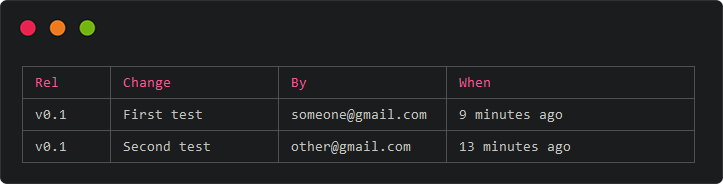
  final table = Table(
    header: ['Rel', 'Change', "By", "When"], // Set headers
    columnWidths: [10, 20, 20, 30], // Optionally set column widhts
  );

  // Table class extends dart List,
  // so you're free to use all the usual List methods
  table
    ..add(['v0.1', 'First test', 'someone@gmail.com', '9 minutes ago'])
    ..add(['v0.1', 'Second test', 'other@gmail.com', '13 minutes ago']);

  // Call `toString()` to render the final table for output
  print(table.toString());
}
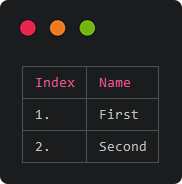
final table = Table(
  header: ['Index', 'Name'],
);

table.addAll([
  ['1.', 'First'],
  ['2.', 'Second'],
]);

print(table.toString());
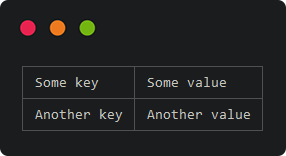
final table = Table();

table.addAll([
  {'Some key': 'Some value'},
  {'Another key': 'Another value'},
]);

print(table.toString());
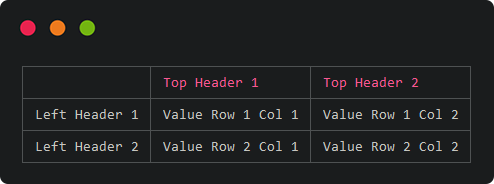
Cross tables are very similar to vertical tables, with two key differences:
header setting when instantiated that has an empty string as the first headerfinal table = Table(header: ["", "Top Header 1", "Top Header 2"]); table.addAll([ { 'Left Header 1': ['Value Row 1 Col 1', 'Value Row 1 Col 2'] }, { 'Left Header 2': ['Value Row 2 Col 1', 'Value Row 2 Col 2'] } ]); print(table.toString());
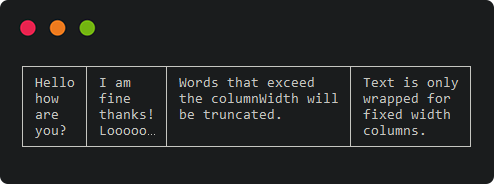
final table = Table(
  style: TableStyle(
    border: [], // Clear border style/color (default is ["gray"])
    header: [], // Clear header style/color (defaults to ['red'])
  ),
  columnWidths: [7, 9], // Requires fixed column widths
  wordWrap: true,
);

table.addAll([
  [
    'Hello how are you?',
    'I am fine thanks! Looooooong',
    ['Words that exceed', 'the columnWidth will', 'be truncated.'].join('\n'),
    ['Text is only', 'wrapped for', 'fixed width', 'columns.'].join('\n'),
  ]
]);

print(table.toString());
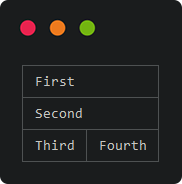
final table = Table();

table.addAll([
  [{'colSpan': 2, 'content': 'First'}], // Set custom column span
  [{'colSpan': 2, 'content': 'Second'}],
  ['Third', 'Fourth']
]);
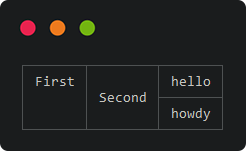
final table = Table();

table.addAll([
  [
    {'rowSpan': 2, 'content': 'First'}, // Set custom row span
    {'rowSpan': 2, 'content': 'Second', 'vAlign': VerticalAlign.center}, // Set custom horizontal alignment
    'hello'
  ],
  ['howdy']
]);