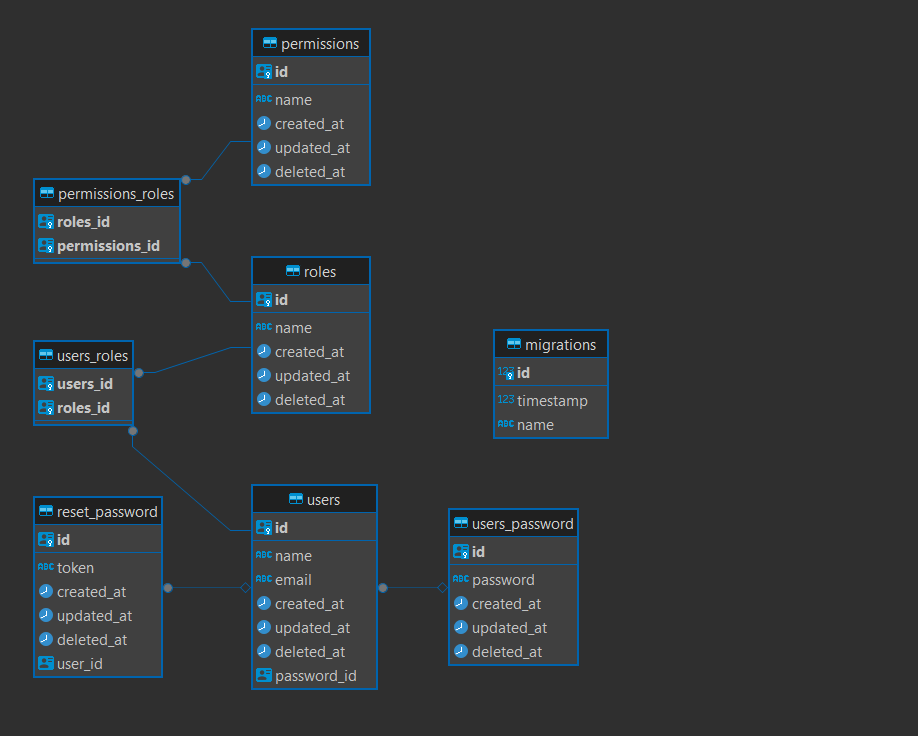
A Complete, Production-Ready Foundation
This repository is more than an application template: it is a complete,
production-oriented microservice foundation. It includes the application,
databases, caching, observability, AWS infrastructure, Kubernetes platform,
GitOps delivery, and operational workflows needed to run a service in a real
environment.
The infrastructure is defined as code with Pulumi and is designed to deploy to
AWS using Amazon EKS, Karpenter, Argo CD, and Kubernetes. It also includes
secure secret integration, health checks, automated database migrations before
application rollouts, autoscaling, persistence, and monitoring components.
This provides a strong production baseline rather than a minimal demo. Before
using it in a specific production environment, review the AWS account
permissions, network topology, security policies, domains, observability
retention, backup strategy, sizing, and environment-specific configuration.
For infrastructure setup and deployment instructions, see the
Infrastructure as Code README.
This project implements a pragmatic architecture that combines the best ideas from Clean Architecture, Domain-Driven Design (DDD), and Hexagonal Architecture. Rather than strictly following one pattern, it takes a practical approach: powerful enough for enterprise applications, yet simple enough for any developer to understand and maintain.
The architecture is built around one fundamental principle: protect your business logic. Your domain rules should never depend on frameworks, databases, or external services. If you decide to switch from PostgreSQL to MongoDB, or from Redis to Memcached, your core business logic remains untouched.
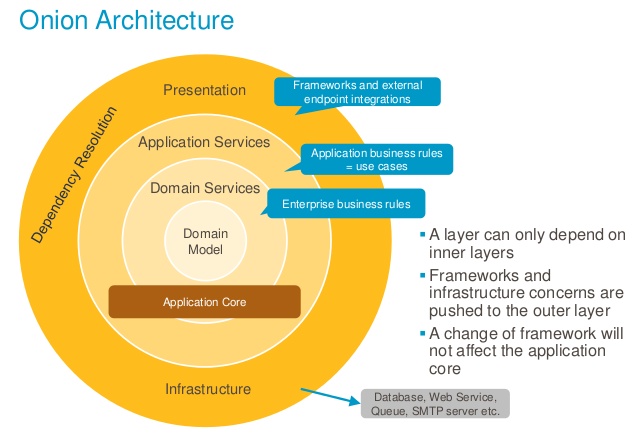
Clean Architecture organizes code into concentric circles where dependencies point inward. The innermost circle contains business rules, and outer circles contain implementation details.
How we implement it:
- Entities live in
src/core/*/entity — pure business objects
- Use Cases live in
src/core/*/use-cases — application-specific business rules
- Interfaces live in
src/core/*/repository — contracts for external dependencies
- Frameworks live in
src/modules and src/infra — NestJS controllers and database implementations
What we simplified:
- No explicit Interactors or Presenters
- No input/output boundary classes
Domain-Driven Design (DDD)
DDD focuses on modeling your business domain. It introduces concepts like Entities, Value Objects, Aggregates, and Repositories.
How we implement it:
- Entities: Objects with identity that persist over time (
UserEntity, RoleEntity)
- Repository Pattern: Abstract interfaces defining data access contracts
- Use Cases: Encapsulate business operations (similar to Application Services in DDD)
- Bounded Contexts: Each module represents a bounded context
What we simplified:
- No Value Objects as separate classes
- Unified service layer (no Domain/Application Service split)
Service Layer Comparison: DDD vs. This Architecture
In traditional DDD, there are two types of services:
- Domain Service: Encapsulates domain logic that does not naturally fit within an Entity or Value Object.
- Application Service: Coordinates use cases, orchestrating entities, repositories, and domain services to fulfill business processes.
In this architecture, both responsibilities are unified into a single component: the UseCase.
- The
UseCase acts as the application service, orchestrating business operations and dependencies.
- Domain logic that would be placed in a domain service is either implemented within entities or directly in the use case, depending on complexity.
This simplification reduces boilerplate and cognitive overhead, while still maintaining a clear separation between business logic and infrastructure. The result is a leaner, more maintainable service layer without sacrificing the core benefits of DDD.
Hexagonal Architecture (Ports and Adapters)
Hexagonal Architecture separates the application from external concerns through Ports (interfaces) and Adapters (implementations).
How we implement it:
┌──────────────────────────────────────────────────────────────┐
│                        ADAPTERS                              │
│  ┌─────────────┐  ┌─────────────┐  ┌─────────────────────┐   │
│  │ Controllers │  │ Repositories│  │ External Services   │   │
│  │ (modules/)  │  │ (modules/)  │  │ (infra/)            │   │
│  └──────┬──────┘  └──────┬──────┘  └──────────┬──────────┘   │
│         │                │                    │              │
│         ▼                ▼                    ▼              │
│  ┌─────────────────────────────────────────────────────────┐ │
│  │                      PORTS                              │ │
│  │            (core/*/repository interfaces)               │ │
│  └─────────────────────────┬───────────────────────────────┘ │
│                            │                                 │
│                            ▼                                 │
│  ┌─────────────────────────────────────────────────────────┐ │
│  │                       CORE                              │ │
│  │           Entities + Use Cases + Interfaces             │ │
│  │                     (src/core/)                         │ │
│  └─────────────────────────────────────────────────────────┘ │
└──────────────────────────────────────────────────────────────┘
Ports (Interfaces):
ICatRepository — defines what operations are availableIHttpAdapter — defines HTTP client contractICacheAdapter — defines caching contract
Adapters (Implementations):
CatRepository in modules/ — implements ICatRepository with TypeORM/MongooseHttpService in infra/ — implements IHttpAdapter with AxiosRedisService in infra/ — implements ICacheAdapter with Redis
⚠️ Important Notes About This Architecture
This section explains some deliberate choices that differ from traditional implementations. Understanding these decisions will help you work with the codebase effectively.
Why We Call Interfaces "Adapters"
You may notice that some interfaces in this project use the word "Adapter" (e.g., IHttpAdapter, ICacheAdapter). In traditional Hexagonal Architecture:
- Port: An interface that defines a contract (what operations are available)
- Adapter: A concrete implementation that fulfills that contract (how it's done)
The academic distinction:
┌──────────────────────────────────────────────────────────────┐
│                  HEXAGONAL (Traditional)                     │
├──────────────────────────────────────────────────────────────┤
│                                                              │
│   Port (Interface)              Adapter (Implementation)     │
│   ─────────────────             ────────────────────────     │
│   IUserRepository        →      PostgresUserRepository       │
│   IEmailService          →      SendGridEmailService         │
│   ICacheService          →      RedisCacheService            │
│                                                              │
└──────────────────────────────────────────────────────────────┘
Our simplified approach:
We use "Adapter" in interface names because, conceptually, both are abstractions. The fundamental principle is the same: decouple your core business logic from implementation details. Whether you call the interface a "Port" or "Adapter" doesn't change how the pattern works.
// Traditional naming
interface IUserRepository {} // Port
class PostgresUserRepository {} // Adapter

// Our naming (simplified)
interface IHttpAdapter {} // Still an abstraction (contract)
class HttpService {} // Still an implementation
Why this simplification?
- Reduced cognitive load — One less concept to explain to new developers
- Practical focus — The behavior is identical regardless of naming
- Consistency — All abstractions follow the same
I*Adapter pattern
The key takeaway: if it's an interface, it's a contract. If it's a class implementing that interface, it's the implementation. The names are just labels.
Why We Use Abstract Classes Instead of Interfaces
You may notice that repository contracts use abstract class instead of TypeScript interface:
// What we use
export abstract class ICatRepository extends IRepository<CatEntity> {
  abstract findByBreed(breed: string): Promise<CatEntity[]>
}

// Instead of
export interface ICatRepository extends IRepository<CatEntity> {
  findByBreed(breed: string): Promise<CatEntity[]>
}
Why? This is a NestJS/Node.js limitation.
TypeScript interfaces are erased at runtime — they don't exist in the compiled JavaScript. NestJS dependency injection relies on runtime tokens to resolve providers. If we used interfaces, we would need to pass a string token:
// ❌ With interface — requires string token
@Module({
  providers: [
    {
      provide: 'ICatRepository',  // String token (error-prone, no type safety)
      useClass: CatRepository,
    },
  ],
})

// ✅ With abstract class — class itself is the token
@Module({
  providers: [
    {
      provide: ICatRepository,    // Class reference (type-safe, refactorable)
      useClass: CatRepository,
    },
  ],
})
Benefits of abstract classes:
- Type safety — No magic strings, refactoring tools work correctly
- Runtime existence — The class exists in compiled JavaScript
- Same behavior — Acts as a contract just like an interface
- Better DX — IDE autocomplete and "Go to Definition" work properly
The trade-off: Abstract classes can have implementation details (which interfaces cannot). We simply don't use that feature — our abstract classes are pure contracts.
Why the "Middlewares" Folder Contains More Than Middlewares
Yes, we know. The src/middlewares/ folder contains:
- Middlewares (authentication)
- Guards (authorization)
- Interceptors (logging, tracing)
- Filters (exception handling)
Why didn't we split them?
Honestly? We couldn't find a better name. 🤷
We tried:
http-pipeline/ — too genericrequest-handlers/ — not quite rightcross-cutting/ — sounds like a buzzword bingo winnerstuff-that-runs-before-and-after-your-code/ — accurate but... no
So we stuck with middlewares/ because:
- They all operate in the HTTP request/response lifecycle
- They're all "things that wrap your controller logic"
- Everyone knows where to find them
If you have a better name, PRs are welcome! Until then, just accept that middlewares/ is a "creative interpretation" of the term. 😄
Why Validations Live Inside Use Cases
This is a fundamental difference from many Clean Architecture implementations.
The traditional approach (Clean Architecture):
Controller → Validates Input → Use Case → Business Logic
In traditional Clean Architecture, input validation happens in the Controller or a dedicated Validation layer before reaching the Use Case. The Use Case assumes it receives valid data.
Our approach:
Controller → Use Case (Validates + Business Logic)
We validate inputs inside the Use Case using Zod schemas.
Why we made this choice:
-
Testability
When you test a Use Case, you should test the complete behavior — including validation. It's unacceptable to have a Use Case that passes tests but fails in production because validation was bypassed.
// Our tests validate the complete use case behavior
it('should throw validation error for invalid email', async () => {
  const input = { email: 'invalid-email', name: 'John' }
  await expect(useCase.execute(input)).rejects.toThrow(ValidationException)
})
-
Use Case Integrity
A Use Case is a complete unit of business logic. If CreateUserUseCase requires a valid email, that validation IS part of the use case — not something external to it.
-
Self-Documenting Code
Looking at a Use Case, you immediately see what inputs it expects and how they're validated. No need to hunt through multiple layers.
-
Reduced Duplication
If multiple controllers call the same Use Case, validations are automatically applied. No risk of one controller forgetting to validate.
Comparison with other approaches:
| Approach |
Validation Location |
Pros |
Cons |
| Traditional Clean |
Controller/Validator layer |
Thin use cases |
Validation can be bypassed, harder to test |
| DDD |
Domain entities (Value Objects) |
Rich domain model |
Complex, verbose |
| Our Approach |
Inside Use Case |
Complete testability, self-contained |
See trade-offs below |
The trade-off:
If you need to consume a Use Case from multiple entry points with different validation rules, the Use Case validations might be too restrictive.
Solution: For those cases, move specific validations to the Application layer (Controller/Adapter). The Use Case can have minimal validations (or none), and each consumer applies its own rules:
// Controller A - Web API (strict validation)
@Post()
async create(@Body() input: CreateUserInput): Promise<UserCreateOutput> {
  // Validate for web context
  const validated = WebUserSchema.parse(input);
  return this.useCase.execute(validated);
}

// Controller B - Internal service (different validation)
async createFromInternal(input: InternalUserInput): Promise<UserCreateOutput> {
  // Validate for internal context
  const validated = InternalUserSchema.parse(input);
  return this.useCase.execute(validated);
}
Our recommendation: Start with validations inside Use Cases. Only move them out when you have a concrete need for different validation rules per consumer.
The core/ folder is sacred — it contains your business logic and must remain pure and independent. Here are the key rules to follow:
Entities: Avoid Anemic Models
An anemic entity is just a data container with no behavior — essentially a DTO. This is an anti-pattern because business logic ends up scattered across use cases and services.
| ❌ Avoid |
✅ Prefer |
| Entity with only properties |
Entity with properties and behavior |
| Business logic in Use Cases |
Business logic in the Entity when it relates to state |
| Calculations outside entity |
Calculations as entity methods |
Ask yourself: "Does this logic relate to the entity's state?" If yes, it belongs in the entity.
📖 See detailed examples: Entity Guide — includes Rich Entity vs Anemic Entity comparison
Entities: Must Extend BaseEntity
Every Entity must extend the BaseEntity class. This is mandatory in this project.
| ❌ Avoid |
✅ Prefer |
class UserEntity { } |
class UserEntity extends BaseEntity<UserEntity>() { } |
export class CatEntity { } |
export class CatEntity extends BaseEntity<CatEntity>() { } |
// ❌ WRONG - Not extending BaseEntity
export class CatEntity {
  id!: string
  name!: string
  breed!: string
  age!: number
  createdAt?: Date
  updatedAt?: Date
  deletedAt?: Date

  constructor(entity: Cat) {
    Object.assign(this, entity)
  }
}

// ✅ CORRECT - Extends BaseEntity
import { BaseEntity } from '@/utils/entity'

export class CatEntity extends BaseEntity<CatEntity>() {
  name!: Cat['name']
  breed!: Cat['breed']
  age!: Cat['age']

  constructor(entity: Cat) {
    super(CatEntitySchema)
    this.validate(entity)
    this.ensureID()
  }
}
What BaseEntity provides:
- Common properties —
id, createdAt, updatedAt, deletedAt are inherited
- Validation —
validate(entity) method validates input against Zod schema
- ID generation —
ensureID() generates UUID if not provided
- Status methods —
isActive(), isDeleted(), activate(), deactivate()
- Serialization —
toObject() returns plain object, clone() creates a copy
- Type safety —
nameOf() provides type-safe property names
Constructor pattern:
Every entity constructor must follow this pattern:
constructor(entity: Cat) {
  super(CatEntitySchema)  // 1. Pass Zod schema to parent
  this.validate(entity)   // 2. Validate and assign properties
  this.ensureID()         // 3. Generate ID if not provided
}
📖 See detailed examples: Entity Guide — includes full entity implementation
Use Cases: Never Know Implementations
A Use Case must never, absolutely never know about concrete implementations. It should only work with abstractions (interfaces).
This is the most important rule: the Use Case receives abstractions, never implementations.
- ✅ Entities (
core/*/entity)
- ✅ Repository interfaces (
core/*/repository)
- ✅ Adapter interfaces (
IHttpAdapter, ICacheAdapter, etc.)
- ✅ Utils and decorators (
utils/)
- ✅ Types and interfaces
| ❌ Avoid |
✅ Prefer |
import { Controller } from '@nestjs/common' |
No framework imports |
import { UserRepository } from 'modules/user/repository' |
import { IUserRepository } from 'core/user/repository' |
import { HttpService } from 'infra/http' |
import { IHttpAdapter } from 'infra/http' (interface only) |
| Direct database calls (TypeORM, Mongoose) |
Repository interface methods |
new RedisService() |
Receive ICacheAdapter via constructor |
The golden rule:
// ❌ WRONG - Use Case knows the implementation
import { HttpService } from '@/infra/http/service'

class MyUseCase {
  constructor(private http: HttpService) {} // Concrete class!
}

// ✅ CORRECT - Use Case only knows the abstraction
import { IHttpAdapter } from '@/infra/http/adapter'

class MyUseCase implements IUsecase {
  constructor(private http: IHttpAdapter) {} // Interface!
}
Why? The Use Case should work identically whether:
- Called from a REST controller, GraphQL resolver, CLI, or message queue
- Using Redis or Memcached for cache
- Using Axios or Fetch for HTTP
- Running in tests with mocks
Use Cases: Must Implement IUsecase
Every Use Case must implement the IUsecase interface. This is mandatory in this project.
| ❌ Avoid |
✅ Prefer |
class MyUseCase { } |
class MyUseCase implements IUsecase { } |
export class CreateUserUseCase { } |
export class CreateUserUseCase implements IUsecase { } |
// ❌ WRONG - Not implementing IUsecase
export class CatCreateUsecase {
  constructor(private readonly catRepository: ICatRepository) {}

  async execute(input: CatCreateInput): Promise<CatCreateOutput> {
    // ...
  }
}

// ✅ CORRECT - Implements IUsecase
import { IUsecase } from '@/utils/usecase';

export class CatCreateUsecase implements IUsecase {
  constructor(private readonly catRepository: ICatRepository) {}

  async execute(input: CatCreateInput): Promise<CatCreateOutput> {
    // ...
  }
}
Why this is mandatory:
- Contract enforcement — Ensures all Use Cases have the same structure
- Dependency injection — NestJS can properly inject and resolve Use Cases
- Type safety — TypeScript validates that
execute() method exists
- Consistency — Every Use Case follows the same pattern across the project
📖 See detailed patterns: Use Case Guide — includes architecture diagrams and testing patterns
Repository Interfaces: Avoid Duplicating Generic Methods
The repository interface should only declare methods that don't exist in the generic IRepository<T>. The generic repository already provides 20+ methods:
| ❌ Avoid |
✅ Prefer |
Declaring create(), findById(), update() |
Already inherited from IRepository<T> |
| Duplicating generic query methods |
Only add domain-specific queries |
// ❌ Wrong - These already exist in IRepository
export abstract class ICatRepository extends IRepository<CatEntity> {
  abstract create(entity: CatEntity): Promise<CatEntity>  // Already exists!
  abstract findById(id: string): Promise<CatEntity>      // Already exists!
}

// ✅ Correct - Only domain-specific methods
export abstract class ICatRepository extends IRepository<CatEntity> {
  abstract paginate(input: CatListInput): Promise<CatListOutput>
  abstract findByBreed(breed: string): Promise<CatEntity[]>
}
📖 See full method list: Repository Guide — includes IRepository<T> generic methods and examples
Controllers: Avoid Business Logic
Controllers must never contain business logic. Their responsibility is limited to:
- Orchestration — Receive request, call use case, return response
- Input standardization — Transform and normalize inputs for the use case
| ❌ Avoid |
✅ Prefer |
| Calculations in controller |
Move to Use Case or Entity |
| Conditional business rules |
Move to Use Case |
| Data manipulation |
Move to Use Case |
| Multiple repository calls |
Move to Use Case |
When input standardization is OK:
We standardize listing inputs (pagination, sorting, search) in the Controller before calling the Use Case:
// ✅ OK - Standardizing pagination inputs (not business logic)
@Get()
@Version('1')
@Permission('cat:list')
async list(@Req() { query }: ApiRequest): Promise<CatListOutput> {
  const input: CatListInput = {
    sort: SortHttpSchema.parse(query.sort),
    search: SearchHttpSchema.parse(query.search),
    limit: Number(query.limit),
    page: Number(query.page)
  }

  return await this.listUsecase.execute(input)
}

// ❌ WRONG - Business logic in controller
@Post()
@Version('1')
@Permission('cat:create')
async create(@Req() { body }: ApiRequest): Promise<CatCreateOutput> {
  // DON'T DO THIS - business logic belongs in Use Case
  if (body.age > 10) {
    body.status = 'senior';
  }
  const discount = body.price * 0.1; // Business calculation!
  return await this.createUsecase.execute({ ...body, discount });
}
📖 See detailed patterns: Controller Guide and Adapter Guide — includes examples and best practices
Core: Avoid External Libraries
The core/ folder must remain pure and framework-agnostic. Never import external libraries directly into entities or use cases.
| ❌ Avoid in Core |
✅ Prefer |
import axios from 'axios' |
Use IHttpAdapter interface |
import { Repository } from 'typeorm' |
Use IRepository<T> interface |
import moment from 'moment' |
Use utils/date or native Date |
import _ from 'lodash' |
Use utils/collection or native methods |
import Redis from 'ioredis' |
Use ICacheAdapter interface |
Why?
If you import axios directly into a Use Case:
- You can't easily test it (need to mock axios globally)
- You can't swap to
fetch or another HTTP client
- Your core business logic is coupled to a specific library
// ❌ WRONG - External library in Use Case
import axios from 'axios'

export class GetExternalDataUseCase {
  async execute(): Promise<ExternalData> {
    const response = await axios.get('https://api.example.com/data')
    return response.data
  }
}

// ✅ CORRECT - Use abstraction
import { IHttpAdapter } from '@/infra/http/adapter'
import { IUsecase } from '@/utils/usecase'

export class GetExternalDataUseCase implements IUsecase {
  constructor(private readonly http: IHttpAdapter) {}

  async execute(): Promise<ExternalData> {
    const response = await this.http.get({ url: 'https://api.example.com/data' })
    return response.data
  }
}
Allowed in Core:
- ✅ Zod (validation is part of domain logic)
- ✅ Native Node.js/JavaScript APIs
- ✅ Your own
utils/ functions
Need an external library? If you need functionality from an external library, create a centralized wrapper in libs/ or utils/:
// ❌ WRONG - Using lodash directly in Use Case
import _ from 'lodash'

export class MyUseCase {
  execute(data: Product[]): Record<string, Product[]> {
    return _.groupBy(data, 'category') // Direct lodash usage
  }
}

// ✅ CORRECT - Create a centralized wrapper
// utils/collection.ts
import _ from 'lodash'

export const CollectionUtil = {
  groupBy: <T>(array: T[], key: keyof T) => _.groupBy(array, key),
  uniqBy: <T>(array: T[], key: keyof T) => _.uniqBy(array, key)
  // ... expose only what you need
}

// Then in Use Case
import { CollectionUtil } from '@/utils/collection'
import { IUsecase } from '@/utils/usecase'

export class MyUseCase implements IUsecase {
  execute(data: Product[]): Record<string, Product[]> {
    return CollectionUtil.groupBy(data, 'category') // ✅ Uses wrapper
  }
}
Benefits of centralization:
- Single point of change if you need to swap libraries
- Easier to mock in tests
- Controls which functions are exposed
- Documents which external libs are used in the project
Types: Use Entity Composition and Proper Naming
When creating Input/Output types, always derive them from the Entity. This is mandatory to avoid property duplication.
Rule 1: Compose from Entity
// ❌ WRONG - Duplicating properties that exist in Entity
type UserCreateInput = {
  name: string // Already in UserEntity!
  email: string // Already in UserEntity!
  password: string // Already in UserEntity!
}

// ✅ CORRECT - Compose from Entity
type UserCreateInput = Pick<UserEntity, 'name' | 'email' | 'password'>

// ✅ CORRECT - Extend when needed
type UserUpdateInput = Pick<UserEntity, 'id'> & Partial<Pick<UserEntity, 'name' | 'email'>>

// ✅ CORRECT - Omit sensitive fields for output
type UserOutput = Omit<UserEntity, 'password' | 'deletedAt'>
Rule 2: Use z.infer for Validated Types
When you need runtime validation, use Zod schema with z.infer. Zod has built-in pick and omit methods for composition:
// ✅ Schema with validation using pick (cleaner)
const UserCreateSchema = UserEntitySchema.pick({
  name: true,
  email: true,
  password: true
})

// ✅ Schema using omit (exclude fields)
const UserOutputSchema = UserEntitySchema.omit({
  password: true,
  deletedAt: true
})

// ✅ Infer type from schema
type UserCreateInput = z.infer<typeof UserCreateSchema>
type UserOutput = z.infer<typeof UserOutputSchema>
📖 See detailed patterns: Entity Guide — includes schema composition examples
Rule 3: Naming Convention — Input and Output Only
Never use prefixes or suffixes like DTO, ViewModel, Request, Response. The standard naming convention is:
| ❌ Avoid |
✅ Use |
CreateUserDTO |
UserCreateInput |
UserResponseDTO |
UserCreateOutput |
UserViewModel |
UserOutput |
GetUserRequest |
UserGetInput |
UserListResponse |
UserListOutput |
Pattern: {Entity}{Action}{Input|Output}
// Naming examples
type UserCreateInput = Pick<UserEntity, 'name' | 'email' | 'password'>
type UserCreateOutput = Pick<UserEntity, 'id' | 'name' | 'email' | 'createdAt'>

type UserUpdateInput = Pick<UserEntity, 'id'> & Partial<Pick<UserEntity, 'name'>>
type UserUpdateOutput = Pick<UserEntity, 'id' | 'name' | 'updatedAt'>

type UserListInput = { pagination: PaginationInput; search?: string }
type UserListOutput = { data: UserOutput[]; pagination: PaginationOutput }
Types: Avoid any — Always Type When Possible
The any type defeats the purpose of TypeScript. Always provide explicit types when it makes sense and doesn't create unnecessary complexity.
| ❌ Avoid |
✅ Prefer |
function process(data: any) |
function process(data: UserEntity) |
const result: any = await fetch() |
const result: ApiResponse = await fetch() |
items.map((item: any) => ...) |
items.map((item: OrderItem) => ...) |
When to type:
- Function parameters — Always type them
- Function return types — Type when not obvious from implementation
- Variables — Type when TypeScript can't infer correctly
- Generics — Use generics instead of
any for flexible types
// ❌ WRONG - Using any
const processItems = (items: any[]): any => {
  return items.map((item: any) => item.value)
}

// ✅ CORRECT - Properly typed
const processItems = <T extends { value: number }>(items: T[]): number[] => {
  return items.map((item) => item.value)
}

// ✅ CORRECT - Using unknown when type is truly unknown
const parseJson = (json: string): unknown => {
  return JSON.parse(json)
}
When any is unavoidable:
Sometimes you genuinely can't type something properly (third-party libraries, complex dynamic types, etc.). In these cases, use eslint-disable to acknowledge the exception:
// ✅ OK - Acknowledged exception with eslint-disable
// eslint-disable-next-line @typescript-eslint/no-explicit-any
const handleLegacyApi = (response: any): ProcessedData => {
  // Legacy API with unpredictable structure
  return transformLegacyResponse(response)
}

// ✅ OK - Type assertion after validation
const processExternalData = (data: unknown): UserData => {
  if (!isValidUserData(data)) {
    throw new Error('Invalid data')
  }
  return data as UserData
}
The rule of thumb: If you're reaching for any, ask yourself:
- Can I use a specific type? → Use it
- Can I use a generic? → Use
<T>
- Can I use
unknown? → Safer than any
- None of the above work? → Use
any with eslint-disable
Functions: Always Declare Explicit Return Types
This is a project standard: every function must have an explicit return type. TypeScript can infer return types, but explicit declarations improve code readability and catch errors earlier.
| ❌ Avoid |
✅ Prefer |
async getUser() |
async getUser(): Promise<UserEntity> |
const sum = (a, b) => |
const sum = (a: number, b: number): number => |
execute(input) |
execute(input: CreateInput): Promise<void> |
// ❌ WRONG - No explicit return type
async getById(id: string) {
  return await this.repository.findById(id)
}

// ❌ WRONG - Missing Promise<void>
async delete(id: string) {
  await this.repository.delete(id)
}

// ✅ CORRECT - Explicit return types
async getById(id: string): Promise<UserEntity> {
  return await this.repository.findById(id)
}

async delete(id: string): Promise<void> {
  await this.repository.delete(id)
}

// ✅ CORRECT - Even for simple functions
const calculateTotal = (items: OrderItem[]): number => {
  return items.reduce((sum, item) => sum + item.price, 0)
}
Why this matters:
- Self-documentation — Reading the function signature tells you exactly what to expect
- Earlier error detection — TypeScript catches mismatches at compile time
- Refactoring safety — Changing implementation won't accidentally change return type
- API contracts — Makes interfaces and abstractions crystal clear
Common return types:
| Scenario |
Return Type |
| Async operation that returns data |
Promise<EntityType& |
| |
| |
| |
| |