Gem 一覧へ戻る
kylekatarnls/simple-cli(新しいタブで開きます)
主要言語: PHP
A simple command line framework
- star 数
- 11
- watcher 数
- 0
- fork 数
- 2
- issue 数
- 2
- 最終更新
- 2022/12/27
 gem-hunter
主要言語: PHP
A simple command line framework
A simple CLI framework oriented object and dependencies-free.
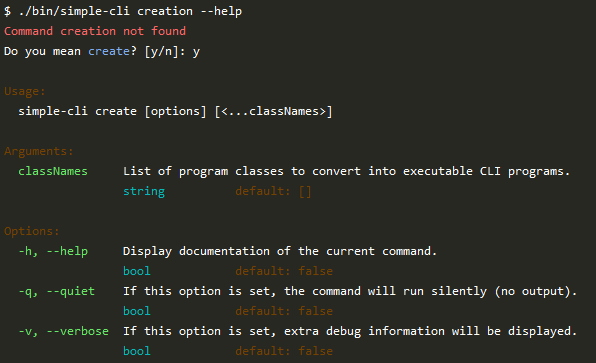
Features:
--help is auto-generated using available commands, arguments and options.usage and version.--help, --quiet and --verbose.The documentation below is for simple-cli 2 which requires PHP 8 and supports both attributes and annotations.
simple-cli 1 is compatible with PHP >= 7.1 and supports only annotations.
You can add your command line program in any existing composer app, or create a new one using composer init.
Then add simple-cli:
composer require simple-cli/simple-cli
Let say your app allows to add or multiply 2 arguments and you want to call easy-calc in your CLI, so you need to
create an EasyCalc class that extends SimpleCli\SimpleCli.
So first check you have a PSR autoload set in your composer.json:
"autoload": {
    "psr-4": {
        "MyVendorName\\": "src/MyVendorName/"
    }
},
(You may need to run composer update or composer dump-autoload to get the autoload in effect.)
Then create the class so it can be autoloaded, so with the example above, we can create the file
src/MyVendorName/CliApp/EasyCalc.php:
<?php

namespace MyVendorName\CliApp;

use SimpleCli\SimpleCli;

class EasyCalc extends SimpleCli
{
    public function getCommands() : array
    {
        return []; // Your class needs to implement the getCommands(), we'll see later what to put in here.
    }
}
By default the name of the program will be calculated from the class name, here EasyCalc becomes easy-calc but
you can pick any name by adding protected ?string $name = 'my-custom-name'; in your class.
Now you can run from the console:
vendor/bin/simple-cli create "MyVendorName\CliApp\EasyCalc"It will create bin/easy-calc for unix systems and bin/easy-calc.bat for Windows OS.
You can add it to composer.json so users can call it via composer:
"bin": [
    "bin/easy-calc"
],
Let's test your CLI program now:
bin/easy-calc
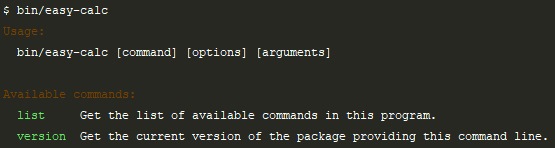
As you can see, by default, simple-cli provide 2 commands: list (that is also the default when the user did not
choose a command) that list the commands available and version (that will show the version of your composer package
and version details you may add if you publish it).
Note that if you don't want to publish it, you can either customize what version should display:
class EasyCalc extends SimpleCli
{
    public function getCommands() : array
    {
        return [];
    }

    public function getVersion(): string
    {
        return '1.0.0';
    }
}
Or you can disable any of the default commands:
class EasyCalc extends SimpleCli
{
    public function getCommands() : array
    {
        return [
            'version' => false,
        ];
    }
}
Simple-CLI allow you to package your program as a single PHAR file.
It will automatically pack all the files in your src folder, the
root folder where your main class is if different, and the vendor
folder.
So to make it light, remove any unneeded files from those folders such as dev dependencies using:
composer install --no-dev
Then simply run:
./bin/simple-cli build-phar
From inside your working directory.
You can also specify a version for your package:
PHAR_PACKAGE_VERSION=2.0.0 ./bin/simple-cli build-phar
So using GitHub Actions, building your project as a PHAR automatically on push can be easily done with:
.github/workflows/phar.yml:
name: Generate phar

on:
  push:
    branches: [ '**' ]
  pull_request:
    branches: [ '**' ]
  create:
    tags:
      - "*"
  release:
    types:
      - created

jobs:
  build:
    runs-on: ubuntu-latest
    timeout-minutes: 15
    env:
      COMPOSER_NO_INTERACTION: 1

    name: Build PHAR

    steps:
      - name: Checkout code
        uses: actions/checkout@v2

      - name: Setup PHP
        uses: shivammathur/setup-php@v2
        with:
          php-version: '8.0'
          coverage: none
          tools: composer:v2

      - name: Cache Composer packages
        id: composer-cache
        uses: actions/cache@v2
        with:
          path: vendor
          key: phar-${{ runner.os }}-php${{ matrix.php }}-${{ hashFiles('**/composer.lock') }}

      - name: Install dependencies
        run: composer install --prefer-dist --no-progress --no-dev

      - name: Build
        run: |
          chmod +x ./bin/simple-cli
          ./bin/simple-cli build-phar
        env:
          PHAR_PACKAGE_VERSION: ${{ secrets.GITHUB_REF }}

      - name: Upload my-cli.phar
        uses: actions/upload-artifact@v2
        with:
          name: my-cli.phar
          path: my-cli.phar

      - name: Release my-cli.phar
        if: github.event_name == 'release'
        uses: skx/github-action-publish-binaries@master
        env:
          GITHUB_TOKEN: ${{ secrets.GITHUB_TOKEN }}
        with:
          args: 'my-cli.phar'
Replace my-cli with the name of your program.
Now it's time for your CLI to get actual commands. To create an add
command for example, you can create a MyVendorName\CliApp\Command\Add class:
<?php

namespace MyVendorName\CliApp\Command;

use SimpleCli\Command;
use SimpleCli\Options\Help;
use SimpleCli\SimpleCli;

/**
 * Sum arguments.
 */
class Add implements Command
{
    use Help;

    public function run(SimpleCli $cli): bool
    {
    }
}
Then add this command with a name in your CLI:
class EasyCalc extends SimpleCli
{
    public function getCommands() : array
    {
        return [
            'add' => \MyVendorName\CliApp\Command\Add::class,
        ];
    }
}
If you run bin/easy-calc (or bin/easy-calc list) again, you will now
see add as an available command. And the comment you put in /** */
appears in the description.
If you run bin/easy-calc add --help (or bin/easy-calc add -h) you will
the documentation of your command based on the options and arguments defined.
As you see, there is only --help option (or -h alias) provided by the
trait SimpleCli\Options\Help (we highly recommend to always use this trait
in your commands).
Now let's add some argument, so your command would actually do something.
<?php

namespace MyVendorName\CliApp\Command;

use SimpleCli\Attribute\Argument;
use SimpleCli\Command;
use SimpleCli\Options\Help;
use SimpleCli\SimpleCli;

/**
 * Sum arguments.
 */
class Add implements Command
{
    use Help;

    #[Argument('The first number')]
    public float $number1 = 0;

    #[Argument('The second number')]
    public float $number2 = 0;

    public function run(SimpleCli $cli): bool
    {
        $cli->write($this->number1 + $this->number2);

        return true;
    }
}
The #[Argument] attribute allows simple-cli to know it's an argument.
Argument type will be taken from property type hint, if you need more
precise type such as string[] instead of simply array you can specify
it using @var annotation in a PHPDoc such as /** @var string[] */
will be used instead, or else the type will be inferred from the default
value. So public float $number2; will be considered as float and
public $number2 = false; will be considered as bool.
If you run bin/easy-calc add --help you will see they appear in the
help with their description, type and default value.
Now's time to execute your command:
bin/easy-calc add 2 3
It outputs 5 🚀
Note than run() must return a boolean:
true for successful command (exit code 0)false for error (exit code 1)You can also allow unlimited number of arguments using the attribute #[Rest]
The rest arguments variable will be an array with all other arguments.
So if you have 2 #[Argument] and a #[Rest] then if your user call your command
with 5 arguments, the first one goes to the first #[Argument], the second one
go to the second #[Argument], and the 3 other ones go as an array to the #[Rest]
argument.
Of course, you can also use #[Rest] with any other argument so for our add
command, it could be:
<?php

namespace MyVendorName\CliApp\Command;

use SimpleCli\Attribute\Rest;
use SimpleCli\Command;
use SimpleCli\Options\Help;
use SimpleCli\SimpleCli;

/**
 * Sum arguments.
 */
class Add implements Command
{
    use Help;

    /** @var float[] */
    #[Rest('The numbers to sum')]
    public array $numbers = [];

    public function run(SimpleCli $cli): bool
    {
        $cli->write(array_sum($this->numbers));

        return true;
    }
}
Now you can call with any number of arguments:
bin/easy-calc build 2 3 1.5
Outputs: 6.5
SimpleCli\Annotation\* imports such as use SimpleCli\Annotation\argument;
are available to help IDE auto-completion but are optional.
simple-cli provides 3 standard options. The --help -h you already know
as SimpleCli\Options\Help trait you can simply use in your commands.
But also --quiet -q as SimpleCli\Options\Quiet that allow your user
to mute the output. If you use this trait in your command and if user
pass the option --quiet or -q methods $cli->write() and
$cli->writeLine() (and all output methods) will no longer output anything.
You can also use --verbose -v using SimpleCli\Options\Verbose:
<?php

namespace MyVendorName\CliApp\Command;

use SimpleCli\Command;
use SimpleCli\Options\Verbose;
use SimpleCli\SimpleCli;

/**
 * Sum arguments.
 */
class Add implements Command
{
    use Verbose;

    public function run(SimpleCli $cli): bool
    {
        // ...

        if ($this->verbose) {
            $cli->writeLine('Log some additional info', 'light_cyan');
        }

        // ...
    }
}
And you can create your own option using the #[Option] attribute:
<?php

namespace MyVendorName\CliApp\Command;

use SimpleCli\Attribute\Option;
use SimpleCli\Command;
use SimpleCli\SimpleCli;

/**
 * Sum arguments.
 */
class Add implements Command
{
    #[Option('Something the command can use.')]
    public $foo = 'default';

    #[Option(
        name: 'show-foo',
        description: 'Whether foo should be displayed or not.',
    )]
    public $showFoo = false;

    public function run(SimpleCli $cli): bool
    {
        if ($this->showFoo) {
            $cli->write($this->foo, 'red');
        }

        return true;
    }
}
bin/easy-calc --show-foo --foo=bar
Outputs: bar (in red).
Note than you can pass the name for the option and alias in the attribute:
#[Option(name: ['some-name', 'other-name'], alias: ['s', 'o'])] this mean
--some-name, --other-name, -s and -o will all store the value
in the same option variable.
Also note than if options are boolean type (bool explicit type, @var bool
or a boolean default value) and have aliases, they can be merged.
If you have #[Option(name: 'show-foo', alias: 's') and
#[Option(name: 'verbose', alias: 'v') and pass -vs in
the CLI, both options will be true.
For non-boolean options values can be set using --foo bar or --foo=bar,
both are valid. And options can come anywhere (before, after or between
arguments).
Finally, if you don't set a name, using the #[Option] attribute alone
the option will have the same name as its variable and will have its
first letter as alias if it's available.
Annotations for @option, @argument and @rest can be written on
one line.
class Add implements Command
{
    #[Argument('First argument.')]
    public $first = 'main';

    #[Rest('Other arguments.')]
    public $others = [];

    #[Option('Something the command can use.')]
    public $foo = 'default';

    #[Option(
        name: 'show-foo',
        alias: 'f',
        description: 'Whether foo should be displayed or not.',
    )]
    public $showFoo = false;

    // run(...)
}
With this syntax, @var typing is not possible, so the type will be
automatically set with the property type hint or inferring from the
default value.
use SimpleCli\Command;
use SimpleCli\SimpleCli;
use SimpleCli\Widget\ProgressBar;

class SomeCommand implements Command
{
    public function run(SimpleCli $cli): bool
    {
        $bar = new ProgressBar($cli);
        $bar->start();
        $bar->setValue(0.3);
        $bar->setValue(0.7);
        $bar->setValue(1);
        $bar->end();

        return true;
    }
}
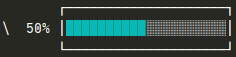
This will show 30% and a bar 30% full, then replace the line with a 70% bar, and finally a full bar. It would looks like:
| 70% [===================================> ]ProgressBar as its settings and characters used exposed as public
properties, so you can simply set as you wish to customize the bar
style:
src/SimpleCli/Widget/ProgressBar.php
Let's see a concrete example:
public function run(SimpleCli $cli): bool
{
    $bar = new ProgressBar($cli);
    // Assuming we have a 214MB file being downloaded in a parallel process
    $bar->total = 214 * 1024 * 1024;
    // Let's customize a bit the style:
    $bar->width = 20; // inner bar size
    $dash = str_repeat('─', $bar->width);
    // Let's draw a swaure around the bar
    $bar->start = "       ┌{$dash}┐\n";
    $bar->barStart = '│';
    $bar->barEnd = '│';
    $bar->after = "\n       └{$dash}┘";
    $bar->cursor = ''; // remove bar middle cursor
    // Colorize some characters for bar (left) and empty bar (right)
    $bar->bar = $cli->colorize('█', 'cyan');
    $bar->emptyBar = $cli->colorize('░', 'light_gray');
    // as ->after contains a new line, we have
    // to rewind 1 more line
    $bar->rewind = "\033[1A\r";
    $bar->start();

    while ($bar->isInProgress()) { // while value < total
        $bar->setValue(filesize('partially-downloaded-file.part'));
        usleep(250000); // Let's refresh every 250ms
    }

    $bar->end();

    return true;
}
use SimpleCli\Command;
use SimpleCli\SimpleCli;
use SimpleCli\Widget\Table;
use SimpleCli\Widget\Cell;

class SomeCommand implements Command
{
    public function run(SimpleCli $cli): bool
    {
        $data = [
            [
                new Cell('Artist', Cell::ALIGN_CENTER),
                new Cell('Song', Cell::ALIGN_CENTER),
                new Cell('Year', Cell::ALIGN_CENTER),
            ],
            [$cli->colorize('Nina Simone', 'cyan'), 'Feeling Good', 1965],
            ['The Marvelettes', 'Please Mr. Postman', 1961],
        ];
        $table = new Table($data);

        $cli->writeLine($table->format());

        return true;
    }
}

Table just take data and wrap them formatter as a text-table so
it can basically be used outside SimpleCli context.
It provides an insanely easy way to customize the template. You
just have to give it an example using 1, 2, 3 and 4 as
content for a 2x2 table and it will apply your example to any
size of tables.
$table = new Table([
    ['One', 'Two', 'Three'],
    ['*'],
    ['Hello', 'World', '!'],
]);
$table->template =
'╔═══╤═══╗
║ 1 │ 2 ║
╟───┼───╢
║ 3 │ 4 ║
╚═══╧═══╝';
Output:
╔═══════╤═══════╤═══════╗
║ One   │ Two   │ Three ║
╟───────┼───────┼───────╢
║ *     │       │       ║
╟───────┼───────┼───────╢
║ Hello │ World │ !     ║
╚═══════╧═══════╧═══════╝
To prevent ugly indent in your code, you can use !template! to start the
template at a given position:
$table->template = '
    !template!
    ╔═══╤═══╗
    ║ 1 │ 2 ║
    ╟───┼───╢
    ║ 3 │ 4 ║
    ╚═══╧═══╝';
equivalent to the template above as indent before ! is ignored.
You can also set the string to use as filler:
$table->fill = '_-';
And last you can set the default alignment for each column:
$table->align = [Cell::ALIGN_LEFT, Cell::ALIGN_CENTER, Cell::ALIGN_RIGHT];
Still you can override the alignment for a given cell using:
new Cell('Text', Cell::ALIGN_CENTER)
Cell also allow you to span columns:
// 2 columns-wide
(new Cell('Text'))->cols(2)

// 3 columns-wide centered
(new Cell('Text', Cell::ALIGN_CENTER))->cols(3)
Space taken by the text is then shared evenly among the columns.
Last, you can add color with $cli->colorize() to the template or
the cell contents. Color special characters are taken into account
so the display will remain properly aligned no matter if there is
some color here and there.
In the examples above, you could see your command run(SimpleCli $cli)
method get a SimpleCli instance. $cli is your program object, an
instance of the class that extends SimpleCli so in the example above,
it's an instance of EasyCalc it means you can access from $cli all
methods you define in your sub-class (or the ones override to customize
your program) and all methods available from the SimpleCli inherited class:
Get details to be displayed with the version command.
Get the composer version of the package handling the CLI program.
Output standard command variable (argument or option).
Get possible completions for a given start.
Ask the user $prompt and return the CLI input.
Get the initial stdin content as receive by the command using: echo "foobar" | command Or: command < some-file.txt Returns an empty string if no input passed.
List of the codes for each text color name.
List of the codes for each background color name.
Returns true if the CLI program is muted (quiet).
Set the mute state.
Mute the program (no more output).
Unmute the program (enable output).
Enable colors support in command line.
Disable colors support in command line.
Set a custom string for escape command in CLI strings.
Set colors palette.
Return $text with given color and background color.
Rewind CLI cursor $length characters behind, if $length is omitted, use the last written string length.
Output $text with given color and background color.
Output $text with given color and background color and add a new line.
Replace last written line with $text with given color and background color.
Replace last written line with $text with given color and background color and re-add the new line.
Get the name of the CLI program.
Get the current program file called from the CLI.
Get the list of commands expect those provided by SimpleCli.
Get the list of commands included those provided by SimpleCli.
Get the selected command.
Get raw parameters (options and arguments) not filtered.
Cast argument/option according to type in the definition.
Get list of current filtered arguments.
Get definitions of expected arguments.
Get the rest of filtered arguments.
Get definition for the rest argument if a @rest property given.
Get list of current filtered options.
Get definition of expected options.
Get option definition and expected types/values of a given one identified by name or alias.
Get the composer package name that handle the CLI program.
Set the vendor that should contains packages including composer/installed.json.
Get the vendor that should contains packages including composer/installed.json.
Get the list of packages installed with composer.
Get data for a given installed package.
Get the version of a given installed package.
Get PHP comment doc block content of a given class.
Get an attribute if present or extract an annotation content from a PHP comment doc block.
Extract an annotation content from a PHP comment doc block.