.,*/(#####(/*,.                               .,*((###(/*.
    .*(%%%%%%%%%%%%%%#/.                           .*#%%%%####%%%%#/.
  ./#%%%%#(/,,...,,***.           .......          *#%%%#*.   ,(%%%#/.
 .(#%%%#/.                    .*(#%%%%%%%##/,.     ,(%%%#*    ,(%%%#*.
.*#%%%#/.    ..........     .*#%%%%#(/((#%%%%(,     ,/#%%%#(/#%%%#(,
./#%%%(*    ,#%%%%%%%%(*   .*#%%%#*     .*#%%%#,      *(%%%%%%%#(,.
./#%%%#*    ,(((##%%%%(*   ,/%%%%/.      .(%%%#/   .*#%%%#(*/(#%%%#/,
 ,#%%%#(.        ,#%%%(*   ,/%%%%/.      .(%%%#/  ,/%%%#/.    .*#%%%(,
  *#%%%%(*.      ,#%%%(*   .*#%%%#*     ./#%%%#,  ,(%%%#*      .(%%%#*
   ,(#%%%%%##(((##%%%%(*    .*#%%%%#(((##%%%%(,   .*#%%%##(///(#%%%#/.
     .*/###%%%%%%%###(/,      .,/##%%%%%##(/,.      .*(##%%%%%%##(*,
          .........                ......                .......
A starter kit for Go API development. Inspired by How I write HTTP services after eight years.
However, I wanted to use chi router which is more common in the community, sqlx for database operations and design towards layered architecture (handler -> business logic -> database).
In short, this kit is a Go + Postgres + Chi Router + sqlx + ent + authentication + testing starter kit for API development.
On the topic of API development, there are two opposing camps between using framework (like echo, gin, buffalo) and starting small and only adding features you need through various libraries.
However, the second option isn't that straightforward. you will want to structure your project in such a way that there are clear separation of functionalities for your controller, business logic and database operations. Dependencies need to be injected from outside to inside. Being modular, swapping a library like a router or database library to a different one becomes much easier.
This kit is composed of standard Go library together with some well-known libraries to manage things like router, database query and migration support.
- Framework-less and net/http compatible handlers
- Router/Mux with Chi Router
- Database Operations with sqlx
- Database Operations with ent
- Database migration with goose
- Input validation that returns multiple error strings
- Read all configurations using a single
.env file or environment variable
- Clear directory structure, so you know where to find the middleware, domain, server struct, handle, business logic, store, configuration files, migrations etc.
- (optional) Request log that logs each user uniquely based on host address
- CORS
- Scans and auto-generate Swagger docs using a declarative comments format
- Custom model JSON output
- Filters (input DTO), Resource (output DTO) for pagination parsing and custom response respectively.
- Cache layer
- Authentication using cookie-based session
- Uses Task to simplify various tasks like mocking, linting, test coverage, hot reload etc
- Unit testing of repository, use case, and handler using mocks and dockertest
- Integration testing
- End-to-end test using ephemeral docker containers
- OpenTelemetry with Grafana, otel-collector, Prometheus, Loki, and Jaeger
It is advisable to use the latest supported Go version (>= v1.26). Optionally docker and docker-compose for easier start up. There is a quick guide for Debian in the appendix.
Get it
git clone https://codeberg.com/gmhafiz/go8
cd go8
The application depends on a database. Ideally applications load configurations from environment variable (Method A) or from a vault.
(Method A)
Set values by exporting them into environment variables
export DB_DRIVER=postgres
export DB_HOST=localhost
export DB_PORT=5432
export DB_USER=postgres
export DB_PASS=password
export DB_NAME=go8_db
(Method B)
It is also possible to set them in an .env file. Just make sure this file is ignored in .gitignore because it should never be checked into source control.
Fill in your database credentials in .env by making a copy of env.example first.
cp env.example .env
vim .env
Have a database ready either by installing them yourself or use the following command. The docker-compose-infra.yml will use database credentials set in either .env file or environment variables which is initialized in the previous step. In addition, creating database this way will also create an integration database as well.
docker-compose -f docker-compose-infra.yml up -d postgres
Once the database is up, tables and seed data needs to be created using a migration system with the following command. The seed data is needed for authentication later.
go run cmd/migrate/main.go
go run cmd/seed/main.go
You will see a bunch of dependencies download for a first time run followed by the sql migration files
2023/09/16 19:06:56 connecting to database...
2023/09/16 19:06:56 database connected
2023/09/16 19:06:56 OK   20221213140051_create_books.sql (28.26ms)
2023/09/16 19:06:56 OK   20221213140144_create_authors.sql (19.26ms)
2023/09/16 19:06:56 OK   20221213140219_create_book_authors.sql (13.34ms)
2023/09/16 19:06:56 OK   20230409004013_create_users_table.sql (14.13ms)
2023/09/16 19:06:56 OK   20230409004420_create_sessions_table.sql (9.67ms)
2023/09/16 19:06:56 goose: successfully migrated database to version: 20230409004420
Run the API with the following command.
You will see the address of the API is running at.
2024/08/20 12:52:43 Starting API version: v0.1.0
{"time":"2024-08-20T12:52:43.809953984+10:00","level":"INFO","msg":"connecting to database... "}
{"time":"2024-08-20T12:52:43.820974939+10:00","level":"INFO","msg":"database connected"}
        .,*/(#####(/*,.                               .,*((###(/*.
    .*(%%%%%%%%%%%%%%#/.                           .*#%%%%####%%%%#/.
  ./#%%%%#(/,,...,,***.           .......          *#%%%#*.   ,(%%%#/.
 .(#%%%#/.                    .*(#%%%%%%%##/,.     ,(%%%#*    ,(%%%#*.
.*#%%%#/.    ..........     .*#%%%%#(/((#%%%%(,     ,/#%%%#(/#%%%#(,
./#%%%(*    ,#%%%%%%%%(*   .*#%%%#*     .*#%%%#,      *(%%%%%%%#(,.
./#%%%#*    ,(((##%%%%(*   ,/%%%%/.      .(%%%#/   .*#%%%#(*/(#%%%#/,
 ,#%%%#(.        ,#%%%(*   ,/%%%%/.      .(%%%#/  ,/%%%#/.    .*#%%%(,
  *#%%%%(*.      ,#%%%(*   .*#%%%#*     ./#%%%#,  ,(%%%#*      .(%%%#*
   ,(#%%%%%##(((##%%%%(*    .*#%%%%#(((##%%%%(,   .*#%%%##(///(#%%%#/.
     .*/###%%%%%%%###(/,      .,/##%%%%%##(/,.      .*(##%%%%%%##(*,
          .........                ......                .......
{"time":"2024-08-20T12:52:43.821753831+10:00","level":"INFO","msg":"Serving at 0.0.0.0:3080"}
To use, open a new terminal and follow examples in the examples/ folder
Create a book:
curl -v --request POST 'http://localhost:3080/api/v1/book' \
 --header 'Content-Type: application/json' \
 --data-raw '{
    "title": "Test title",
    "image_url": "https://example.com",
    "published_date": "2020-07-31T15:04:05.123499999Z",
    "description":
    "test description"
  }'
Retrieve all books:
curl --request GET 'http://localhost:3080/api/v1/book'
To see all available routes, run
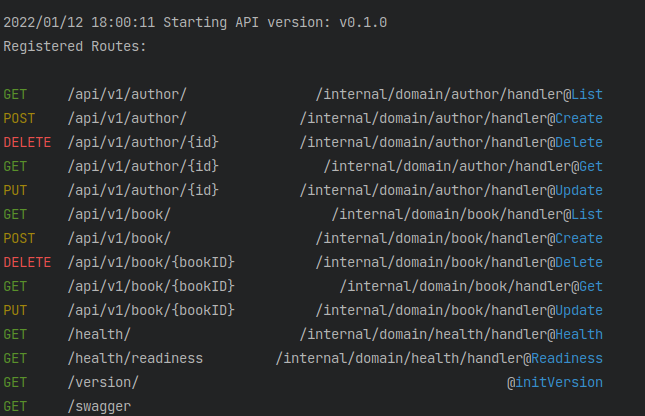
To run both unit and integration tests,
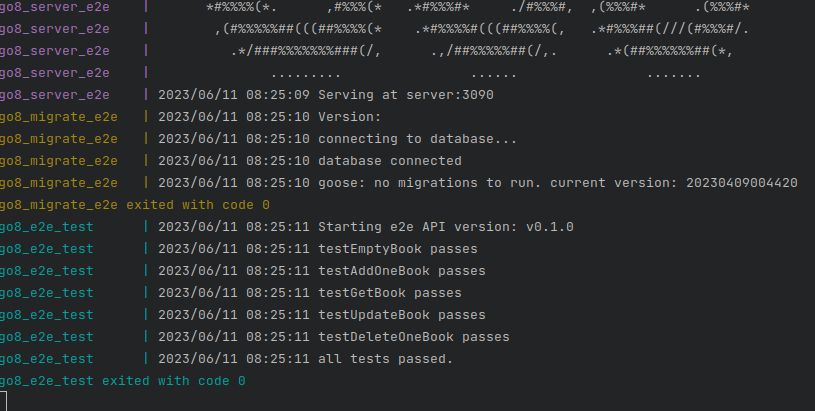
For end-to-end tests, run the following docker-compose command. It will run a database, a server, and its table migrations. Then it runs end-to-end program (located in e2e/main.go) against it — all in a self-contained container environment.
docker-compose -f e2e/docker-compose.yml up --build
You will see a bunch of containers being built before the tests are run. The e2e test ends with the following message
go8_e2e_test | 2023/12/30 03:08:04 api is up
go8_e2e_test | 2023/12/30 03:08:04 testEmptyBook passes
go8_e2e_test | 2023/12/30 03:08:04 testAddOneBook passes
go8_e2e_test | 2023/12/30 03:08:04 testGetBook passes
go8_e2e_test | 2023/12/30 03:08:04 testUpdateBook passes
go8_e2e_test | 2023/12/30 03:08:04 testDeleteOneBook passes
go8_e2e_test | 2023/12/30 03:08:04 all tests have passed.
go8_e2e_test exited with code 0
Press Ctrl+C to quit the e2e test and stop all e2e containers.
To remove the containers,
docker-compose -f e2e/docker-compose.yml down
During development, we follow a process and have many tools including functional tests (unit, integration, end-to-end), static analyzer, performance regression tests, and others before we ship to production. In spite of developers' best effort, bugs do occur in production. Typical tools we have during development may not be applicable to a production setting. What we need is some visibility on how our program's internal state and how it behaves in production for example, error logs can be useful to give us this information. An endpoint which is slow will need to be looked at, and it will be great if we can pinpoint exactly where the offending part of a codebase is.
OpenTelemetry is a collection of APIs, SDKs, and tools to instrument, generate, collect, and export telemetry data including metrics, logs, and traces. Using docker-compose, all infrastructure needed to bring up OpenTelemetry integration can be started automatically. This includes configurations and the dashboard.
docker-compose -f docker-compose-infra.yml up -d
Once everything is up, the dashboard is accessed through Grafana at http://localhost:3300. Initial login credential is admin/admin. Then you will be prompted to set a new password.
Before moving forward with the dashboard, OpenTelemetry needs to be enabled in the api server. Switch on the feature in environment variable either by exporting it or by editing the value for OTEL_ENABLE from false to true in .env.
sed -i "s/^OTEL_ENABLE=.*/OTEL_ENABLE=true/" ".env"
# or
export OTEL_ENABLE=true
As everything is started as containers, finding the services are now done with its container name instead of localhost. Using docker-compose provides the convenience of setting the correct host necessary for api server to find the services. Stop the current api server and start it again with the provided docker-compose file.
ctrl+C
docker-compose up -d
Circling back to Grafana, the dashboard named 'Observe' is empty until there are some data being created. Synthetic load can be generated by using tools like k6 or locust.
The above quick start is sufficient to start the API. However, we can take advantage of a tool to make task management easier. While you may run migration with go run cmd/migrate/main.go, it is a lot easier to remember to type task migrate instead. Think of it as a simplified Makefile.
You may also choose to run sql scripts directly from database/migrations folder instead.
This project uses Task to handle various tasks such as migration, generation of swagger docs, build and run the app. It is essentially a sh interpreter.
Install task runner binary bash script:
sudo ./scripts/install-task.sh
This installs task to /usr/local/bin/task so sudo is needed.
Task tasks are defined inside Taskfile.yml file. A list of tasks available can be viewed with:
or
Various tooling can be installed automatically by running which includes
Install the tools above with:
Various tooling are included within the Task runner. Configurations are done inside Taskfile.yml file.
List all registered routes, typically done by register.go files by
or
Runs go generate ./.... It looks for //go:generate tags found in .go files. Useful for recreating mock file for unit tests.
Generate Swagger Documentation
Ensure your environment variable is API_RUN_SWAGGER=true, then re-run the api. Generates swagger files with the following command.
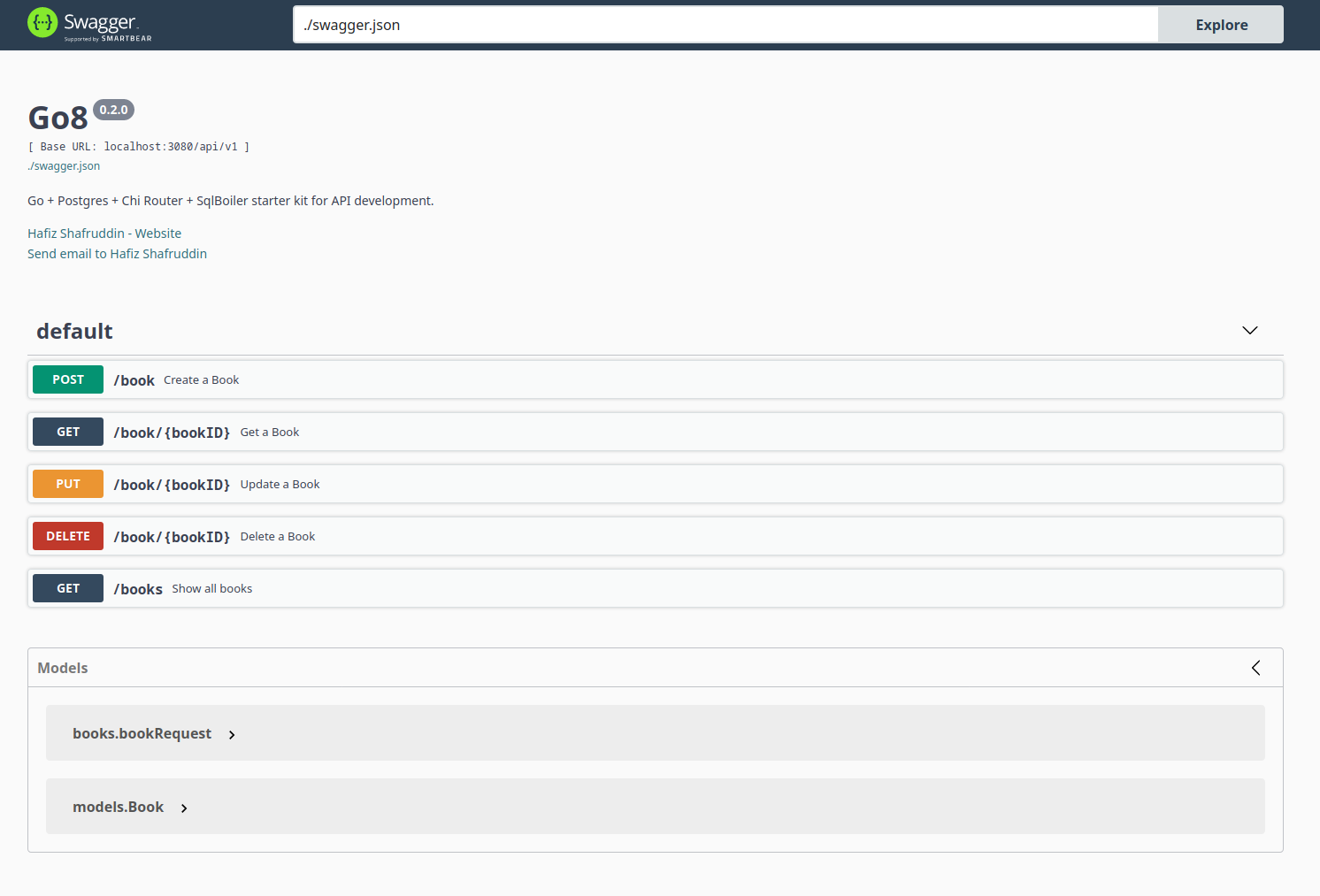
This reads annotations from controller and model file to create a swagger documentation file. The UI can be accessed from http://localhost:3080/swagger/
Runs go fmt ./... to lint Go code
go fmt is part of official Go toolchain that formats your code into an opinionated format.
Runs Go's tooling go vet ./....
Quickly catches compile error.
Runs https://golangci-lint.run linter. Includes gosec via golangci.yaml.
Runs unit tests using go test ./.... Other commands are task test:verbose for verbose output and task test:slow to find top slow-running tests.
Find software supply chain vulnerabilities using https://vuln.go.dev.
This runs govulncheck ./...
Runs all the above tasks (Format Code until Security Checks)
Runs go mod tidy to sync dependencies.
Runs air which watches for file changes and rebuilds binary. Configure in .air.toml file.
Runs unit test coverage with go test -cover ./...
Create a statically linked executable for linux.
Clears all files inside bin directory as well as cached unit test files.
This project follows a layered architecture mainly consisting of three layers:
- Handler
- Use Case
- Repository

The handler is responsible to receiving requests, validating them hand over to business logic.
Values returned from use case layer is then formatted and to be returned to the client.
Business logic (use case) is the meat of operations, and it calls a repository if necessary.
Database calls lives in this repository layer where data is retrieved from a store.
All of these layers are encapsulated in a domain, and an API can contain many domain.
Each layer communicates through an interface which means the layer depends on
abstraction instead of concrete implementation. This achieves loose-coupling and
makes unit testing easier.
Starting point of project is at cmd/go8/main.go
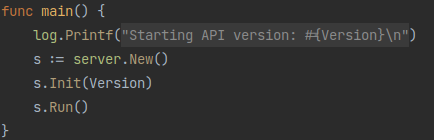
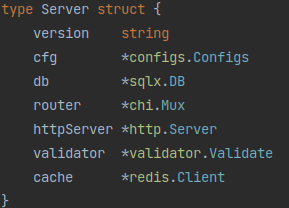
The Server struct in internal/server/server.go is where all important dependencies are
registered and to give a quick glance on what your server needs.
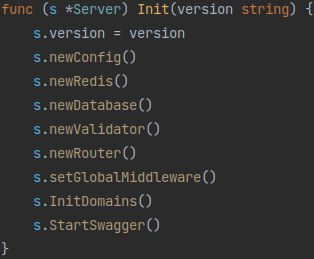
s.Init() in internal/server/server.go simply initializes server configuration, database, input validator, router, global middleware, domains, and swagger. Any new dependency added to the Server struct can be initialized here too.
The api can be configured by taking values from environment variables or an .env file.
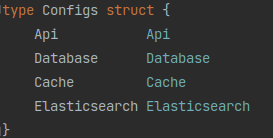
These variables are read into specific Configs struct initialized in configs/configs.go. Each of the embedded struct are defined in its own file of the same package where its fields are read from either environment variable or .env file.
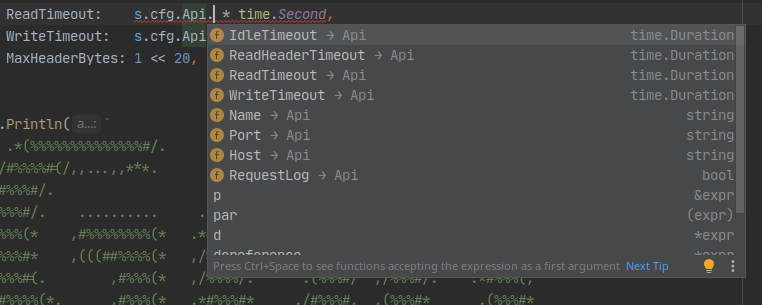
This approach allows code completion when accessing your configurations.
Simply set the environment variables by exporting them like so:
export DB_DRIVER=postgres
export DB_HOST=localhost
export DB_PORT=5432
etc
Alternatively, the .env file can be used. Just make sure this file is not committed in source control. Make a copy from example env file:
To add a new type of configuration, for example for Elasticsearch
- Create a new go file in
./configs
touch configs/elasticsearch.go
- Create a new struct for your type
type Elasticsearch struct {
  Address  string
  User     string
  Password string
}
Various validation and default values among others can also be configured into this struct. Visit https://github.com/kelseyhightower/envconfig for more details.
- Add a constructor for it
func ElasticSearch() Elasticsearch {
   var elasticsearch Elasticsearch
   envconfig.MustProcess("ELASTICSEARCH", &elasticsearch)

   return elasticsearch
}
- Register to main Config struct
type Config struct {
	Api
	Cors
	...
	Elasticsearch // add the constructor
}

func New() *Config {
	...
	return &Config{
		...
		Elasticsearch: ElasticSearch(), // Add here
    }
}
- Add to
.env of the new environment variables
A namespace is defined as ELASTICSEARCH.
ELASTICSEARCH_ADDRESS=http://localhost:9200
ELASTICSEARCH_USER=user
ELASTICSEARCH_PASS=password
Limiting the number of connection pool avoids 'time-slicing' of the CPU. Use the following formula to determine a suitable number
number of connections = ((core_count * 2) + effective_spindle_count)
Migrations files are stored in database/migrations folder. goose library is used to perform migration using task commands.
Router multiplexer or mux is created for use by Domain. While chi library is being used here, you can swap out the router to an alternative one when assigning s.router field. However, you will need to adjust how you register your handlers in each domain.
Let us look at how this project attempts at layered architecture. A domain consists of:
- Handler (Controllers)
- Use case (Business Logic)
- Repository (Database)
Let us start by looking at how repository is implemented.
Starting with Database. This is where all database operations are handled. Inside the internal/domain/health folder:
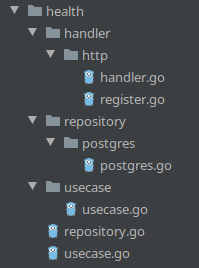
Interfaces for both use case and repository are on its own file under the health package while its implementation are in usecase and repository package respectively.
The health repository has a single method
internal/domain/health/repository.go
 type Repository interface {
     Readiness() error
 }
And it is implemented in a package called postgres in internal/domain/health/repository/postgres/postgres.go
func (r *repository) Readiness() error {
  return r.db.Ping()
}This is where all business logic lives. By having repository layer underneath in a separate layer, those functions are reusable in other use case layers.
This layer is responsible in handling request from outside world and into the use case layer. It does the following:
- Parse request into a 'request' struct
- Sanitize and validates said struct
- Pass into
use case layer
- Process results from coming from
use case layer and decide how the payload is going to be formatted to the outside world.
Route API are defined in RegisterHTTPEndPoints in their respective register.go file.
1. Parse request into 'request' struct
A struct must be defined with fields along with its type. For example in book.CreateRequest, there are four possible inputs and all of them are required, denoted by struct tag. ImageURL needs to be a URL, which is a handy utility provided by the validation library, among others.
type CreateRequest struct {
	Title         string `json:"title" validate:"required"`
	PublishedDate string `json:"published_date" validate:"required"`
	ImageURL      string `json:"image_url" validate:"url"`
	Description   string `json:"description" validate:"required"`
}
validate struct tag is parsed by the library to know which one is required. json struct tag helps with customising fields' letter case.
To parse the request, simply use the json package.
var bookRequest book.CreateRequest
err := json.NewDecoder(r.Body).Decode(&bookRequest)
Take care to supply the address of bookRequest variable by prepending ampersand & to it.
If there are no errors, the bookRequest can be passed into the usecase or repository layer.
Using the json package to parse is although simple, works well. It doesn't cover all cases in which you may want to refer to this article
Finally, a domain is initialized by wiring up all dependencies in server/initDomains.go. Here, any dependencies can be injected such as a custom logger.
func (s *Server) initBook() {
   newBookRepo := bookRepo.New(s.GetDB())
   newBookUseCase := bookUseCase.New(newBookRepo)
    s.Domain.Book = bookHandler.RegisterHTTPEndPoints(s.router, newBookUseCase)
}A middleware is just a handler that returns a handler as can be seen in the internal/middleware/cors.go
func Cors(next http.Handler) http.Handler {
    return http.HandlerFunc(func(w http.ResponseWriter, r *http.Request) {

        // do something before going into Handler

        next.ServerHTTP(w, r)

        // do something after handler has been served
    }
}
Then you may choose to have this middleware to affect all routes by registering it insetGlobalMiddleware() or only a specific domain at RegisterHTTPEndPoints() function in its register.go file.
Middleware External Dependency
Sometimes you need to add an external dependency to the middleware which is often the case for
authorization be that a config or a database. To do that, we wrap our middleware with a
func(http.Handler) http.Handler. Any dependencies can now be passed in into Auth().
func Auth(cfg configs.Configs) func(http.Handler) http.Handler {
    return func(next http.Handler) http.Handler {
        return http.HandlerFunc(func(w http.ResponseWriter, r *http.Request) {
            claims, err := getClaims(r, cfg.Jwt.SecretKey)
            if err != nil {
                w.WriteHeader(http.StatusUnauthorized)
                return
            }

            next.ServeHTTP(w, r)
        })
    }
}
Dependency injection in Go is simple. We can simply pass in whatever we need
into the function or method signature. There is no need to make a dependency injection
container like other object-oriented programming language.
How does dependency injection happens? It starts with InitDomains() method. We
initialize the dependency we want early in the start-up of the program and then
pass it down the layers.
newBookRepo := bookRepo.New(s.DB())
newBookUseCase := bookUseCase.New(newBookRepo)
s.Domain.Book = bookHandler.RegisterHTTPEndPoints(
	s.router,
	s.validator,
	newBookUseCase,
)
The repository gets access to a pointer to sql.DB from the s.DB()
initialisation to perform database operations. This layer also knows nothing of
layers above it. NewBookUseCase depends on that repository and finally the
handler depends on the use case.
Initialization of external libraries are located in third_party/
Since sqlx is a third party library, it is initialized in /third_party/database/sqlx.go
Migration is a good step towards having a versioned database and makes publishing to a production server a safe process.
All migration files are stored in database/migrations folder.
Using Task, creating a migration file is done by the following command. Name the file after NAME=.
task migrate:create NAME=create_a_tablename
Write your schema in pure sql in the 'up' section and any reversal in the 'down' section of the file.
After you are satisfied with your .sql files, run the following command to migrate your database.
To migrate one step
To roll back migration by one step
Further goose commands are available in its page
Once goose tool is installed, create a migration with
migrate create -ext sql -dir database/migrations -format unix "{{.NAME}}"You will need to create a data source name string beforehand. e.g.:
postgres://postgres_user:$password@$localhost:5432/db?sslmode=false
Note: You can save the above string into an environment variable for reuse e.g.
export DSN=postgres://postgres_user:$password@$localhost:5432/db?sslmode=false
Then migrate with the following command, specifying the path to migration files, data source name and action.
migrate -path database/migrations -database $DSN up
To migrate 1 step,
migrate -path database/migrations -database $DSN up-by-one
Rollback migration by using down action and the number of steps
migrate -path database/migrations -database $DSN down
Conventionally, all apps are placed inside the cmd folder.
If you have Task installed, the server can be run with:
or without Task, just like in quick start section:
You can build a docker image with the app with its config files. Docker needs to be installed beforehand.
This task also makes a copy of .env. Since Docker doesn't copy hidden file, we make a copy of it on our src stage before transferring it to our final scratch stage. It also inserts formats git tag and git hash as the API version which runs at compile time.
Note that this is a multistage Dockerfile. Since we statically compile this API, we can use a minimal images like a distroless that includes both timezones and CA certificates.
Run the following command to build a container from this image. --net=host tells the container to use local's network so that it can access host database.
docker-compose up -d postgres # If you haven't run this from quick start
Or using Task
If you prefer to use docker-compose instead, both server and the database can be run with:
task docker-compose:start
If you have task installed, simply run
It does a task check prior to the build and puts both the binary and .env files into ./bin folder
go mod download
CGO_ENABLED=0 GOOS=linux
go build -ldflags="-X main.Version=$(git describe --abbrev=0 --tags)-$(git rev-list -1 HEAD) -s" -o ./server ./cmd/go8/main.go;
Authentication is proving who or identity of a person as opposed to Authorization where it tells what this person can do. The most popular way is by using JWT which is a stateless solution by using signed token generated from the server and then stored client-side. This token contains an algorithm, date and time it expires, and may store arbitrary data. This token is attached to each subsequent requests by client-side where the server verifies its validity by checking if the token has not been tampered and then see if it is not past expiry date.
This repository on the other hand demonstrates an age-old method of authentication — sessions. It generates a session containing random characters and set in a cookie. This session is also stored in a database, and this makes it a stateful solution. Arbitrary data can be saved inside the session by saving it in the database but client-side only receives the random token.
Advantage of this approach is invalidating or logging out a user can be done by simply deleting the associated session record in the database. With HttpOnly flag set to true, this ensures the cookie can only be read by the browser, not client-side javascript. Thus, this prevents cross-site scripting (XSS) attack. SameSite=lax and setting the Domain minimises the risk of cross-site request forgery (CSRF). However, this approach incurs additional cost of database querying in every request.
Why not JWT in cookie? This prevents XSS with correct cookie flags. However, session invalidation is not possible without storing the sessions in a persistent store.
Session management is done using alexedwards/scs library. All routes go through a custom middleware based on LoadAndSave middleware. On top of storing data in a database and setting the cookie in a response header before going into any handler, it also saves user ID as a foreign key to users table.
At first time login, no cookie is present. Upon successful login, we call RenewToken() method that creates a new random string token, and after it exits the handler, it re-enters the LoadAndSave middleware to save the token into the database. If any action to add data were done, it will be saved in the database, not in the cookie. The response will contain the cookie in the header.
It is recommended to both migrate (if you have not) and seed users table with a super admin account. Run with
go run cmd/migrate/main.go
go run cmd/seed/main.go
This generates a super admin user with a randomly generated password. This password is automatically saved in .env file.
Let us register a new user:
curl -vX POST  -H 'content-type: application/json' 'http://localhost:3080/api/v1/register' -d '{
  "first_name": "Hafiz",
  "last_name": "Shafruddin",
  "email": "email@example.com",
  "password": "highEntropyPassword"
}'
You should get a 201 Created HTTP status response. Now you can login
curl -vX POST -H 'content-type: application/json' \
'http://localhost:3080/api/v1/login' \
-d '{
  "email": "email@example.com",
  "password": "highEntropyPassword"
}
'
You will get a 200 OK HTTP status response along with a cookie in the header. By default, our token is stored from session key in the Set-Cookie header. In this example, it is gedFYqAUXejpgmBhnCkKLip7dOjecbBC1HzSHCX7KGI.
< HTTP/1.1 200 OK
< Cache-Control: no-cache="Set-Cookie"
< Content-Type: application/json
< Set-Cookie: session=gedFYqAUXejpgmBhnCkKLip7dOjecbBC1HzSHCX7KGI; Path=/; Expires=Wed, 03 May 2023 13:45:59 GMT; Max-Age=86365; SameSite=Lax
< Vary: Origin
< Vary: Cookie
< Date: Tue, 02 May 2023 13:46:34 GMT
< Content-Length: 147
At this point, you will also see that a new record is stored into sessions table.
You can see the token is stored along with our user ID. data column stores arbitrary payload in the session as supported by alexedwards/scs library.