一覧へ戻る
NikolayS/PGSimCity(新しいタブで開きます)
主要言語: TypeScript
An explorable 3D city that shows how Postgres actually works
- star 数
- 775
- watcher 数
- 3
- fork 数
- 65
- issue 数
- 16
- 最終更新
- 2026/10/11
 gem-hunter
主要言語: TypeScript
An explorable 3D city that shows how Postgres actually works
Walk through PostgreSQL. Break things. Understand why.




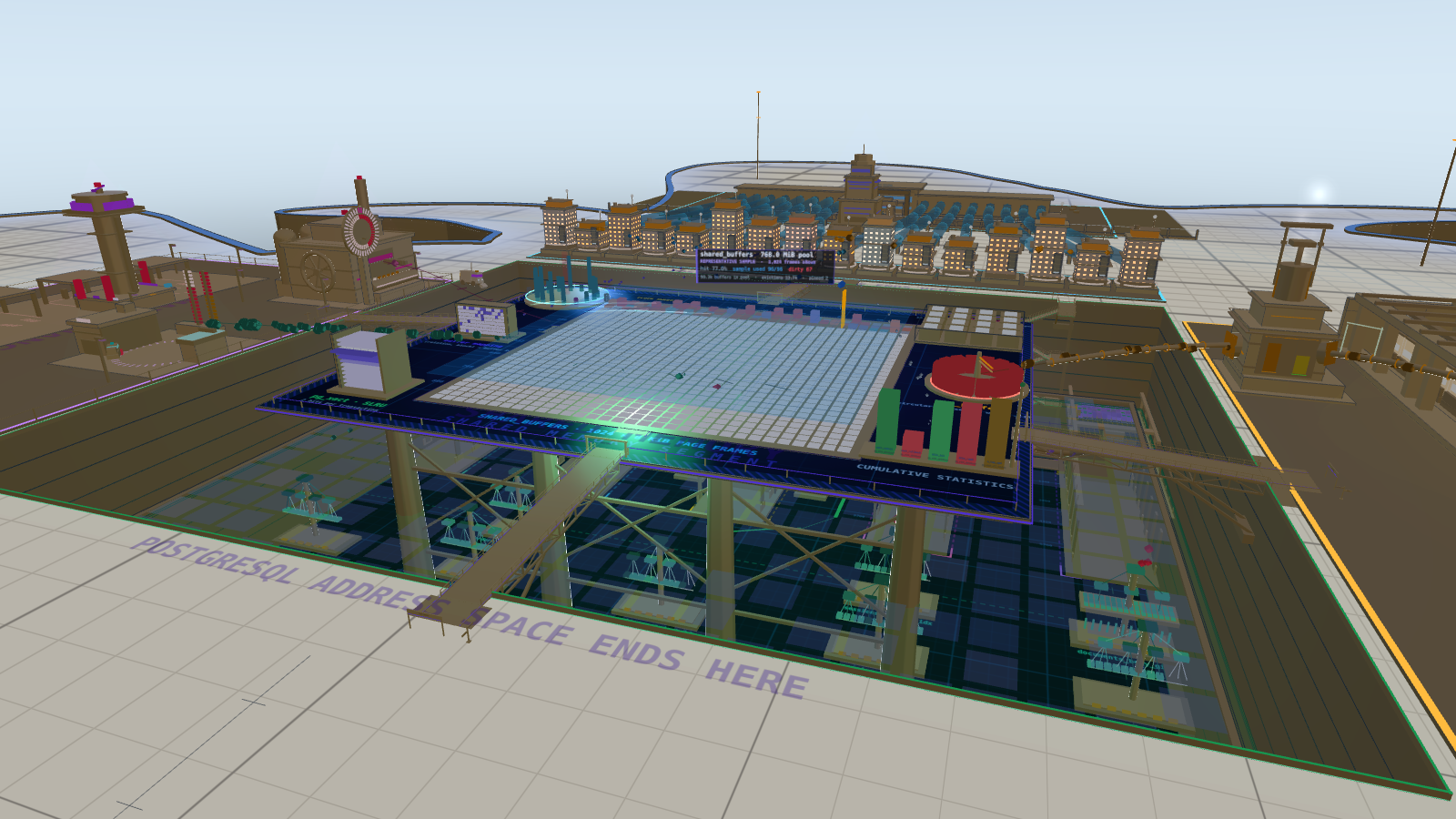
An explorable 3D city where buildings represent PostgreSQL internals and motion shows their interaction. Follow a query, investigate a growing table, or see what changes when memory, checkpoints and replication become bottlenecks.
Explore the city → · Diagnose · Machine
Community discussion · Press coverage · Start here · Model accuracy
No installation. Runs in a browser with WebGL2. The city is an educational model, not a running PostgreSQL server.
930 points · 91 comments on Hacker News →
Explore the community’s questions, technical discussion and feedback on PGSimCity — How PostgreSQL Works, posted July 27, 2026.
Counts checked October 11, 2026. The discussion describes the version available then.
Selected reporting and hands-on reviews of PGSimCity:
| Publication | Article | Published |
|---|---|---|
| Clement Mondary · Français | PGSIMCITY : comprendre PostgreSQL en visitant une ville en 3D — an introduction to the city’s visual language, interactive scenarios and distinction between the simulation and PGlite. | August 22, 2026 |
| InfoQ | How PGSimCity Turns PostgreSQL Complexity into a Virtual City 3D Simulation — Olimpiu Pop on the project’s architecture and educational approach. Also available in 简体中文, translated by 田橙. | August 16, 2026 |
| IBM Think | Someone turned PostgreSQL into a city you can walk around in — Antonia Davison’s feature, also included in the IBM Think newsletter. | July 31, 2026 |
| Gizmodo | This SimCity-Like Visualization Turns Tech’s Most Boring Systems Into Fun — Tom Hawking’s hands-on review. | July 28, 2026 |
| GIGAZINE | データベース「PostgreSQL」がどのように実際には内部で動いているかがシムシティっぽい3Dでわかる「PGSimCity」 — a screenshot-led Japanese walkthrough of connections, query planning, buffers, page storage, WAL, vacuum and replication. English edition. | July 28, 2026 |
| Developers Digest | PGSimCity: A 3D Interactive City That Visualizes How PostgreSQL Works — an overview of the visualization and the Hacker News discussion, including community feedback on usability and accuracy. | July 27, 2026 |
Articles describe the version available when published.
A table keeps growing even though autovacuum is running. Why?
Pause when you need time to read. Try challenge mode afterward for less guidance. Evidence and notes belong to the current attempt; they do not survive a reload.
| Experience | What you can do |
|---|---|
| City | Explore the engine spatially, follow the guided tour and investigate a vacuum incident. |
| Diagnose | Follow a query’s path and inspect the simulation through a 2D diagnostic interface. |
| Machine | Run real SQL with opt-in PGlite beside a 2D architecture board; measured and modeled values are labeled separately. |
The city is a model, not a running PostgreSQL server. Its numbers and timing are scaled to make internals observable. The separate Machine and opt-in Query flow can execute real PostgreSQL through PGlite; they do not turn the city into a production monitor.
The project is an evolving 0.x prototype, with known simplifications and tests against PostgreSQL behavior. See model accuracy and limitations for the reviewed reference version, formulas and review history.
PGSimCity targets the PostgreSQL 18 major line, with PostgreSQL 18.6 as its
reviewed reference and REL_18_STABLE
as the source branch. Four review rounds are documented in the accuracy notes;
they do not establish complete coverage or make this model an emulator.
Report a PostgreSQL mismatch.
Lessons include keyboard and text-first routes; the 3D scene and first-person walk do not have a nonvisual equivalent. Touch verification has used browser emulation, not physical devices. Accessibility and alternatives.
| District | What it is |
|---|---|
| Client sky (north, above) | Connections arriving from the application tier |
| Postmaster | The supervisor. Forks one backend per connection and never touches your data |
| Backend row | 16 backend processes. Their lighting is their state — including idle in transaction |
Buffer pool (shared_buffers) |
Up to 1,024 representative frames (256 active at the 2 GiB model default; PostgreSQL 18 defaults to 128 MiB), beside wal_buffers, the ProcArray, lock table, CLOG and buffer mapping table |
| The excavation | The data directory: where memory ends and storage begins |
| Storage (below) | Heap files as fields of 8 KiB pages, B-trees as actual trees, TOAST, the FSM and visibility map, the OS page cache and the disks |
| WAL district (east) | Backends and walwriter write WAL into pg_wal; the archiver copies completed segments, while walsenders independently stream WAL as it is generated |
| Maintenance yard (west) | Checkpointer, background writer, autovacuum launcher and its workers |
| Standbys (south) | Two independent walreceivers, startup processes replaying WAL, and the lag on each stream |
| Continuity quarter (outer east and south) | WAL archive, base backups, point-in-time recovery, delayed replay, leader lease and rejoin machinery |
| Query lab (above the backends) | Select a backend and its statement unfolds: parse → rewrite → plan → execute |
PostgreSQL 18's bulk-read strategy grows with
io_combine_limit × effective_io_concurrency, subject to caps. This city's animation uses a fixed 32-frame ring instead; it is a historical simplification, not PostgreSQL 18's sizing rule. Model accuracy and source reference.
Colour is semantic everywhere and never decorative: WAL is amber, dirty pages are red, clean pages are blue, vacuum is violet, checkpoints are pink, the background writer is teal, replication is orange, storage is green, indexes are aqua, locks are red.
T for the 14-chapter guided tour. It follows one connection from
the client through planning, caching, WAL, checkpoints, vacuum and replication.Enter to trace one statement. Pick Non-HOT UPDATE and slow
playback exposes where it enters the buffer pool, creates WAL and waits to
commit.shared_buffers to
16 MiB — below the manual control's 128 MiB minimum — so the clock sweep races
and backends write their own dirty victims before they can read another page.base/pgsql_tmp, temp counters and latency breakdown show the consequence.sessions table keeps bloating. Release the transaction and cleanup
can begin again.synchronous_commit to off and watch backends stop waiting in
commit_wait. Then read what you just traded away.sent_lsn, write_lsn, flush_lsn and
replay_lsn pull apart on the standby.G and walk through the city at eye level. A buffer frame that read
as one tile from the establishing shot becomes a structure above your head.
Press E at the autovacuum lever or the postmaster door to operate it;
the control center inside can trace one of six statements across a map of the city.Start with drag to pan, wheel/pinch to zoom, T for the tour, K to pause and H to return to the overview.
All camera controls and keyboard shortcutsPress ? in the city for the city control map and colour legend.
| Input | Action |
|---|---|
| Left-drag | Pan in orbit mode — grab the ground and move it, the way a map does |
Shift-left-drag or Ctrl/Cmd-left-drag |
Orbit around the city |
| Middle-drag | Pan in orbit mode |
| Right-click or touch long-press | Open the context menu |
| Wheel | Zoom towards the cursor in orbit mode · adjust movement speed in fly mode |
| 1 finger | Pan in orbit mode |
| 2 fingers | Pinch to zoom · twist to orbit · drag both up/down to tilt |
| First-person touch | Left thumb moves · right thumb looks · buttons jump and crouch (rise and dive while swimming) |
| Click | Select a building · in fly or walk mode, capture the mouse for looking |
| Double-click | Focus a component — semantic focus instead of a map-style zoom step |
W A S D or the arrow keys |
Move |
Shift + left/right arrow |
Turn left/right in orbit, fly, or walk mode |
Shift + up/down arrow |
Tilt or look up/down in orbit, fly, or walk mode |
+ / - |
Zoom in/out in orbit mode |
Space or E · C or Q |
Rise · descend in fly mode; in walk mode, Space jumps, E operates nearby levers, doors, or consoles, and C crouches |
PageUp / PageDown |
Change altitude in orbit or fly mode |
Shift · Alt |
Boost · precision in orbit or fly mode; Shift runs in walk mode |
Esc |
Leave pointer lock |
| Key | Action |
|---|---|
F |
Toggle fly / orbit camera |
G |
Get down and walk the city on foot, 1.7 m tall |
H |
Back to the establishing shot |
Home |
Back to the default establishing shot |
O |
Straight-down overview of the whole plate |
T |
Guided tour — the core query and maintenance path in 14 chapters |
Enter |
Open Run a Query |
/ or Ctrl/Cmd+K |
Command palette — search every component, setting and scenario |
? |
Keyboard map and colour legend |
L |
Toggle the floating labels |
N |
Cycle night / afternoon daylight / approximate local-time light |
M |
Toggle walk sound |
K or P |
Pause / resume |
Focus +0.1 model s, then Enter |
Advance the paused workload by 0.1 model seconds; remain paused |
, . |
Slower / faster (0.1× – 5×) |
R |
Reset to the default settings |
Esc |
Close the topmost overlay |
1 – 8 |
Jump to a district: clients, backends, buffer pool, WAL, storage, query lab, maintenance, standby |
Choose Campaign, or open the required-standby case and the retired-consumer challenge. Opening preserves the city; Reset city and start explicitly creates a fresh case and clears replay history. Record ownership and live pressure, intervene, then observe and verify recovery. Explain why the same slot operation has a different trade-off when the consumer must return versus when it is retired.
Observation advances at most 300 model seconds per request and can be stopped. Slot removal releases one retention requirement; physical WAL reclamation waits for checkpoint completion and other retainers. Completion records an observed model result, not a graded explanation or measured learning gain. Only bounded case-completion identifiers persist locally; notes/evidence stay in this attempt and are discarded when switching cases. Clear local completion history removes that record. Storage failure leaves session-only progress usable.
Choose Replay, then Save checkpoint before an intervention. Observe an outcome, Rewind to checkpoint, change a model control or operator decision, and Run alternative to same duration. The comparison preserves the seeded prefix and labels counters, current gauges and model-time latency explicitly. Rewind reconstructs the model; saved investigation evidence and Diagnose’s previous-step button are navigation, not rewind.
The linked Console and Back to city controls transfer the current model incident in the same tab, including selection and diagnostic trail. Diagnostic sampling windows restart on arrival; PGlite remains a separate opt-in database. Export a comparison before switching views: saved replay checkpoints, comparison baselines and investigation notes do not transfer. Browser reload/Back is not linked navigation and can reject an expired or already-consumed transfer. Use the explicit new-city link to discard it. Replay records are local, bounded and exact-build-specific; copying a record is not a URL share, and does not include lesson answers or PGlite data.
Choose Export image in the city toolbar. The model pauses until you return to the city. PNG export keeps the current camera and graphics quality; visible object names are optional, but the model disclosure, version, and model clock always remain in the image footer. After a replay comparison, include the comparison explanation to retain the seed/checkpoint, recorded interventions, original and alternative durations, and qualified outcomes. Unequal durations are marked as not a controlled comparison. Long action lists are summarized with an explicit omitted count.
The default 2× option caps the scene at 4 megapixels. An explicit 4K scene option fits the camera aspect within 3840 × 2160 (rotated for a portrait view), subject to GPU limits. The disclosure footer adds height. Large captures can exhaust GPU memory; try 1× if an export fails. A prepared-image link remains available if the browser blocks the automatic download.
src/
  core/           shared contracts, event bus, registry, themes and utilities
  sim/            the PostgreSQL simulation
  world/          the city geometry, one module per district
  engine/         renderer, camera, flows, labels, picking, collision and audio
  ui/             controls, inspector, tour, search and written explanations
  observability/  a separate diagnostic interface over the same simulation
machine/           a separate psql workbench and 2D architecture board
Three rules hold it together:
world/layout.ts is the single source of truth for geography. Anchors,
table definitions and the route network live there. No district hard-codes a
coordinate another district needs.SimState.Stack: three.js r185, TypeScript, Vite. three.js is the 3D application's only bundled runtime dependency. The separate 2D Query flow and Machine may lazy-load PGlite after reader opt-in. There is no framework, and Plausible analytics is the sole external service.
window.PGSIMCITY in the browser console includes sim, registry, bus,
rig, gfx and flows if you would rather drive the city from the outside.
For formulas, review history and known simplifications, see
Model accuracy and limitations. Each inspector names
material simplifications at the point where they matter.
The accuracy boundary makes internals such as the clock sweep's frame-by-frame victim choice observable. The separate Query flow and the Machine offer opt-in PGlite modes: real PostgreSQL supplies parsing, plans, catalogs, buffer counters, errors and results, while the visual model supplies the otherwise hidden interior. Each surface labels those sources separately because PostgreSQL exposes the former and not the latter.
You need Node.js ^20.19.0 || >=22.12.0 and a browser with WebGL2.
npm install
npm run dev      # http://localhost:5173
npm test npm run typecheck npm run build # static bundle in dist/ npm run preview # http://localhost:4173
There is no application server. The result is a static bundle. The 3D city and Diagnose model path make only the analytics requests described below. Query flow and the Machine may, after an explicit click or first submitted query, load the same-origin PGlite JavaScript, data and WebAssembly assets and run an in-memory PostgreSQL in the browser. Their model paths continue to work when analytics or PGlite is blocked.
Analytics and privacy. PGSimCity uses
Plausible for aggregate, cookie-free analytics on the
city, observability, and Machine pages. It records pageviews, unique visitors,
referring sites, bounce rate, visit duration and interactions such as starting
the tour, changing playback, opening a panel, tracing a statement, selecting a
building or following an outbound link. PGSimCity sends no names, email addresses,
free-form input, browser fingerprint or application-supplied personal data, and
creates no analytics cookies, analytics local storage, advertising identifier
or session recording. Blocking plausible.io stops measurement without
affecting the application.
Follow the living delivery roadmap for current milestones and the technical roadmap for longer-term direction. See releases for what is actually shipped.
PGSimCity is an independent, non-commercial educational visualization of PostgreSQL internals. It is not affiliated with, sponsored, endorsed, or approved by Electronic Arts Inc. SimCity is a trademark of Electronic Arts Inc. This project contains no SimCity code, assets, artwork, logos, characters, audio, or game content.
Apache-2.0. Copyright 2026 Nikolay Samokhvalov. See NOTICE.
PostgreSQL is a trademark of the PostgreSQL Community Association of Canada. PGSimCity is an independent educational project and is not affiliated with, sponsored by, or endorsed by the PostgreSQL project.