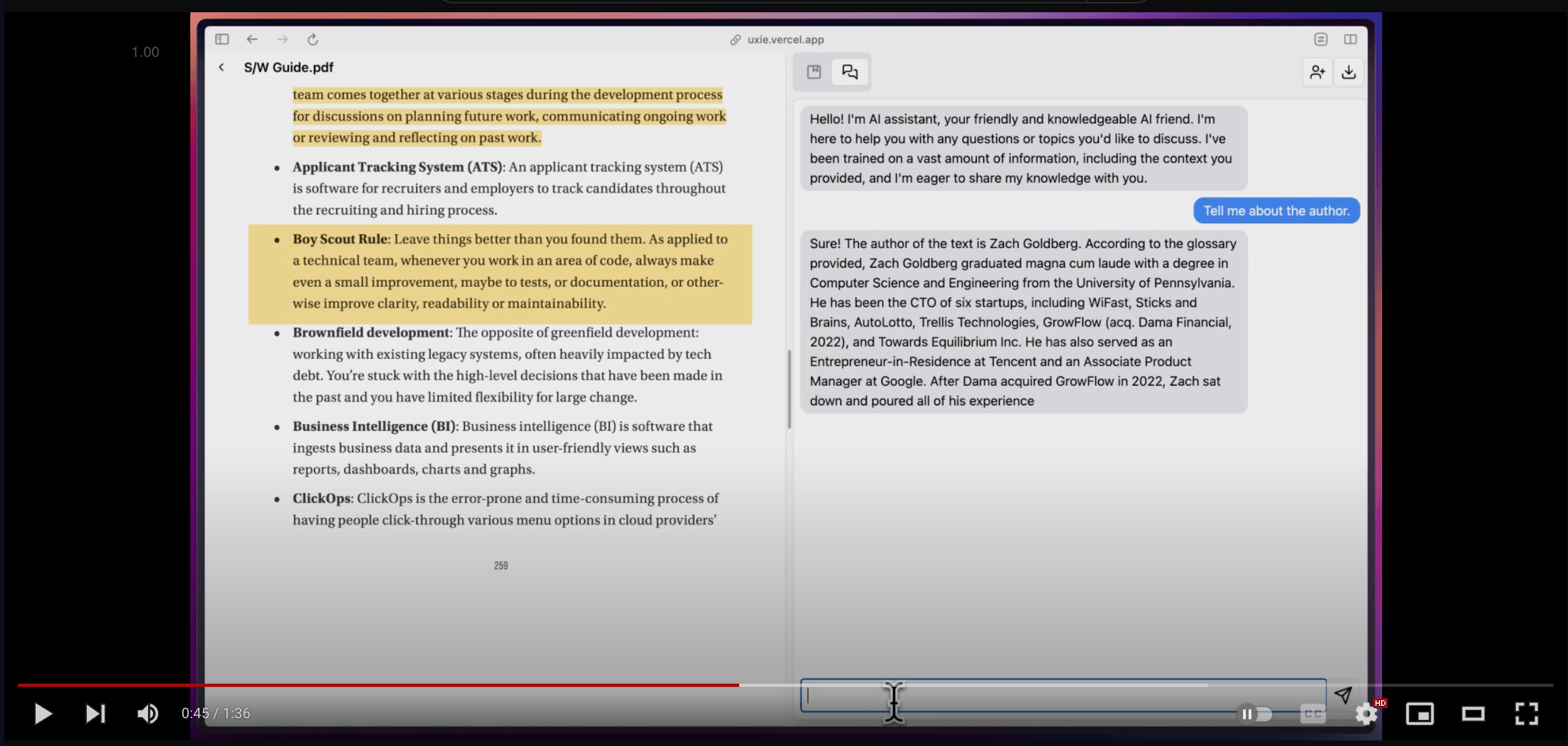
PDF reader designed to revolutionise your learning experience — annotate, take notes,
and talk to your documents.
Originally a hackathon project which I ended up winning 🥇, Uxie now ships as two apps
from one codebase: the hosted web app, and a local-first desktop app where your
documents and inference never leave your machine.
I'd love for you to give it a try and share your feedback.
|
Web (apps/web) |
Desktop (apps/desktop) |
| Runtime |
Next.js on Vercel |
Electron (macOS arm64) |
| Data |
Supabase Postgres via Prisma |
SQLite on disk via Drizzle |
| Files |
Uploadthing |
Local userData folder, served over uxie-pdf:// |
| Vectors |
Pinecone (768-dim) |
sqlite-vec (768-dim) |
| Embeddings |
bge-base-en-v1.5 via Hugging Face API |
the same model, run on-device via transformers.js |
| LLM |
Google Gemini |
Any OpenAI-compatible endpoint you point it at |
| Auth |
NextAuth (Google) |
None — single local user |
| Collaboration |
Liveblocks |
— |
| Accounts/plans |
Free / Free Plus / Pro limits |
No limits |
Both render the same reader, notes editor, flashcards and chat UI out of shared/.
Both apps embed with the same model at the same dimension
(shared/lib/embedding-models.ts); desktop just runs it locally rather than calling
an API. The stores still hold slightly different vectors — desktop uses the quantized
q8 build — so they aren't byte-for-byte interchangeable, but the dimensions match.
- Highlight and annotate PDFs; highlights link back into your notes and jump to the page on click
- Note taking with custom blocks, AI autocompletion and text enhancement; export as markdown
- Summarise and ask questions about a PDF (RAG, with tool-calling on desktop)
- Flashcards with AI evaluation of your answers
- PDF text-to-speech with sentence-by-sentence highlighting (local models or the browser's)
- Reading modes: bionic, RSVP, read-along, full-screen, disable-hyperlinks
- PDF OCR (English only) — web
- Realtime collaboration — web (currently disabled, free-tier limits)
apps/
  web/        Next.js app          → apps/web/README.md
  desktop/    Electron app         → apps/desktop/README.md
shared/       UI + logic used by both → shared/README.md
scripts/      release.sh, generate-icons.sh
patches/      pnpm patch for react-pdf-highlighter
pnpm workspace, packages named @uxie/web, @uxie/desktop, @uxie/shared.
Prerequisites: Node.js 20+, pnpm 9.
git clone https://github.com/zeus-12/uxie.git
cd uxie
pnpm install
Then follow whichever app you want to run:
- Web — needs Supabase, Uploadthing, Pinecone, Google OAuth + Gemini keys.
See
apps/web/README.md.
- Desktop — needs no accounts or keys to start; you point it at an LLM endpoint
in Settings on first run. See
apps/desktop/README.md.
| Command |
What it does |
pnpm dev:web |
Next dev server on :3000 |
pnpm dev:desktop |
electron-vite dev (rebuilds native modules first) |
pnpm build:web |
Production Next build |
pnpm build:desktop |
Bundle main/preload/renderer into apps/desktop/out |
pnpm typecheck |
Typecheck both apps |
pnpm lint |
ESLint (web) |
pnpm format |
Prettier across the repo |
pnpm release <ver> |
Tag and push a desktop release (see below) |
Releasing the desktop app
Bumps apps/desktop/package.json, commits, tags v0.1.1, pushes. The tag push triggers
.github/workflows/release.yml, which builds an unsigned arm64 DMG on macos-14 and
publishes a GitHub Release. Releases must be cut from a clean main; the workflow refuses
to publish a tag that isn't an ancestor of main.
Because the DMG is unsigned, first launch needs right-click → Open (or
xattr -dr com.apple.quarantine /Applications/Uxie.app).
Issues and PRs welcome — github.com/zeus-12/uxie.
Fork, branch, commit, open a PR against main.
Please run pnpm typecheck and pnpm format before opening a PR.

