CLI UI is a small framework for generating nice command-line user interfaces
or add the following to your Gemfile:
In your code, simply add a require 'cli/ui'. Most options assume CLI::UI::StdoutRouter.enable has been called.
This may not be an exhaustive list. Please check our documentation for more information.
To handle content flow (see example below)
CLI::UI::StdoutRouter.enable
CLI::UI::Frame.open('Frame 1') do
  CLI::UI::Frame.open('Frame 2') { puts "inside frame 2" }
  puts "inside frame 1"
end
Prompt user with options and ask them to choose. Can answer using arrow keys, vim bindings (j/k), or numbers (or y/n for yes/no questions).
For large numbers of options, using e, :, or G will toggle "line select" mode which allows numbers greater than 9 to be typed and
f or / will allow the user to filter options using a free-form text input.
CLI::UI.ask('What language/framework do you use?', options: %w(rails go ruby python))To set the color of instruction text:
CLI::UI::Prompt.instructions_color = CLI::UI::Color::GRAY
Can also assign callbacks to each option
CLI::UI::Prompt.ask('What language/framework do you use?') do |handler|
  handler.option('rails')  { |selection| selection }
  handler.option('go')     { |selection| selection }
  handler.option('ruby')   { |selection| selection }
  handler.option('python') { |selection| selection }
end
- Note that the two examples provided above are identical in functionality

CLI::UI.ask('Is CLI UI Awesome?', default: 'It is great!')
Handle many multi-threaded processes while suppressing output unless there is an issue. Can update title to show state.
CLI::UI::SpinGroup.new do |spin_group|
  spin_group.add('Title')   { |spinner| sleep 3.0 }
  spin_group.add('Title 2') { |spinner| sleep 3.0; spinner.update_title('New Title'); sleep 3.0 }
end
e.g. {{red:Red}} {{green:Green}}
puts CLI::UI.fmt "{{red:Red}} {{green:Green}}"
e.g. {{*}} => a yellow ⭑
puts CLI::UI.fmt "{{*}} {{v}} {{?}} {{x}}"
CLI::UI::Spinner.spin("building packages: {{@widget/status:1:2:3:4}}") do |spinner|
  # spinner.update_title(...)
  sleep(3)
end
Show progress of a process or operation.
CLI::UI::Progress.progress do |bar|
  100.times do
    bar.tick
  end
end
Modify the appearance of CLI::UI both globally and on an individual frame level.
To set the default style:
CLI::UI.frame_style = :box
To style an individual frame:
CLI::UI.frame('New Style!', frame_style: :bracket) { puts "It's pretty cool!" }The default style - :box - is what has been used up until now. The other style - :bracket - looks like this:
CLI::UI.frame_style = :bracket
CLI::UI::StdoutRouter.enable
CLI::UI::Frame.open('Frame 1') do
  CLI::UI::Frame.open('Frame 2') { puts "inside frame 2" }
  puts "inside frame 1"
end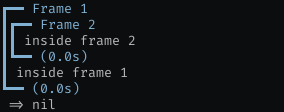
We make use of Sorbet in cli-ui. We provide stubs for Sorbet so that you can use this gem even
if you aren't using Sorbet. We activate these stubs if T is undefined when the gem is loaded. For this reason, if you
would like to use this gem and your project does use Sorbet, ensure you load Sorbet before loading cli-ui.
The following code makes use of nested-framing, multi-threaded spinners, formatted text, and more.
require 'cli/ui'

CLI::UI::StdoutRouter.enable

CLI::UI::Frame.open('{{*}} {{bold:a}}', color: :green) do
  CLI::UI::Frame.open('{{i}} b', color: :magenta) do
    CLI::UI::Frame.open('{{?}} c', color: :cyan) do
      CLI::UI::SpinGroup.new do |sg|
        sg.add('wow') do |spinner|
          sleep(2.5)
          spinner.update_title('second round!')
          sleep (1.0)
        end
        sg.add('such spin') { sleep(1.6) }
        sg.add('many glyph') { sleep(2.0) }
      end
    end
  end
  CLI::UI::Frame.divider('{{v}} lol')
  puts CLI::UI.fmt '{{info:words}} {{red:oh no!}} {{green:success!}}'
  CLI::UI::SpinGroup.new do |sg|
    sg.add('more spins') { sleep(0.5) ; raise 'oh no' }
  end
end
Output:

- Run tests using
bundle exec rake test. All code should be tested.
- No code, outside of development and tests needs, should use dependencies. This is a self contained library
Bug reports and pull requests are welcome on GitHub at https://github.com/Shopify/cli-ui.
The code is available as open source under the terms of the MIT License.

