This is a compilation of all the questions and answers on Alisdair Owen's PostgreSQL Exercises. Keep in mind that actually solving these problems will make you go further than just skimming through this guide, so make sure to pay PostgreSQL Exercises a visit.
It's pretty simple to get going with the exercises: all you have to do is open the exercises, take a look at the questions, and try to answer them!
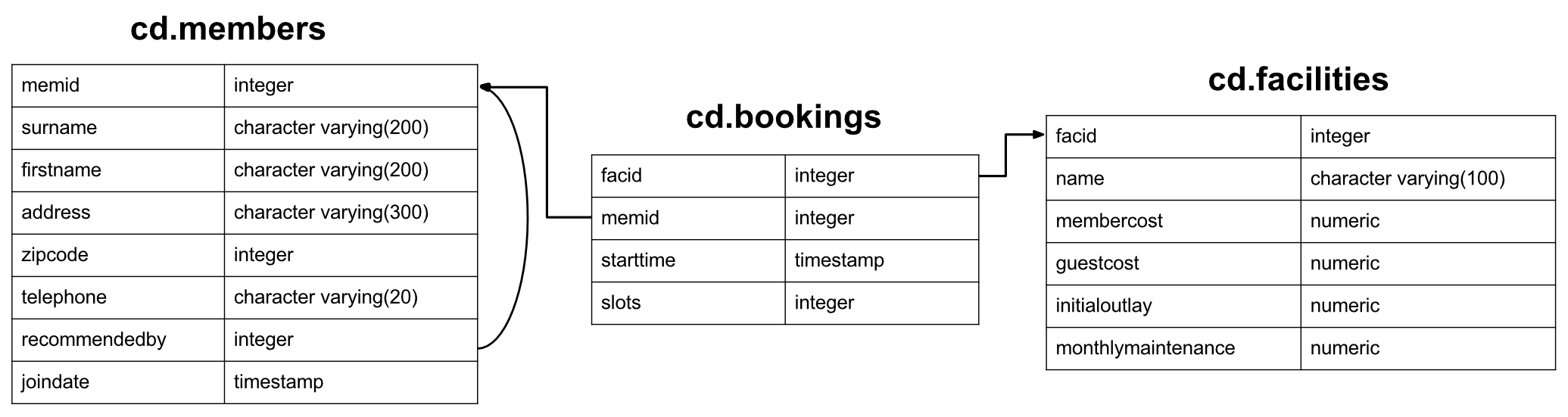
The dataset for these exercises is for a newly created country club, with a set of members, facilities such as tennis courts, and booking history for those facilities. Amongst other things, the club wants to understand how they can use their information to analyse facility usage/demand. Please note: this dataset is designed purely for supporting an interesting array of exercises, and the database schema is flawed in several aspects - please don't take it as an example of good design. We'll start off with a look at the Members table:
CREATE TABLE cd.members
(
    memid integer NOT NULL,
    surname character varying(200) NOT NULL,
    firstname character varying(200) NOT NULL,
    address character varying(300) NOT NULL,
    zipcode integer NOT NULL,
    telephone character varying(20) NOT NULL,
    recommendedby integer,
    joindate timestamp not null,
    CONSTRAINT members_pk PRIMARY KEY (memid),
    CONSTRAINT fk_members_recommendedby FOREIGN KEY (recommendedby)
        REFERENCES cd.members(memid) ON DELETE SET NULL
);
Each member has an ID (not guaranteed to be sequential), basic address information, a reference to the member that recommended them (if any), and a timestamp for when they joined. The addresses in the dataset are entirely (and unrealistically) fabricated.
CREATE TABLE cd.facilities
(
    facid integer NOT NULL,
    name character varying(100) NOT NULL,
    membercost numeric NOT NULL,
    guestcost numeric NOT NULL,
    initialoutlay numeric NOT NULL,
    monthlymaintenance numeric NOT NULL,
    CONSTRAINT facilities_pk PRIMARY KEY (facid)
);
The facilities table lists all the bookable facilities that the country club possesses. The club stores id/name information, the cost to book both members and guests, the initial cost to build the facility, and estimated monthly upkeep costs. They hope to use this information to track how financially worthwhile each facility is.
CREATE TABLE cd.bookings
(
    bookid integer NOT NULL,
    facid integer NOT NULL,
    memid integer NOT NULL,
    starttime timestamp NOT NULL,
    slots integer NOT NULL,
    CONSTRAINT bookings_pk PRIMARY KEY (bookid),
    CONSTRAINT fk_bookings_facid FOREIGN KEY (facid) REFERENCES cd.facilities(facid),
    CONSTRAINT fk_bookings_memid FOREIGN KEY (memid) REFERENCES cd.members(memid)
);
Finally, there's a table tracking bookings of facilities. This stores the facility id, the member who made the booking, the start of the booking, and how many half hour 'slots' the booking was made for. This idiosyncratic design will make certain queries more difficult, but should provide you with some interesting challenges - as well as prepare you for the horror of working with some real-world databases :-).
Okay, that should be all the information you need. You can select a category of query to try from the menu above, or alternatively start from the beginning.
I want to use my own Postgres system
No problem! Getting up and running isn't too hard. First, you'll need an install of PostgreSQL, which you can get from here. Once you have it started, download the SQL.
Finally, run psql -U <username> -f clubdata.sql -d postgres -x -q to create the 'exercises' database, the Postgres 'pgexercises' user, the tables, and to load the data in. Note that you may find that the sort order of your results differs from those shown on the web site: that's probably because your Postgres is set up using a different locale to that used by PGExercises (which uses the C locale)
When you're running queries, you may find psql a little clunky. If so, I recommend trying out pgAdmin or the Eclipse database development tools.
This category deals with the basics of SQL. It covers select and where clauses, case expressions, unions, and a few other odds and ends. If you're already educated in SQL you will probably find these exercises fairly easy. If not, you should find them a good point to start learning for the more difficult categories ahead!
If you struggle with these questions, I strongly recommend Learning SQL, by Alan Beaulieu, as a concise and well-written book on the subject. If you're interested in the fundamentals of database systems (as opposed to just how to use them), you should also investigate An Introduction to Database Systems by C.J. Date.
Retrieve everything from a table
How can you retrieve all the information from the cd.facilities table?
Expected results:
| facid |
name |
membercost |
guestcost |
initialoutlay |
monthlymaintenance |
| 0 |
Tennis Court 1 |
5 |
25 |
10000 |
200 |
| 1 |
Tennis Court 2 |
5 |
25 |
8000 |
200 |
| 2 |
Badminton Court |
0 |
15.5 |
4000 |
50 |
| 3 |
Table Tennis |
0 |
5 |
320 |
10 |
| 4 |
Massage Room 1 |
35 |
80 |
4000 |
3000 |
| 5 |
Massage Room 2 |
35 |
80 |
4000 |
3000 |
| 6 |
Squash Court |
3.5 |
17.5 |
5000 |
80 |
| 7 |
Snooker Table |
0 |
5 |
450 |
15 |
| 8 |
Pool Table |
0 |
5 |
400 |
15 |
Answer:
select * from cd.facilities;
The SELECT statement is the basic starting block for queries that read information out of the database. A minimal select statement is generally comprised of select [some set of columns] from [some table or group of tables].
In this case, we want all of the information from the facilities table. The from section is easy - we just need to specify the cd.facilities table. 'cd' is the table's schema - a term used for a logical grouping of related information in the database.
Next, we need to specify that we want all the columns. Conveniently, there's a shorthand for 'all columns' - *. We can use this instead of laboriously specifying all the column names.
Retrieve specific columns from a table
You want to print out a list of all of the facilities and their cost to members. How would you retrieve a list of only facility names and costs?
Expected results:
| name |
membercost |
| Tennis Court 1 |
5 |
| Tennis Court 2 |
5 |
| Badminton Court |
0 |
| Table Tennis |
0 |
| Massage Room 1 |
35 |
| Massage Room 2 |
35 |
| Squash Court |
3.5 |
| Snooker Table |
0 |
| Pool Table |
0 |
Answer:
select name, membercost from cd.facilities;
For this question, we need to specify the columns that we want. We can do that with a simple comma-delimited list of column names specified to the select statement. All the database does is look at the columns available in the FROM clause, and return the ones we asked for, as illustrated below
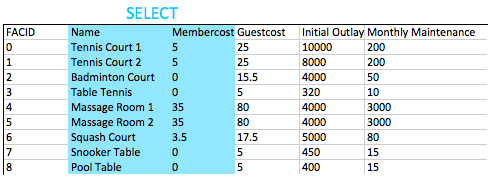
Generally speaking, for non-throwaway queries it's considered desirable to specify the names of the columns you want in your queries rather than using *. This is because your application might not be able to cope if more columns get added into the table.
Control which rows are retrieved
How can you produce a list of facilities that charge a fee to members?
Expected results:
| facid |
name |
membercost |
guestcost |
initialoutlay |
monthlymaintenance |
| 0 |
Tennis Court 1 |
5 |
25 |
10000 |
200 |
| 1 |
Tennis Court 2 |
5 |
25 |
8000 |
200 |
| 4 |
Massage Room 1 |
35 |
80 |
4000 |
3000 |
| 5 |
Massage Room 2 |
35 |
80 |
4000 |
3000 |
| 6 |
Squash Court |
3.5 |
17.5 |
5000 |
80 |
Answer:
select * from cd.facilities where membercost > 0;
The FROM clause is used to build up a set of candidate rows to read results from. In our examples so far, this set of rows has simply been the contents of a table. In future we will explore joining, which allows us to create much more interesting candidates.
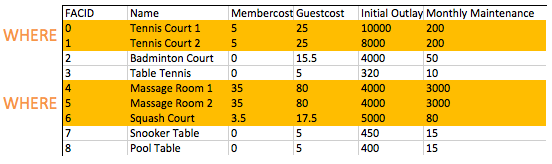
Once we've built up our set of candidate rows, the WHERE clause allows us to filter for the rows we're interested in - in this case, those with a membercost of more than zero. As you will see in later exercises, WHERE clauses can have multiple components combined with boolean logic - it's possible to, for instance, search for facilities with a cost greater than 0 and less than 10. The filtering action of the WHERE clause on the facilities table is illustrated below:
Control which rows are retrieved, Part 2
How can you produce a list of facilities that charge a fee to members, and that fee is less than 1/50th of the monthly maintenance cost? Return the facid, facility name, member cost, and monthly maintenance of the facilities in question.
Expected results:
| facid |
name |
membercost |
monthlymaintenance |
| 4 |
Massage Room 1 |
35 |
3000 |
| 5 |
Massage Room 2 |
35 |
3000 |
Answer:
select facid, name, membercost, monthlymaintenance
	from cd.facilities
	where
		membercost > 0 and
		(membercost < monthlymaintenance/50.0);
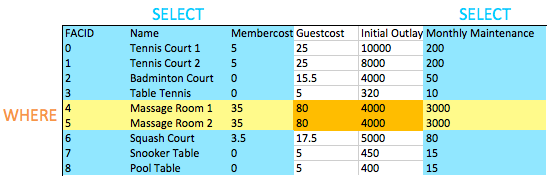
The WHERE clause allows us to filter for the rows we're interested in - in this case, those with a membercost of more than zero, and less than 1/50th of the monthly maintenance cost. As you can see, the massage rooms are very expensive to run thanks to staffing costs!
When we want to test for two or more conditions, we use AND to combine them. We can, as you might expect, use OR to test whether either of a pair of conditions is true.
You might have noticed that this is our first query that combines a WHERE clause with selecting specific columns. You can see in the image below the effect of this: the intersection of the selected columns and the selected rows gives us the data to return. This may not seem too interesting now, but as we add in more complex operations like joins later, you'll see the simple elegance of this behaviour.
How can you produce a list of all facilities with the word 'Tennis' in their name?
Expected results:
| facid |
name |
membercost |
guestcost |
initialoutlay |
monthlymaintenance |
| 0 |
Tennis Court 1 |
5 |
25 |
10000 |
200 |
| 1 |
Tennis Court 2 |
5 |
25 |
8000 |
200 |
| 3 |
Table Tennis |
0 |
5 |
320 |
10 |
Answer:
select *
	from cd.facilities
	where
		name like '%Tennis%';
SQL's LIKE operator provides simple pattern matching on strings. It's pretty much universally implemented, and is nice and simple to use - it just takes a string with the % character matching any string, and _ matching any single character. In this case, we're looking for names containing the word 'Tennis', so putting a % on either side fits the bill.
There's other ways to accomplish this task: Postgres supports regular expressions with the ~ operator, for example. Use whatever makes you feel comfortable, but do be aware that the LIKE operator is much more portable between systems.
Matching against multiple possible values
How can you retrieve the details of facilities with ID 1 and 5? Try to do it without using the OR operator.
Expected results:
| facid |
name |
membercost |
guestcost |
initialoutlay |
monthlymaintenance |
| 1 |
Tennis Court 2 |
5 |
25 |
8000 |
200 |
| 5 |
Massage Room 2 |
35 |
80 |
4000 |
3000 |
Answer:
select *
	from cd.facilities
	where
		facid in (1,5);
The obvious answer to this question is to use a WHERE clause that looks like where facid = 1 or facid = 5. An alternative that is easier with large numbers of possible matches is the IN operator. The IN operator takes a list of possible values, and matches them against (in this case) the facid. If one of the values matches, the where clause is true for that row, and the row is returned.
The IN operator is a good early demonstrator of the elegance of the relational model. The argument it takes is not just a list of values - it's actually a table with a single column. Since queries also return tables, if you create a query that returns a single column, you can feed those results into an IN operator. To give a toy example:
select *
	from cd.facilities
	where
		facid in (
			select facid from cd.facilities
			);
This example is functionally equivalent to just selecting all the facilities, but shows you how to feed the results of one query into another. The inner query is called a subquery.
Classify results into bucket
How can you produce a list of facilities, with each labelled as 'cheap' or 'expensive' depending on if their monthly maintenance cost is more than $100? Return the name and monthly maintenance of the facilities in question.
Expected results:
| name |
cost |
| Tennis Court 1 |
expensive |
| Tennis Court 2 |
expensive |
| Badminton Court |
cheap |
| Table Tennis |
cheap |
| Massage Room 1 |
expensive |
| Massage Room 2 |
expensive |
| Squash Court |
cheap |
| Snooker Table |
cheap |
| Pool Table |
cheap |
Answer:
select name,
	case when (monthlymaintenance > 100) then
		'expensive'
	else
		'cheap'
	end as cost
	from cd.facilities;
This exercise contains a few new concepts. The first is the fact that we're doing computation in the area of the query between SELECT and FROM. Previously we've only used this to select columns that we want to return, but you can put anything in here that will produce a single result per returned row - including subqueries.
The second new concept is the CASE statement itself. CASE is effectively like if/switch statements in other languages, with a form as shown in the query. To add a 'middling' option, we would simply insert another when...then section.
Finally, there's the AS operator. This is simply used to label columns or expressions, to make them display more nicely or to make them easier to reference when used as part of a subquery.
How can you produce a list of members who joined after the start of September 2012? Return the memid, surname, firstname, and joindate of the members in question.
Expected results:
| memid |
surname |
firstname |
joindate |
| 24 |
Sarwin |
Ramnaresh |
2012-09-01 08:44:42 |
| 26 |
Jones |
Douglas |
2012-09-02 18:43:05 |
| 27 |
Rumney |
Henrietta |
2012-09-05 08:42:35 |
| 28 |
Farrell |
David |
2012-09-15 08:22:05 |
| 29 |
Worthington-Smyth |
Henry |
2012-09-17 12:27:15 |
| 30 |
Purview |
Millicent |
2012-09-18 19:04:01 |
| 33 |
Tupperware |
Hyacinth |
2012-09-18 19:32:05 |
| 35 |
Hunt |
John |
2012-09-19 11:32:45 |
| 36 |
Crumpet |
Erica |
2012-09-22 08:36:38 |
| 37 |
Smith |
Darren |
2012-09-26 18:08:45 |
Answer:
select memid, surname, firstname, joindate
	from cd.members
	where joindate >= '2012-09-01';
This is our first look at SQL timestamps. They're formatted in descending order of magnitude: YYYY-MM-DD HH:MM:SS.nnnnnn. We can compare them just like we might a unix timestamp, although getting the differences between dates is a little more involved (and powerful!). In this case, we've just specified the date portion of the timestamp. This gets automatically cast by postgres into the full timestamp 2012-09-01 00:00:00.
Removing duplicates, and ordering results
How can you produce an ordered list of the first 10 surnames in the members table? The list must not contain duplicates.
Expected results:
| surname |
| Bader |
| Baker |
| Boothe |
| Butters |
| Coplin |
| Crumpet |
| Dare |
| Farrell |
| Genting |
| GUEST |
Answer:
select distinct surname
	from cd.members
order by surname
limit 10;
There's three new concepts here, but they're all pretty simple.
- Specifying
DISTINCT after SELECT removes duplicate rows from the result set. Note that this applies to rows: if row A has multiple columns, row B is only equal to it if the values in all columns are the same. As a general rule, don't use DISTINCT in a willy-nilly fashion - it's not free to remove duplicates from large query result sets, so do it as-needed.
- Specifying
ORDER BY (after the FROM and WHERE clauses, near the end of the query) allows results to be ordered by a column or set of columns (comma separated).
- The
LIMIT keyword allows you to limit the number of results retrieved. This is useful for getting results a page at a time, and can be combined with the OFFSET keyword to get following pages. This is the same approach used by MySQL and is very convenient - you may, unfortunately, find that this process is a little more complicated in other DBs.
Combining results from multiple queries
You, for some reason, want a combined list of all surnames and all facility names. Yes, this is a contrived example :-). Produce that list!
Expected results:
| surname |
| Tennis Court 2 |
| Worthington-Smyth |
| Badminton Court |
| Pinker |
| Dare |
| Bader |
| Mackenzie |
| Crumpet |
| Massage Room 1 |
| Squash Court |
Answer:
select surname
	from cd.members
union
select name
	from cd.facilities;
The UNION operator does what you might expect: combines the results of two SQL queries into a single table. The caveat is that both results from the two queries must have the same number of columns and compatible data types.
UNION removes duplicate rows, while UNION ALL does not. Use UNION ALL by default, unless you care about duplicate results.
You'd like to get the signup date of your last member. How can you retrieve this information?
Expected results:
| latest |
| 2012-09-26 18:08:45 |
Answer:
select max(joindate) as latest
	from cd.members;
This is our first foray into SQL's aggregate functions. They're used to extract information about whole groups of rows, and allow us to easily ask questions like:
- What's the most expensive facility to maintain on a monthly basis?
- Who has recommended the most new members?
- How much time has each member spent at our facilities?
The MAX aggregate function here is very simple: it receives all the possible values for joindate, and outputs the one that's biggest. There's a lot more power to aggregate functions, which you will come across in future exercises.
You'd like to get the first and last name of the last member(s) who signed up - not just the date. How can you do that?
Expected results:
| firstname |
surname |
joindate |
| Darren |
Smith |
2012-09-26 18:08:45 |
Answer:
select firstname, surname, joindate
	from cd.members
	where joindate =
		(select max(joindate)
			from cd.members);
In the suggested approach above, you use a subquery to find out what the most recent joindate is. This subquery returns a scalar table - that is, a table with a single column and a single row. Since we have just a single value, we can substitute the subquery anywhere we might put a single constant value. In this case, we use it to complete the WHERE clause of a query to find a given member.
You might hope that you'd be able to do something like below:
select firstname, surname, max(joindate)
        from cd.members
Unfortunately, this doesn't work. The MAX function doesn't restrict rows like the WHERE clause does - it simply takes in a bunch of values and returns the biggest one. The database is then left wondering how to pair up a long list of names with the single join date that's come out of the max function, and fails. Instead, you're left having to say 'find me the row(s) which have a join date that's the same as the maximum join date'.
As mentioned by the hint, there's other ways to get this job done - one example is below. In this approach, rather than explicitly finding out what the last joined date is, we simply order our members table in descending order of join date, and pick off the first one. Note that this approach does not cover the extremely unlikely eventuality of two people joining at the exact same time :-).
select firstname, surname, joindate
	from cd.members
order by joindate desc
limit 1;
This category deals primarily with a foundational concept in relational database systems: joining. Joining allows you to combine related information from multiple tables to answer a question. This isn't just beneficial for ease of querying: a lack of join capability encourages denormalisation of data, which increases the complexity of keeping your data internally consistent.
This topic covers inner, outer, and self joins, as well as spending a little time on subqueries (queries within queries). If you struggle with these questions, I strongly recommend Learning SQL, by Alan Beaulieu, as a concise and well-written book on the subject.
Retrieve the start times of members' bookings
How can you produce a list of the start times for bookings by members named 'David Farrell'?
Expected results:
| starttime |
| 2012-09-18 09:00:00 |
| 2012-09-18 17:30:00 |
| 2012-09-18 13:30:00 |
| 2012-09-18 20:00:00 |
| 2012-09-19 09:30:00 |
| 2012-09-19 15:00:00 |
| 2012-09-19 12:00:00 |
| 2012-09-20 15:30:00 |
| 2012-09-20 11:30:00 |
| 2012-09-20 14:00:00 |
Answer:
select bks.starttime
	from
		cd.bookings bks
		inner join cd.members mems
			on mems.memid = bks.memid
	where
		mems.firstname='David'
		and mems.surname='Farrell';
The most commonly used kind of join is the INNER JOIN. What this does is combine two tables based on a join expression - in this case, for each member id in the members table, we're looking for matching values in the bookings table. Where we find a match, a row combining the values for each table is returned. Note that we've given each table an alias (bks and mems). This is used for two reasons: firstly, it's convenient, and secondly we might join to the same table several times, requiring us to distinguish between columns from each different time the table was joined in.
Let's ignore our select and where clauses for now, and focus on what the FROM statement produces. In all our previous examples, FROM has just been a simple table. What is it now? Another table! This time, it's produced as a composite of bookings and members. You can see a subset of the output of the join below:

For each member in the members table, the join has found all the matching member ids in the bookings table. For each match, it's then produced a row combining the row from the members table, and the row from the bookings table.
Obviously, this is too much information on its own, and any useful question will want to filter it down. In our query, we use the start of the SELECT clause to pick columns, and the WHERE clause to pick rows, as illustrated below:

That's all we need to find David's bookings! In general, I encourage you to remember that the output of the FROM clause is essentially one big table that you then filter information out of. This may sound inefficient - but don't worry, under the covers the DB will be behaving much more intelligently :-).
One final note: there's two different syntaxes for inner joins. I've shown you the one I prefer, that I find more consistent with other join types. You'll commonly see a different syntax, shown below:
select bks.starttime
        from
                cd.bookings bks,
                cd.members mems
        where
                mems.firstname='David'
                and mems.surname='Farrell'
                and mems.memid = bks.memid;
This is functionally exactly the same as the approved answer. If you feel more comfortable with this syntax, feel free to use it!
Work out the start times of bookings for tennis courts
How can you produce a list of the start times for bookings for tennis courts, for the date '2012-09-21'? Return a list of start time and facility name pairings, ordered by the time.
Expected results:
| start |
name |
| 2012-09-21 08:00:00 |
Tennis Court 1 |
| 2012-09-21 08:00:00 |
Tennis Court 2 |
| 2012-09-21 09:30:00 |
Tennis Court 1 |
| 2012-09-21 10:00:00 |
Tennis Court 2 |
| 2012-09-21 11:30:00 |
Tennis Court 2 |
| 2012-09-21 12:00:00 |
Tennis Court 1 |
| 2012-09-21 13:30:00 |
Tennis Court 1 |
| 2012-09-21 14:00:00 |
Tennis Court 2 |
| 2012-09-21 15:30:00 |
Tennis Court 1 |
| 2012-09-21 16:00:00 |
Tennis Court 2 |
| 2012-09-21 17:00:00 |
Tennis Court 1 |
| 2012-09-21 18:00:00 |
Tennis Court 2 |
Answer:
select bks.starttime as start, facs.name as name
	from
		cd.facilities facs
		inner join cd.bookings bks
			on facs.facid = bks.facid
	where
		facs.facid in (0,1) and
		bks.starttime >= '2012-09-21' and
		bks.starttime < '2012-09-22'
order by bks.starttime;
This is another INNER JOIN query, although it has a fair bit more complexity in it! The FROM part of the query is easy - we're simply joining facilities and bookings tables together on the facid. This produces a table where, for each row in bookings, we've attached detailed information about the facility being booked.
On to the WHERE component of the query. The checks on starttime are fairly self explanatory - we're making sure that all the bookings start between the specified dates. Since we're only interested in tennis courts, we're also using the IN operator to tell the database system to only give us back facility IDs 0 or 1 - the IDs of the courts. There's other ways to express this: We could have used where facs.facid = 0 or facs.facid = 1, or even where facs.name like 'Tennis%'.
The rest is pretty simple: we SELECT the columns we're interested in, and ORDER BY the start time.
Produce a list of all members who have recommended another member
How can you output a list of all members who have recommended another member? Ensure that there are no duplicates in the list, and that results are ordered by (surname, firstname).
Expected results:
| firstname |
surname |
| Florence |
Bader |
| Timothy |
Baker |
| Gerald |
Butters |
| Jemima |
Farrell |
| Matthew |
Genting |
| David |
Jones |
| Janice |
Joplette |
| Millicent |
Purview |
| Tim |
Rownam |
| Darren |
Smith |
| Tracy |
Smith |
| Ponder |
Stibbons |
| Burton |
Tracy |
Answer:
select distinct recs.firstname as firstname, recs.surname as surname
	from
		cd.members mems
		inner join cd.members recs
			on recs.memid = mems.recommendedby
order by surname, firstname;
Here's a concept that some people find confusing: you can join a table to itself! This is really useful if you have columns that reference data in the same table, like we do with recommendedby in cd.members.
If you're having trouble visualising this, remember that this works just the same as any other inner join. Our join takes each row in members that has a recommendedby value, and looks in members again for the row which has a matching member id. It then generates an output row combining the two members entries. This looks like the diagram below:

Note that while we might have two 'surname' columns in the output set, they can be distinguished by their table aliases. Once we've selected the columns that we want, we simply use DISTINCT to ensure that there are no duplicates.
Produce a list of all members, along with their recommender
How can you output a list of all members, including the individual who recommended them (if any)? Ensure that results are ordered by (surname, firstname).
Expected results:
| memfname |
memsname |
recfname |
recsname |
| Florence |
Bader |
Ponder |
Stibbons |
| Anne |
Baker |
Ponder |
Stibbons |
| Timothy |
Baker |
Jemima |
Farrell |
| Tim |
Boothe |
Tim |
Rownam |
| Gerald |
Butte | | |
| | | |
| | | |
| | | |
| | | |
| | | |
| | | |
| | | |
| | | |
| | | |
| | | |
| | | |
| | | |
| | | |
| | | |
| | | |
| | | |
| | | |
| | | |
| | | |
| | | |
| | | |
| | | |
| | | |
| | | |
| | | |
| | | |


