



Generate Markdown docs from Zod schemas.
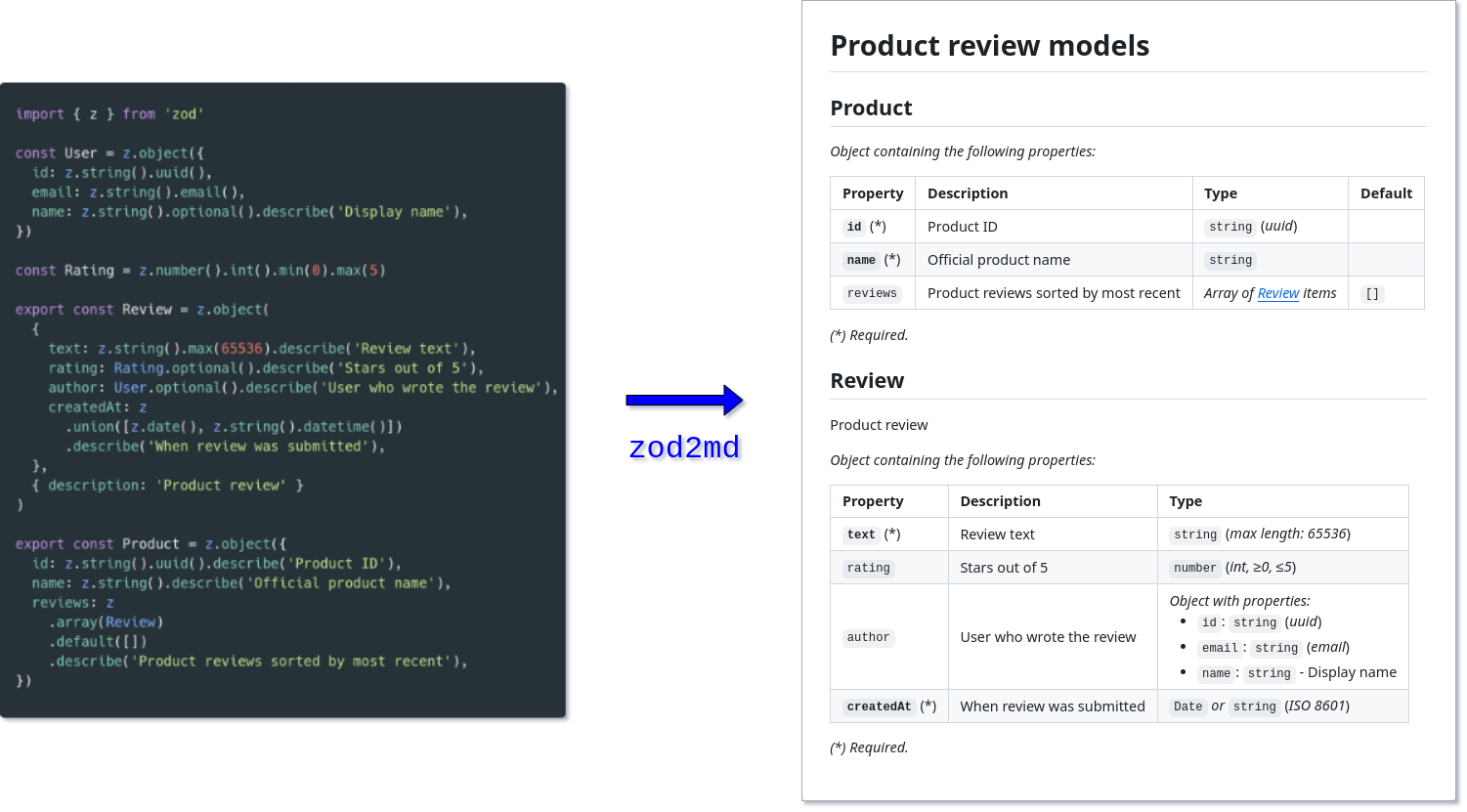
Install the zod2md package (optional):
npm install --save-dev zod2md
Run the CLI. The following arguments are required:
entry - path to file which exports Zod schemas,title - heading text for Markdown document,output - path where output Markdown file will be generated.
npx zod2md --entry src/schemas.ts --title "Models reference" --output docs/models.md
Although most arguments may be provided directly to the CLI, it may be more convenient to use a configuration file.
For example, create the following zod2md.config.ts and then you can simply run npx zod2md:
import type { Config } from 'zod2md';

const config: Config = {
  entry: 'src/schemas.ts',
  title: 'Models reference',
  output: 'docs/models.md',
};

export default config;
CLI arguments take precedence over configuration file values.
| Option |
Type |
Required |
Description |
-e, --entry |
string[] (*) |
yes |
Entry point(s), i.e. paths to modules with Zod schema exports |
-t, --title |
string |
yes |
Heading text for Markdown document |
-o, --output |
string |
yes |
Output file path where Markdown document will be generared |
--tsconfig |
string |
no |
Path to tsconfig.json to be used when importing entry point(s) |
-f, --format |
'esm' | 'cjs' |
no |
Module type to assume when importing entry point(s) |
-c, --config |
string |
no |
Path to configuration file (default is zod2md.config.{ts,mjs,js}) |
-h, --help |
boolean |
no |
Display CLI help and exit |
(*) Use --entry PATH_1 --entry PATH_2 to provide multiple paths.
Configuration file reference
| Property |
Type |
Required |
Description |
entry |
string | string[] |
yes |
Entry point(s), i.e. paths to modules with Zod schema exports |
tsconfig |
string |
no |
Path to tsconfig.json to be used when importing entry point(s) |
format |
'esm' | 'cjs' |
no |
Module type to assume when importing entry point(s) |
title |
string |
yes |
Heading text for Markdown document |
transformName |
(name: string | undefined, path: string, schema: z4.$ZodType | z3.ZodTypeAny) => string |
no |
Custom function for converting exported schema to to display title (*) |
(*) The default is to use the title from Zod v4 metadata. Alternatively, the variable name is used, stripping the Schema-suffix and converting it to PascalCase (e.g. userSchema becomes User). In case of a default export, the file path is used.
It's also possible to import the core zod2md function to generate the Markdown string in your own code:
import { zod2md } from 'zod2md';

const markdown = await zod2md({
  entry: 'src/schemas.ts',
  title: 'Models reference',
});A few examples of inputs and outputs are provided (used in E2E tests):
Since Zod version 4, z.function is no longer a Zod schema, but a function factory (see changelog). If you wish to define function schemas like in Zod v3, you'll need the following workaround ($ZodFunction in metadata needed for zod2md):
// HELPER FUNCTION
import { z } from 'zod/v4';
import type { $ZodFunction } from 'zod/v4/core';

export function convertZodFunctionToSchema<T extends $ZodFunction>(factory: T) {
  return z
    .custom()
    .transform((arg, ctx) => {
      // 👇 runtime validation
      if (typeof arg !== 'function') {
        ctx.addIssue('Must be a function');
        return z.NEVER;
      }
      return factory.implement(arg as Parameters<T['implement']>[0]); // 👈 compile-time validation
    })
    .meta({
      $ZodFunction: factory, // 👈 this metadata enables zod2md to find your input/output schemas
    });
}

// USAGE

export const predicateSchema = convertZodFunctionToSchema(
  z.function({ input: [z.string(), z.number()], output: z.boolean() }),
);
- Install dependencies with
pnpm install.
- Run unit tests with
pnpm test (uses Vitest).
- Run E2E tests with
pnpm run e2e (uses Vitest and Verdaccio).
- Build library with
pnpm run build (uses tsup).
- Release new version with
pnpm run release (uses release-it).


