Putting it All Together: Components and Props
- Create components that return JSX
- Use props to make components dynamic
- Transform lists of data into lists of components
Now that you've learned how to work with components in React, it's time to build
something and put those skills to use! Your goal for this lab is to make a
static site in React to practice building components, writing JSX, and passing
down data as props.
We'll be creating a personal blog site, similar to
Dan Abramov's Overreacted:
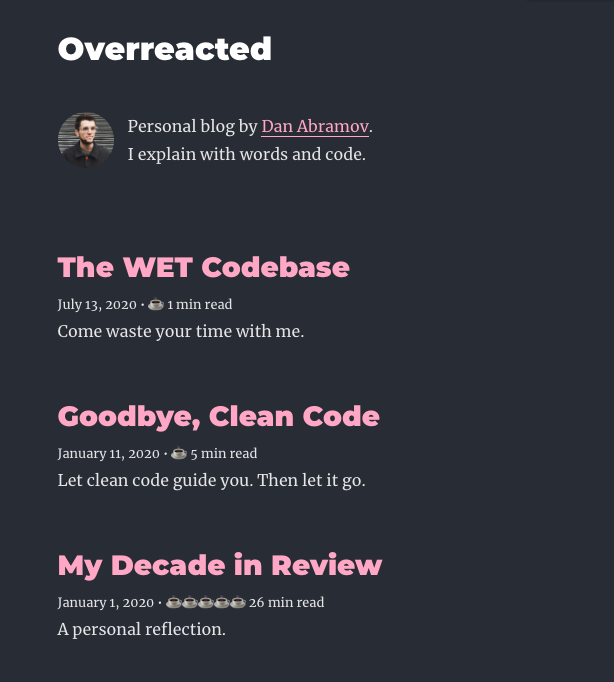
There is some starter code available in src/components/App.js. There is also
some data in data/blog.js that is being imported into App so you can pass it
down to the components that need it.
Have a look at the components below and draw out a component hierarchy so you
can determine how to pass data down as props.
Make a Header component as a child of App. It should return:
- a
<header> element with the following elements inside:
- an
<h1> with the name of the blog, passed as a prop called name
Make an About component as a child of App. It should return:
- an
<aside> element with the following elements inside:
- an
<img> element, with the src set to an image passed as a prop called
image
- the
<img> element should use this placeholder image as a default value
for the prop if no prop is passed in: "https://via.placeholder.com/215"
- the image should also be accessible! Give it an
alt attribute of "blog
logo"
- a
<p> element, with the text for the blog passed in as a prop called
about
Make an ArticleList component as a child of App. It should return:
- a
<main> element with the following components inside:
- an array of
Article components (one component for each of the posts
passed down as props to ArticleList)
- make sure to assign a unique
key attribute to each Article
Make an Article component as a child of ArticleList. It should return:
- an
<article> element, with the following elements inside:
- an
<h3> element displaying the title of the article, passed as a prop
called title
- a
<small> element displaying the date of the article, passed as a prop
called date
- a default value of "January 1, 1970" should be used if no date is passed
as a prop
- a
<p> element displaying the preview of the article, passed as a prop
called preview
Bonus Feature: 'Minutes to Read'
You'll notice in the original Overreacted site,
there's a 'minutes to read' indicator next to each article.
If the article takes less than 30 minutes to read:
- For every 5 minutes (rounded up to the nearest 5), display a coffee cup emoji.
For example, if the article takes 3 minutes to read, you should display "☕️ 3
min read". If the article takes 7 minute, you should display "☕️☕️ 7 min
read".
If the article takes 30 minutes or longer to read:
- For every 10 minutes (rounded up to the nearest 10), display a bento box
emoji. For example, if the article takes 35 minutes to read, you should
display "🍱🍱🍱🍱 35 min read". If the article takes 61 minutes to read, you
should display "🍱🍱🍱🍱🍱🍱🍱 61 min read".
There aren't tests for this feature, so you'll have to rely on running the code
in the browser to see if your implementation works!

