json2graphql: From a JSON file to postgres-backed GraphQL


json2graphql is a tool that imports a JSON file to initialise schema and data in Postgres and then allows you to start querying it with GraphQL.
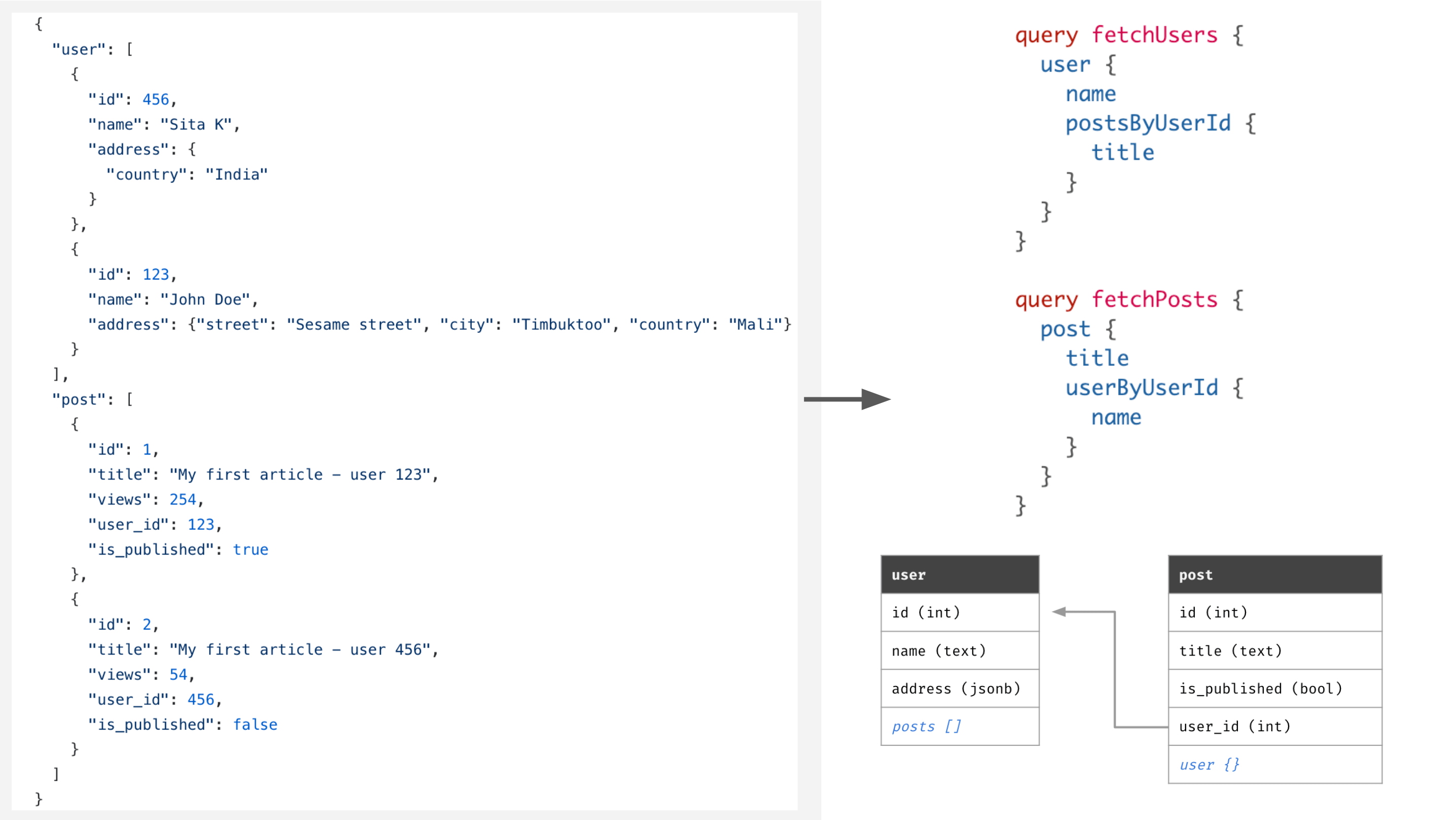
Hasura is used to expose a realtime GraphQL API on Postgres. Once your schema and data is imported, you can instantly start running powerful queries with filters, pagination, sorting, fetching relations, insert/update/delete mutations and subscriptions too.
Use-cases:
- Bootstrapping a GraphQL backend: Try out this example of initialising a GraphQL chat backend using a messages/groups/users chat JSON file. Try it out
- Play with a mongo dataset in Postgres & GraphQL: Export a mongo JSON dump, import it to Postgres and start querying it with GraphQL. Try it out
- Query existing JSON datasets over GraphQL: Pick up a JSON dataset, import to your new or existing Hasura/Postgres instance and start querying it. Try using jdorfman/awesome-json-datasets.

In the GIF above, we are importing a schema and data from a JSON database. The Hasura GraphQL Engine is running at https://j2gtest.herokuapp.com
-
Create a JSON file Create a JSON file, say, db.json as:
{
    "post": [
        { "id": 1, "title": "Lorem Ipsum", "views": 254, "user_id": 123 },
        { "id": 2, "title": "Sic Dolor amet", "views": 65, "user_id": 456 }
    ],
    "user": [
        { "id": 123, "name": "John Doe" },
        { "id": 456, "name": "Alison Craus" }
    ],
    "comment": [
        { "id": 987, "post_id": 1, "body": "Consectetur adipiscing elit", "user_id": 123 },
        { "id": 995, "post_id": 2, "body": "Nam molestie pellentesque dui", "user_id": 456 },
        { "id": 999, "post_id": 1, "body": "quid agis", "user_id": 456 }
    ]
}
-
Run Hasura + Postgres: Run the Hasura GraphQL Engine and Postgres on Heroku's free tier by clicking this button:

Note the URL. It will be of the form: https://<app-name>.herokuapp.com. Let's say it's j2gtest.herokuapp.com.
For instructions on how to deploy Hasura in other environments, head to the docs.
-
json2graphql: We import schema, data and create Hasura configuration in one command:
npm install -g json2graphql
json2graphql https://<app-name>.herokuapp.com --db=./path/to/db.json
-
Run GraphQL queries: You can query the data in Postgres tables over GraphQL using Hasura GraphQL Engine. You can make complicated queries like:
query {
  user {
    postsByUserId {
      id
      title
      commentsByPostId {
        body
        id
      }
    }
    id
  }
}
-
Behind the scenes: The following schema is created in Postgres::
user (
  id integer not null primary key,
  name text
)

post (
  id integer not null primary key,
  title text,
  views integer,
  user_id integer foreign key references user(id)
)

comment (
  id integer not null primary key,
  body text,
  post_id integer foreign key references post(id),
  user_id integer foreign key references user(id)
)
## Install globally
npm install -g json2graphql

## Or run as a one-off command
npx json2graphql <hasura-url> -d ./path/to/db.json
# Running against a hasura without an admin secret
json2graphql https://j2gtest.herokuapp.com -d ./path/to/db.json

# Running against a hasura with an admin secret
json2graphql https://j2gtest.herokuapp.com -s <admin-secret> -d ./path/to/db.json

# Reset configuration, schema & data and import
# Useful for updating schema structure or working against an existing Hasura setup
# WARNING: This will remove all existing schema/data before applying
json2graphql https://j2gtest.herokuapp.com --overwrite -d ./path/to/db.json
URL: The URL where Hasura GraphQL Engine is running
-d --db: path to the JS file that exports your sample JSON database-o --overwrite: DANGER: Overwrite tables if they already exist in database-v --version: show CLI version-h, --help: show CLI help
The top level of your JSON database should be a JSON object with keys being the name of entities and values being list of entities. For example:
{
    "user": [
        { "id": 123, "name": "John Doe" },
        { "id": 456, "name": "Jane Doe" }
    ],
    "city": [
        { "id": 987, "name": "Stockholm", "country": "Sweden" },
        { "id": 995, "name": "Sydney", "country": "Australia" }
    ]
}
- The JSON structure is a "normalised" set of objects
- Top level objects are mapped to tables in postgres and root fields in the GraphQL schema
- Keys in the objects are mapped to columns of the tables in postgres, and as fields in the GraphQL schema
- Keys in the object with the column name of the form
<ENTITY_NAME>_id, are considered to indicate foreign-key constraints on postgres, and connections in the GraphQL schema
- The types of the columns/fields are inferred from the data in the columns
json2graphql treats top-level objects as tables, and their keys as columns. If it encounters a column name of the form
<ENTITY_NAME>_id, json2graphql will consider it a foreign key to the entity with name <ENTITY_NAME>.
| JavaScript type (constructor.name) |
Postgres column type |
GraphQL field type |
Example data |
| Number |
numeric |
numeric |
12.34 or 1223 |
| String |
text |
String |
Hello world |
| Boolean |
bool |
Boolean |
true |
| Date |
timestamptz |
timestamptz |
new Date("Jan 24, 2010 00:00:00") |
| Object or Array |
jsonb |
jsonb |
{ ... } |
Generating data - importing with .js files
You can also use Javascript .js files. This allows you to:
- Write some generation logic for sample data
- Use
date types
module.exports = {
    user: [1,2,3,4,5].map(i => ({
      id: i,
      name: `user-${i}`,
      created: new Date()
    }))
};
If you need to do some asynchronous stuff before exporting your data, you can
also export an function:
Note: You can require node-fetch in your function
const fetch = require('node-fetch');

module.exports = async function() {

  const db = await fetch (...)
  return db
}Play with GraphQL on your MongoDB data
Note: This assumes that you've already run through the quickstart!
You can migrate your data from MongoDB and explore Realtime GraphQL over it.
- Tweak the MongoDB doc to fit the required JSON structure.
- Use json2graphql to import the data from the JSON
- Make realtime GraphQL queries
Consider this MongoDB doc:
-
Tweak the doc to fit the required JSON structure.
The doc originally looks something like this:
{"_id":{"$oid":"55a0f42f20a4d760b5fc305e"},"altSpellings":["AI"],"area":91, ... }
{"_id":{"$oid":"55a0f42f20a4d760b5fc305e"},"altSpellings":["AI"],"area":91, ... }
{"_id":{"$oid":"55a0f42f20a4d760b5fc305e"},"altSpellings":["AI"],"area":91, ... }
.
.
.
You should wrap it in an array and make the array a value of a top level key of your choice, say, country. You should also field name _id to id because the CLI expects an id field. It should look something like this:
{
  "country": [
    {"id":{"$oid":"55a0f42f20a4d760b5fc305e"},"altSpellings":["AI"],"area":91, ... }
    {"id":{"$oid":"55a0f42f20a4d760b5fc305e"},"altSpellings":["AI"],"area":91, ... }
    {"id":{"$oid":"55a0f42f20a4d760b5fc305e"},"altSpellings":["AI"],"area":91, ... }
    .
    .
    .
  ]
}
-
Use json2graphql to import the data from the JSON to Postgres using Hasura GraphQL Engine:
json2graphql https://j2gtest.herokuapp.com -d ./db.js
-
Try realtime GraphQL. Go to your GraphQL Engine console and try making GraphQL queries like so:
query {
  country (
    order_by: { name: asc }
    limit: 10
    where: { capital: { _is_null: false }}
  ){
    id
    name
    area
    currency
    callingCode
    capital
  }
}
Quickly bootstrap a GraphQL Backend
Note: This assumes that you've already run through the quickstart!
You can write your schema and data in JSON format to quickly get a Realtime GraphQL API.
For example, to start with a group chat backend:
{
  "user": [
    { "id": 1, "name": "John Doe", "username": "johndoe", "last_seen": new Date() },
    { "id": 2, "name": "Alice Wan", "username": "alisson", "last_seen": new Date() },
    { "id": 3, "name": "Natalie Jackson", "username": "nats", "last_seen": new Date() },
    { "id": 4, "name": "George Walsh", "username": "georgee", "last_seen": new Date() }
  ],
  "group": [
    { "id": 1, "name": "Engineering", is_active: true },
    { "id": 2, "name": "Marketting", is_active: false }
  ],
  "message": [
    { "id": 1, group_id: 1, "body": "Message 1", "sent_at": new Date(), "user_id": 1 },
    { "id": 2, group_id: 1, "body": "Message 2", "sent_at": new Date(), "user_id": 2 },
    { "id": 3, group_id: 2, "body": "Message 3", "sent_at": new Date(), "user_id": 3 },
    { "id": 4, group_id: 2, "body": "Message 4", "sent_at": new Date(), "user_id": 4 }
  ]
}
You can import the above JSON dataset and make queries like:
# fetch all the active groups
query fetch_groups {
  group (
    where: {is_active: { _eq: true }}
    order_by: { name: asc }
  ){
    id
    is_active
    name
  }
}

# fetch all messages from a group
query fetch_messeges_from_a_group {
  message(
    where: { group_id: { _eq: 1 }}
    order_by: { sent_at: asc }
  ) {
    id
    body
    sent_at
    sent_by: userByUserId {
      id
      username
    }
  }
}For more examples, check out the ./example-datasets directory.
Credits and related projects

