


Reduce boiler plate needed on each new Golang main functions (Command Line Interface) for both tools and servers (use fortio.org/scli ServerMain() for server)
It abstracts the repetitive parts of a main() command line tool, flag parsing, usage, etc...
You can see real use example in a tool like multicurl or a server like proxy.
It also supports (sub)commands style (where there is a word/command before the flags and remaining arguments, fortio uses that mode).
If you have durations in flags, do use the 0 dependencies fortio.org/duration Flag along this package.
Client/Tool example (no dynamic flag url or config) sampleTool
Code as simple as
import (
	"flag"
	"os"

	"fortio.org/cli"
	"fortio.org/duration"
	"fortio.org/log"
)

func main() {
	myFlag := flag.String("myflag", "default", "my flag")
	durationExample := duration.Flag("duration", 1*duration.Day, "example of `duration` flag with days support")
	cli.MinArgs = 2
	cli.MaxArgs = 4
	cli.Main() // Will have either called cli.ExitFunction or everything is valid
	// Next line output won't show when passed -quiet
	log.Infof("Info test, -myflag is %q and duration is %v", *myFlag, duration.Duration(*durationExample))
	// This always shows
	log.Printf("Hello world, version %s, args %v", cli.ShortVersion, flag.Args())
	// This shows and is colorized and structured, unless loglevel is set to critical.
	log.S(log.Error, "Error test",
		log.Str("myflag", *myFlag),
		log.Attr("num_args", len(flag.Args())),
		log.Attr("args", flag.Args()))
}
$ sampleTool a
sampleTool 1.2.0 usage:
sampleTool [flags] arg1 arg2 [arg3...arg4]
or 1 of the special arguments
sampleTool {help|version|buildinfo}
flags:
-duration duration
example of duration flag with days support (default 1d)
-logger-force-color
Force color output even if stderr isn't a terminal
-logger-no-color
Prevent colorized output even if stderr is a terminal
-loglevel level
log level, one of [Debug Verbose Info Warning Error Critical Fatal] (default Info)
-myflag string
my flag (default "default")
-quiet
Quiet mode, sets loglevel to Error (quietly) to reduces the output
At least 2 arguments expected, got 1Since v1.3, the above is colorized on a terminal and looks like this:
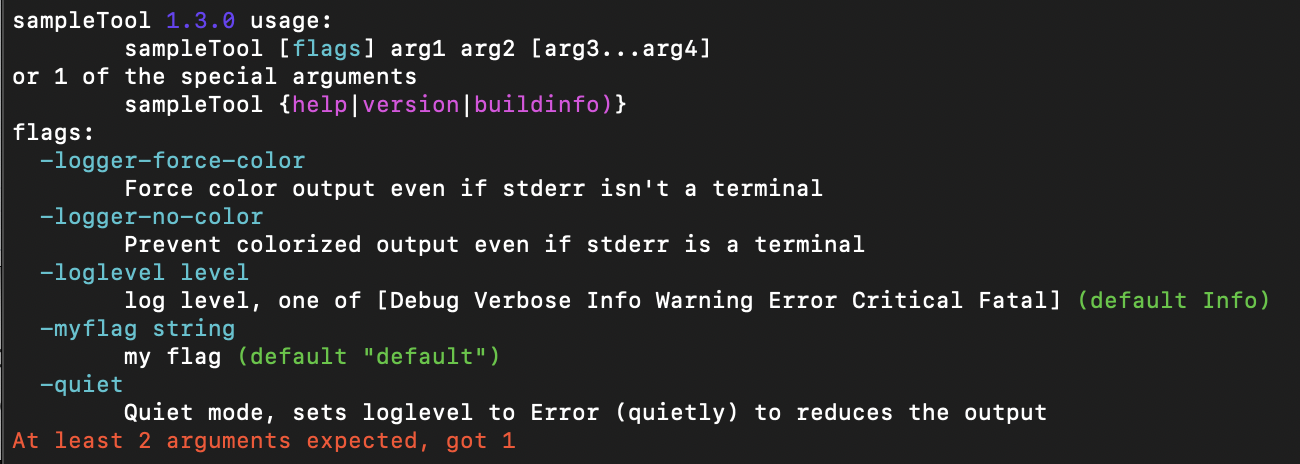
or normal case:

Old style, no colors:
$ sampleTool -logger-no-color a b -duration 1w3h
17:20:41 [I] Info test, -myflag is "default" and duration is 1w3h
17:20:41 Hello world, version dev, args [a b]
17:20:41 [E] Error test, myflag="default", num_args="2", args="[a b]"
e.g
% go install github.com/fortio/multicurl@latest
go: downloading github.com/fortio/multicurl v1.10.1
% multicurl buildinfo
1.10.1 h1:h9yM3XplwG7JWtVaSS0eJPiDmCJfnxvj3w+yoAMWMo4= go1.19.6 arm64 darwin
go	go1.19.6
path	github.com/fortio/multicurl
mod	github.com/fortio/multicurl	v1.10.1	h1:h9yM3XplwG7JWtVaSS0eJPiDmCJfnxvj3w+yoAMWMo4=
dep	fortio.org/cli	v0.6.1	h1:V9L6ly4oz4fJjeQ5745FulIMsFAwFZvLPSUN+cKUrKk=
dep	fortio.org/log	v1.2.2	h1:vs42JjNwiqbMbacittZjJE9+oi72Za6aekML9gKmILg=
dep	fortio.org/version	v1.0.2	h1:8NwxdX58aoeKx7T5xAPO0xlUu1Hpk42nRz5s6e6eKZ0=
build	-compiler=gc
build	CGO_ENABLED=1
build	CGO_CFLAGS=
build	CGO_CPPFLAGS=
build	CGO_CXXFLAGS=
build	CGO_LDFLAGS=
build	GOARCH=arm64
build	GOOS=darwin
% multicurl help
Fortio multicurl 1.10.1 usage:
	multicurl [flags] url
or 1 of the special arguments
	multicurl {help|version|buildinfo}
flags:
[...]
  -logger-force-color
    	Force color output even if stderr isn't a terminal
  -logger-no-color
    	Prevent colorized output even if stderr is a terminal
  -loglevel level
    	log level, one of [Debug Verbose Info Warning Error Critical Fatal] (default Info)
  -quiet
Quiet mode, sets loglevel to Error (quietly) to reduces the outputShort 'numeric' version (v skipped, useful for docker image tags etc)
 % multicurl version
1.10.1
https/tls in FROM scratch docker images
You should always try to use FROM scratch Docker images when possible,
it's one of the strength of go.
Using this fortio.org/cli as a base makes it work for outcalls to internet valid TLS certs (e.g. https).
It does this by defaulting to the bundle provided by golang.org/x/crypto/x509roots/fallback automatically.
See https://github.com/fortio/multicurl for a good example.
If you do not want this behavior, build using -tags no_tls_fallback.
If you application doesn't do http request/response logging at all, use -tags no_http or -tags no_net (that one will also imply no_tls_fallback) and save 1.6 Mbytes in your binary's size (because the linker isn't smart enough to see net/http isn't actually used) (1.1Mbytes for log's no_http and 530k from the no_tls_fallback)
And, if you don't need any of the advanced JSON logging (which is quite likely with a cli), use -tags no_json the logger will still produce json structured logging just not as advanced if what you log are deep structures - this saves another 130k or so.
These tags are from fortio.org/log v1.14 and later
In summary: for smallest pure local cli binaries using this package:
CGO_ENABLE=0 go build -trimpath -ldflags="-w -s" -tags no_net,no_json .
saves ~1.7Mbytes in total (a basic cli dependending on this package will then only be about 300k more as an hello world yet include color help, buildinfo, version, logging etc)


