SELECT a.AGGREGATE_TYPE,
       s.JSON_DATA
  FROM ES_AGGREGATE_SNAPSHOT s
  JOIN ES_AGGREGATE a ON a.ID = s.AGGREGATE_ID
 WHERE s.AGGREGATE_ID = :aggregateId
   AND (:version IS NULL OR s.VERSION <= :version)
 ORDER BY s.VERSION DESC
 LIMIT 1
then read forward from the event stream from the revision the snapshot points to
SELECT ID,
       TRANSACTION_ID::text,
       EVENT_TYPE,
       JSON_DATA
  FROM ES_EVENT
 WHERE AGGREGATE_ID = :aggregateId
   AND (:fromVersion IS NULL OR VERSION > :fromVersion)
   AND (:toVersion IS NULL OR VERSION <= :toVersion)
 ORDER BY VERSION ASC
Synchronously updating projections
Using PostgreSQL as an event store and a read database allows for transactional updates of the read model.
Each time we append a new event, the projection is updated synchronously in the same transaction.
It's a big advantage because sometimes consistency is not so easy to achieve.
You can't get consistent projections when a separate database is used as an event store.
Asynchronously sending integration events to a message broker
Integration events should be sent asynchronously after the transaction updating the write model.
PostgreSQL doesn't allow subscribing on changes, so the solution is a Transactional Outbox pattern.
A service that uses a database inserts events into an outbox table as part of the local transaction.
A separate process publishes the events inserted into database to a message broker.
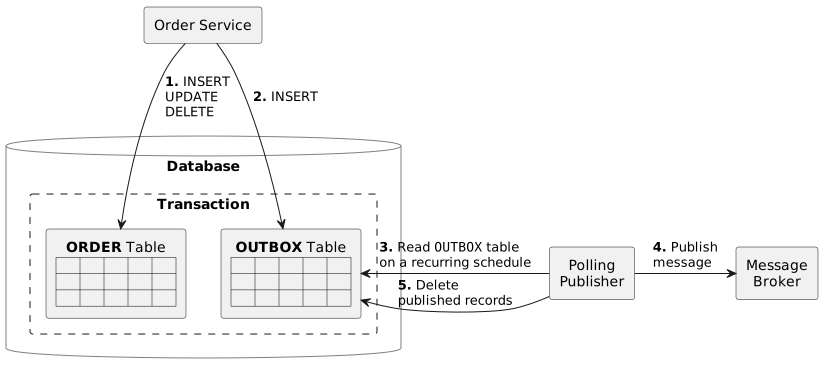
We may have multiple asynchronous event handlers or so-called subscriptions.
The subscription concept is required to keep track of delivered events separately for different event handlers.
The last event processed by the event handler (subscription) is stored in the separate table ES_EVENT_SUBSCRIPTION.
New events are processed by polling the ES_EVENT table.
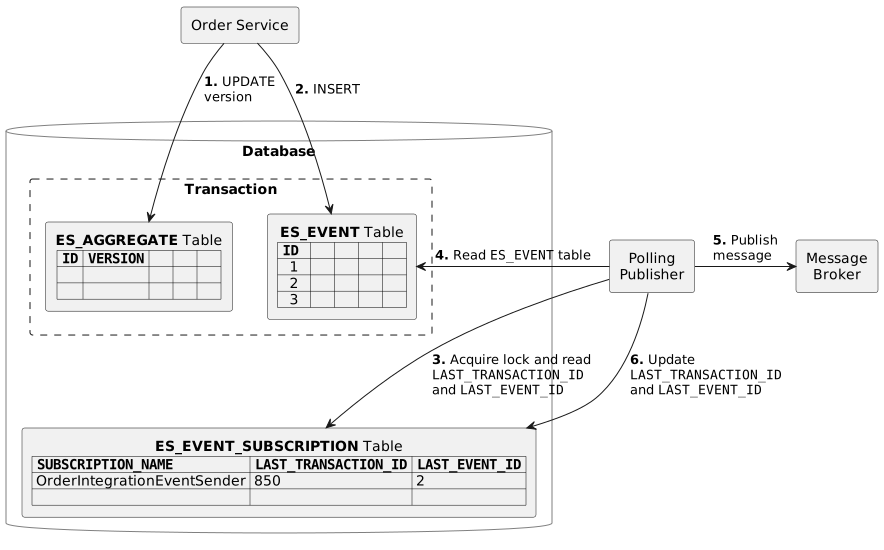
Since multiple instances of this application can run in parallel,
we need to ensure that any processing only affects the event once.
We don't want more than one event handler instance to handle the same event.
This is achieved by acquiring locks on the rows of the ES_EVENT_SUBSCRIPTION table.
We lock the row (SELECT FOR UPDATE) of the currently processed subscription.
To not hang other backend instances, we want to skip already locked rows (SELECT FOR UPDATE SKIP LOCKED)
and lock the "next" subscription.
It allows multiple backend instances to select different subscriptions that do not overlap.
This way, we improve availability and scalability.
The event subscription processor polls ES_EVENT_SUBSCRIPTION table every second (interval is configurable) for new events
and processes them:
- read the last transaction ID and event ID processed by the subscription and acquire lock
SELECT LAST_TRANSACTION_ID::text,
       LAST_EVENT_ID
  FROM ES_EVENT_SUBSCRIPTION
 WHERE SUBSCRIPTION_NAME = :subscriptionName
   FOR UPDATE SKIP LOCKED
- read new events
SELECT e.ID,
       e.TRANSACTION_ID::text,
       e.EVENT_TYPE,
       e.JSON_DATA
  FROM ES_EVENT e
  JOIN ES_AGGREGATE a on a.ID = e.AGGREGATE_ID
 WHERE a.AGGREGATE_TYPE = :aggregateType
   AND (e.TRANSACTION_ID, e.ID) > (:lastProcessedTransactionId::xid8, :lastProcessedEventId)
   AND e.TRANSACTION_ID < pg_snapshot_xmin(pg_current_snapshot())
ORDER BY e.TRANSACTION_ID ASC, e.ID ASC(a, b) > (c, d) is a row comparison and is equivalent to a > c OR (a = c AND b > d).
- update the last transaction ID and event ID processed by the subscription
UPDATE ES_EVENT_SUBSCRIPTION
   SET LAST_TRANSACTION_ID = :lastProcessedTransactionId::xid8,
       LAST_EVENT_ID = :lastProcessedEventId
 WHERE SUBSCRIPTION_NAME = :subscriptionName
Transactional outbox using transaction ID
Using only the event ID to track events processed by the subscription is unreliable
and can result in lost events.
The ID column of the ES_EVENT table is of type BIGSERIAL.
It's a notational convenience for creating ID columns having their default values assigned from a SEQUENCE generator.
PostgreSQL sequences can't be rolled back.
SELECT nextval('ES_EVENT_ID_SEQ') increments and returns the sequence value.
Even if the transaction is not yet committed, the new sequence value becomes visible to other transactions.
If transaction #2 started after transaction #1 but committed first,
the event subscription processor can read the events created by transaction #2, update the last processed event ID,
and thus lose the events created by transaction #1.
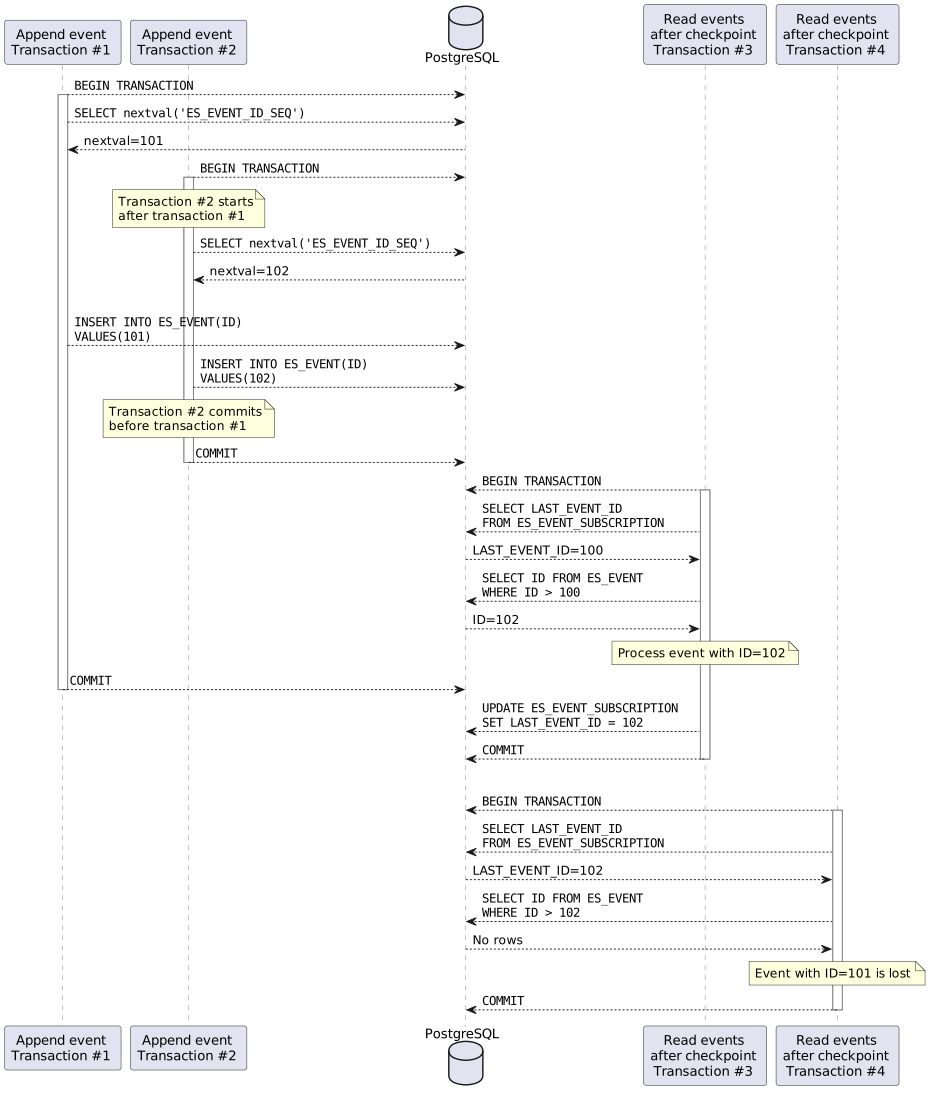
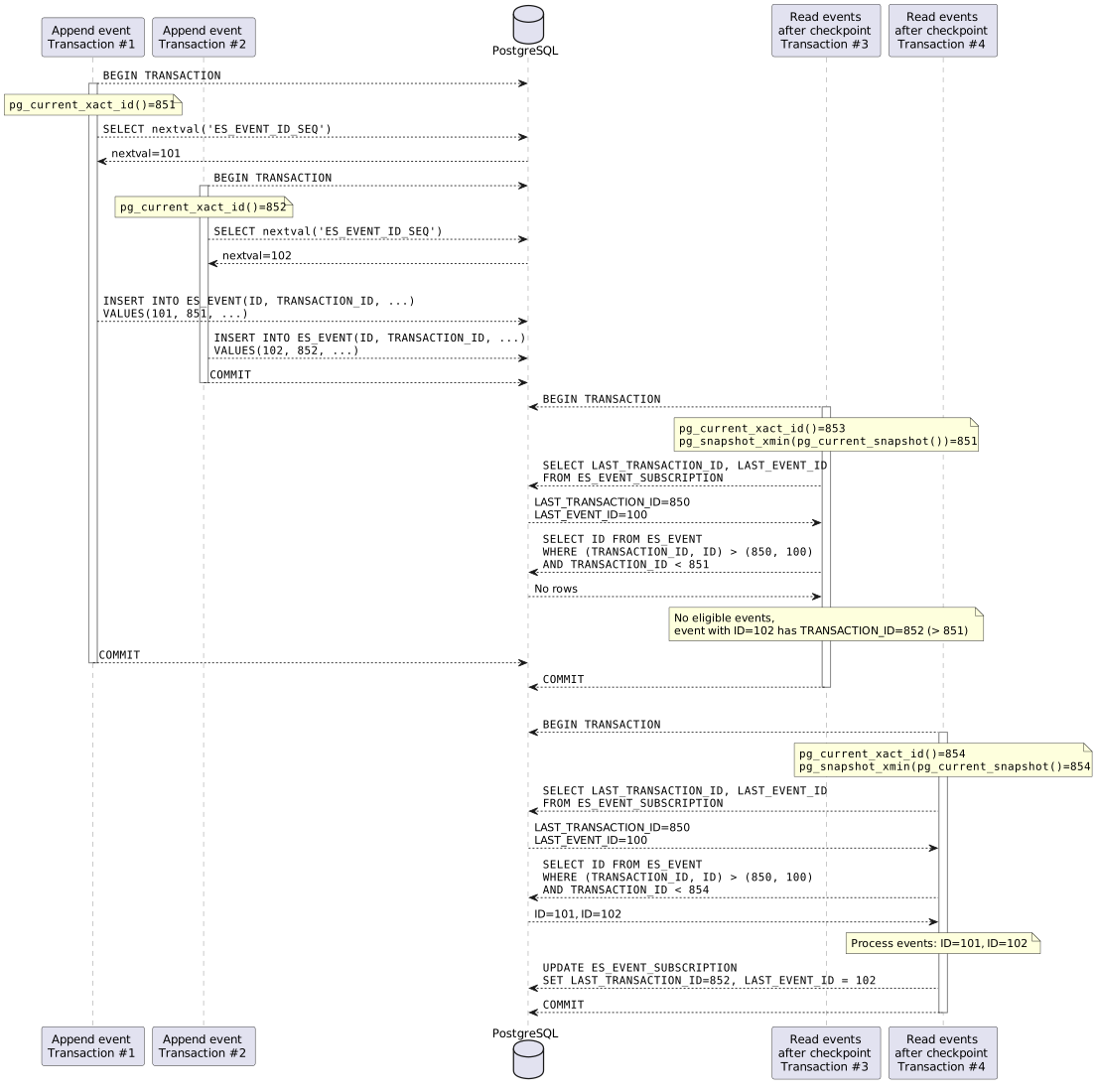
We use transaction ID with event ID to build a reliable PostgreSQL polling mechanism that doesn't lose events.
Each event is supplemented with the current transaction ID.
pg_current_xact_id() returns the current transaction's ID of type xid8.
xid8 values increase strictly monotonically and cannot be reused in the lifetime of a database cluster.
The latest event that is "safe" to process is right before the xmin of the current snapshot.
pg_current_snapshot() returns a current snapshot, a data structure showing which transaction IDs are now in-progress.
pg_snapshot_xmin(pg_snapshot) returns the xmin of a snapshot.
xmin is the lowest transaction ID that was still active.
All transaction IDs less than xmin are either committed and visible, or rolled back.
Even if transaction #2 started after transaction #1 and committed first,
the events it created won't be read by the event subscription processor until transaction #1 is committed.
NOTE
The transaction ID solution is used by default as it is non-blocking.
Transactional outbox using table-level lock
With the transaction ID solution, event subscription processor doesn't wait for in-progress transactions to complete.
Events created by already committed transactions will not be available for processing
while transactions started earlier are still in-progress.
These events will be processed immediately after these earlier transactions have completed.
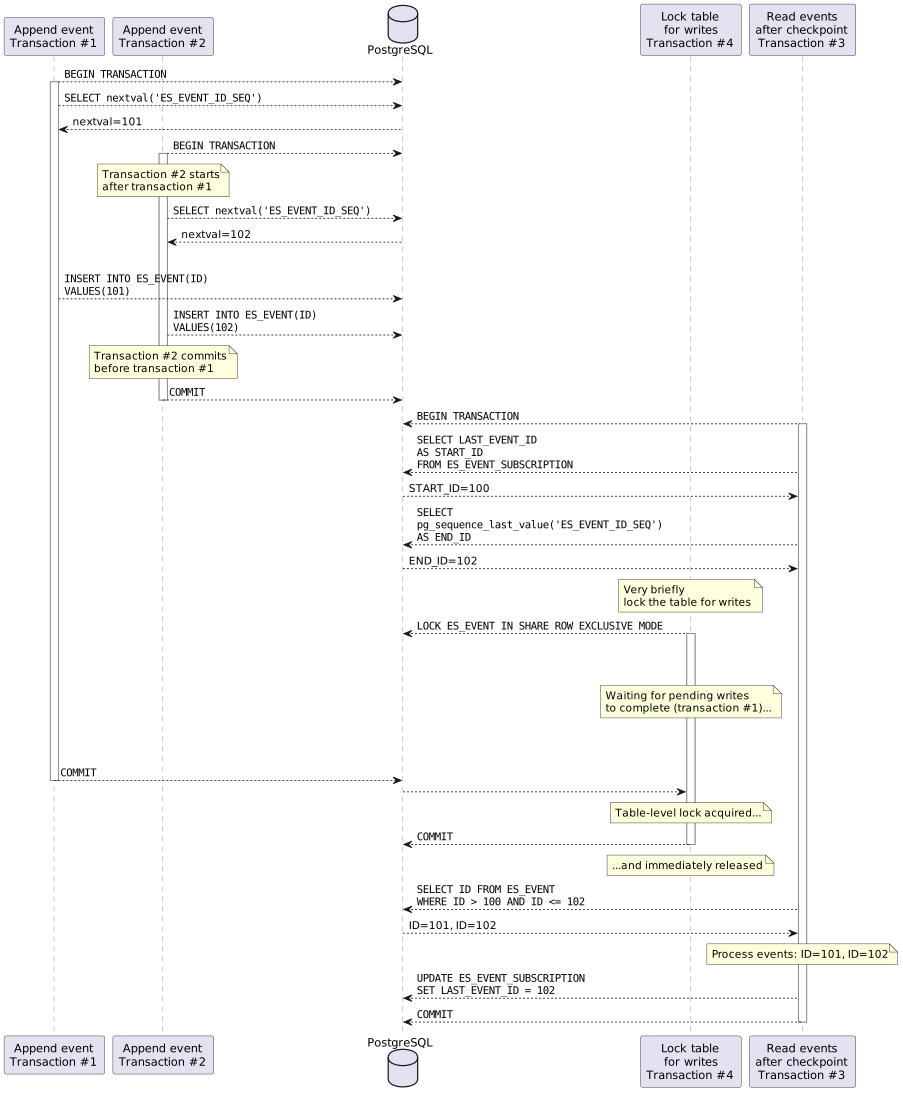
An alternative solution is to use PostgreSQL explicit locking to make event subscription processor wait for in-progress transactions.
Before reading new events, the event subscription processor
- gets the most recently issued ID sequence number,
- very briefly locks the table for writes to wait for all pending writes to complete.
The most recently issued ES_EVENT_ID_SEQ sequence number is obtained using the pg_sequence_last_value function:
SELECT pg_sequence_last_value('ES_EVENT_ID_SEQ').
Events are created with the command INSERT INTO ES_EVENT... that acquires the ROW EXCLUSIVE lock mode on ES_EVENT table.
ROW EXCLUSIVE (RowExclusiveLock) lock mode is acquired by any command that modifies data in a table.
The command LOCK ES_EVENT IN SHARE ROW EXCLUSIVE MODE acquires the SHARE ROW EXCLUSIVE lock mode on ES_EVENT table.
SHARE ROW EXCLUSIVE (ShareRowExclusiveLock) mode protects a table against concurrent data changes,
and is self-exclusive so that only one session can hold it at a time.
SHARE ROW EXCLUSIVE lock must be acquired in a separate transaction (Propagation.REQUIRES_NEW).
The transaction must contain only this command and commit quickly to release the lock, so writes can resume.
When the lock is acquired and released, it means
that there are no more uncommitted writes with an ID less than or equal to the ID returned by pg_sequence_last_value.
To get new events from the ES_EVENT table, the application has to poll the database.
The shorter the polling period, the shorter the delay between persisting a new event and processing it by the subscription.
But the lag is inevitable. If the polling period is 1 second, then the lag is at most 1 second.
The polling mechanism implementation ScheduledEventSubscriptionProcessor
uses a Spring annotation @Scheduled to poll database with a fixed period.
The polling event subscription processing can be enabled and configured in the application.yml
event-sourcing:
  subscriptions: polling # Enable database polling subscription processing
  polling-subscriptions:
    polling-initial-delay: PT1S
    polling-interval: PT1S
Listen/Notify as an alternative to database polling
To reduce the lag associated with database polling, the polling period can be set to a very low value,
such as 1 second.
But this means that there will be 3600 database queries per hour and 86400 per day, even if there are no new events.
PostgreSQL LISTEN and NOTIFY feature can be used instead of polling.
This mechanism allows for sending asynchronous notifications across database connections.
Notifications are not sent directly from the application,
but via the database trigger on a table.
To use this functionality an unshared PgConnection
which remains open is required.
The long-lived dedicated JDBC Connection for receiving notifications has to be created using the DriverManager API,
instead of getting from a pooled DataSource.
PostgreSQL JDBC driver can't receive asynchronous notifications
and must poll the backend to check if any notifications were issued.
A timeout can be given to the poll function getNotifications(int timeoutMillis),
but then the execution of statements from other threads will block.
When timeoutMillis = 0, blocks forever or until at least one notification has been received.
It means that notification is delivered almost immediately, without a lag.
If more than one notification is about to be received, these will be returned in one batch.
This solution significantly reduces the number of issued queries
and also solves the lag problem that the polling solution suffers from.
The Listen/Notify mechanism implementation PostgresChannelEventSubscriptionProcessor
is inspired by the Spring Integration class PostgresChannelMessageTableSubscriber.
The Listen/Notify event subscription processing can be enabled in the application.yml
event-sourcing:
  subscriptions: postgres-channel # Enable Listen/Notify event subscription processing
NOTE
The Listen/Notify mechanism is used by default as it is more efficient.
Adding new asynchronous event handlers
After restarting the backend, existing subscriptions will only process new events after the last processed event
and not everything from the first one.
WARNING
Critical content demanding immediate user attention due to potential risks.
New subscriptions (event handlers) in the first poll will read and process all events.
Be careful, if there are too many events, they may take a long time to process.
Using PostgreSQL as an event store has a lot of advantages, but there are also drawbacks.
- Asynchronous event handlers can process the same event more than once.
It might crash after processing an event but before recording the fact that it has done so.
When it restarts, it will then process the same event again (e.g., send an integration event).
Integration events are delivered with at-least-once delivery guarantee.
The exactly-once delivery guarantee is hard to achieve due to a dual-write.
A dual-write describes a situation when you need to atomically update the database and publish messages
without two-phase commit (2PC).
Consumers of integration events should be idempotent and filter duplicates and unordered events.
- The asynchronous event handling results in the eventual consistency between the write model and sent integration events.
The polling database table for new events with a fixed delay introduces a full consistency lag
greater than or equal to the interval between polls (1 second by default).
- A long-running transaction in the same database will effectively "pause" all event handlers.
pg_snapshot_xmin(pg_snapshot) will return the ID of this long-running transaction
and events created by all later transactions will be read by the event subscription processor
only after this long-running transaction is committed.
This reference implementation can be easily extended to comply with your domain model.
Event sourcing related code and application specific code are located in separate Gradle subprojects:
event-sourcing-app depends on postgresql-event-sourcing-core:
dependencies {
    implementation project(':postgresql-event-sourcing-core')
}
Database schema migrations
Event sourcing related database schema migrations:
Application specific projections database schema migration:
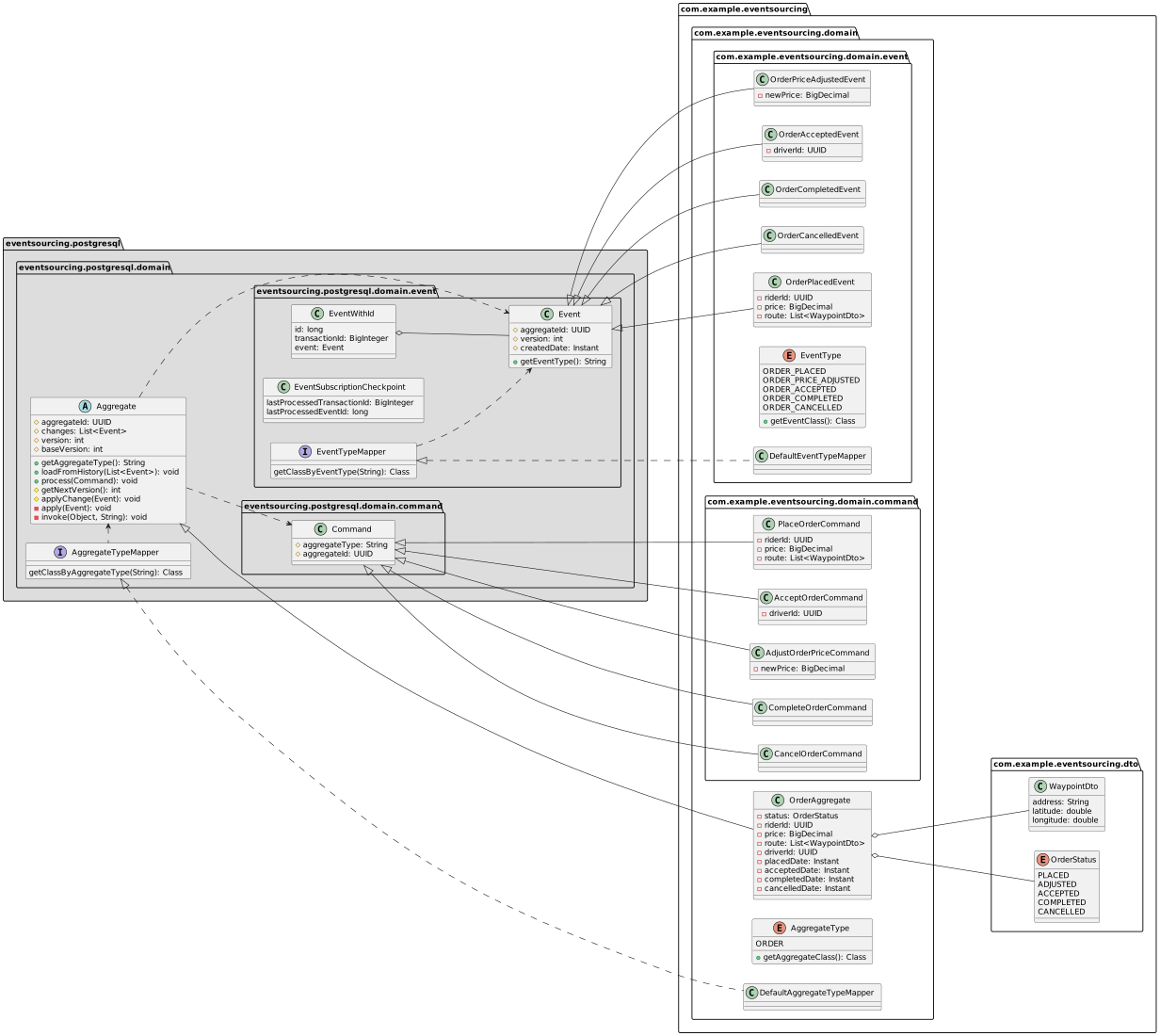
Class diagram of the domain model
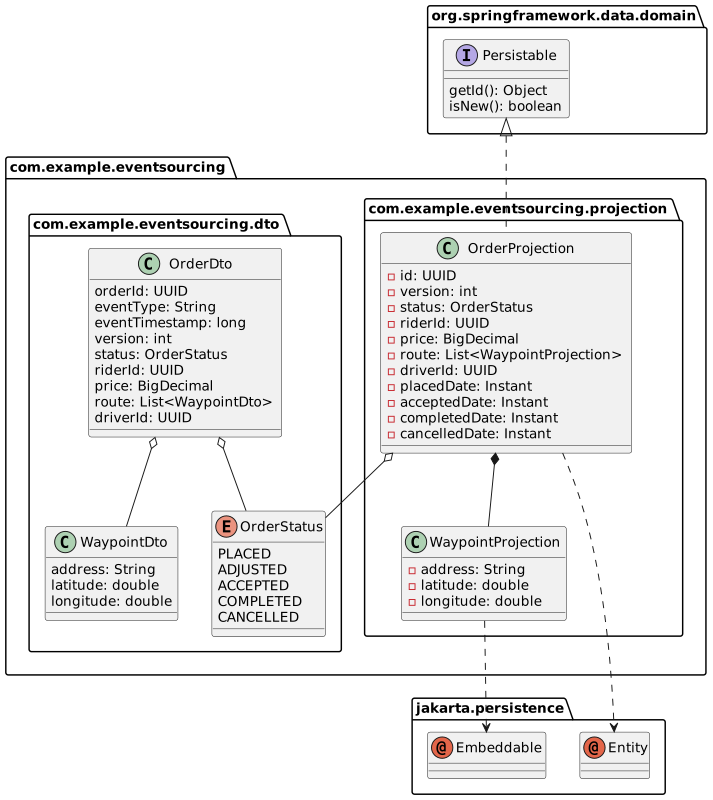
Class diagram of the projections
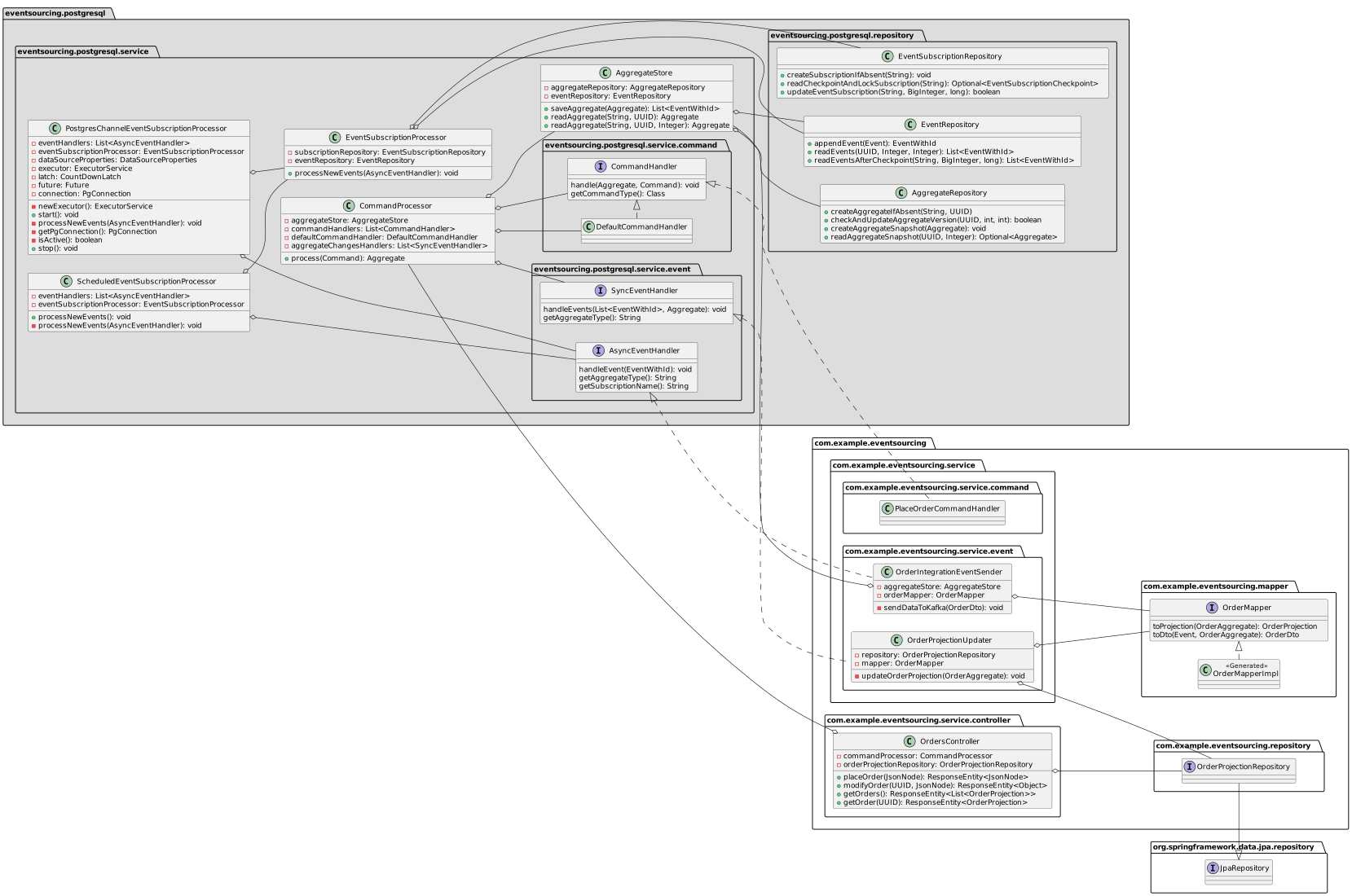
Class diagram of the service layer
How to adapt it to your domain?
To adapt this sample to your domain model, make changes to event-sourcing-app subproject.
No changes to postgresql-event-sourcing-core subproject are required.
-
Download & install SDKMAN!.
-
Install JDK 21
sdk list java
sdk install java 21-tem
-
Install Docker
and Docker Compose.
-
Build Java project and Docker image
./gradlew clean build jibDockerBuild -i
-
Run PostgreSQL, Kafka and event-sourcing-app
docker compose --env-file gradle.properties up -d --scale event-sourcing-app=2
# wait a few minutes
-
Follow the logs of the application
docker compose logs -f event-sourcing-app
-
Run E2E tests and see the output
E2E_TESTING=true ./gradlew clean test -i
-
Explore the database using the Adminer database management tool at http://localhost:8181.
Find the database name, user, and password in the docker-compose.yml.
You can also manually call the REST API endpoints.
-
Install curl and jq
-
Place new order
ORDER_ID=$(curl -s -X POST http://localhost:8080/orders -d '{"riderId":"63770803-38f4-4594-aec2-4c74918f7165","price":"123.45","route":[{"address":"Kyiv, 17A Polyarna Street","lat":50.51980052414157,"lon":30.467197278948536},{"address":"Kyiv, 18V Novokostyantynivska Street","lat":50.48509161169076,"lon":30.485170724431292}]}' -H 'Content-Type: application/json' | jq -r .orderId)
-
Get the placed order
curl -s -X GET http://localhost:8080/orders/$ORDER_ID | jq
-
Accept the order
curl -s -X PUT http://localhost:8080/orders/$ORDER_ID -d '{"status":"ACCEPTED","driverId":"2c068a1a-9263-433f-a70b-067d51b98378"}' -H 'Content-Type: application/json'
-
Get the accepted order
curl -s -X GET http://localhost:8080/orders/$ORDER_ID | jq
-
Complete the order
curl -s -X PUT http://localhost:8080/orders/$ORDER_ID -d '{"status":"COMPLETED"}' -H 'Content-Type: application/json'
-
Get the completed order
curl -s -X GET http://localhost:8080/orders/$ORDER_ID | jq
-
Try to cancel a completed order to simulate business rule violation
curl -s -X PUT http://localhost:8080/orders/$ORDER_ID -d '{"status":"CANCELLED"}' -H 'Content-Type: application/json' | jq
-
Print integration events
docker compose exec kafka /bin/kafka-console-consumer --bootstrap-server localhost:9092 --topic order-events --from-beginning --property print.key=true --timeout-ms 10000


