Angular Lib for OpenID Connect & OAuth2







Secure your Angular app using the latest standards for OpenID Connect & OAuth2. Provides support for token refresh, all modern OIDC Identity Providers and more.
This library is certified by OpenID Foundation. (RP Implicit and Config RP)

You can use the schematics and ng add the library.
ng add angular-auth-oidc-client
And answer the questions. The schematic detects how your application is bootstrapped and configures the library accordingly:
- Standalone applications (
bootstrapApplication): an auth.config.ts is created and provideAuth(authConfig) is added to the providers of your application config.
- NgModule applications: an
AuthConfigModule is created and imported in your AppModule.
You can choose the setup explicitly with --standalone or --legacy-modules:
ng add angular-auth-oidc-client --standalone
ng add angular-auth-oidc-client --legacy-modules
--standalone also works in NgModule applications, provideAuth(authConfig) is then added to the providers of the AppModule. --legacy-modules requires an AppModule. The two options cannot be combined.
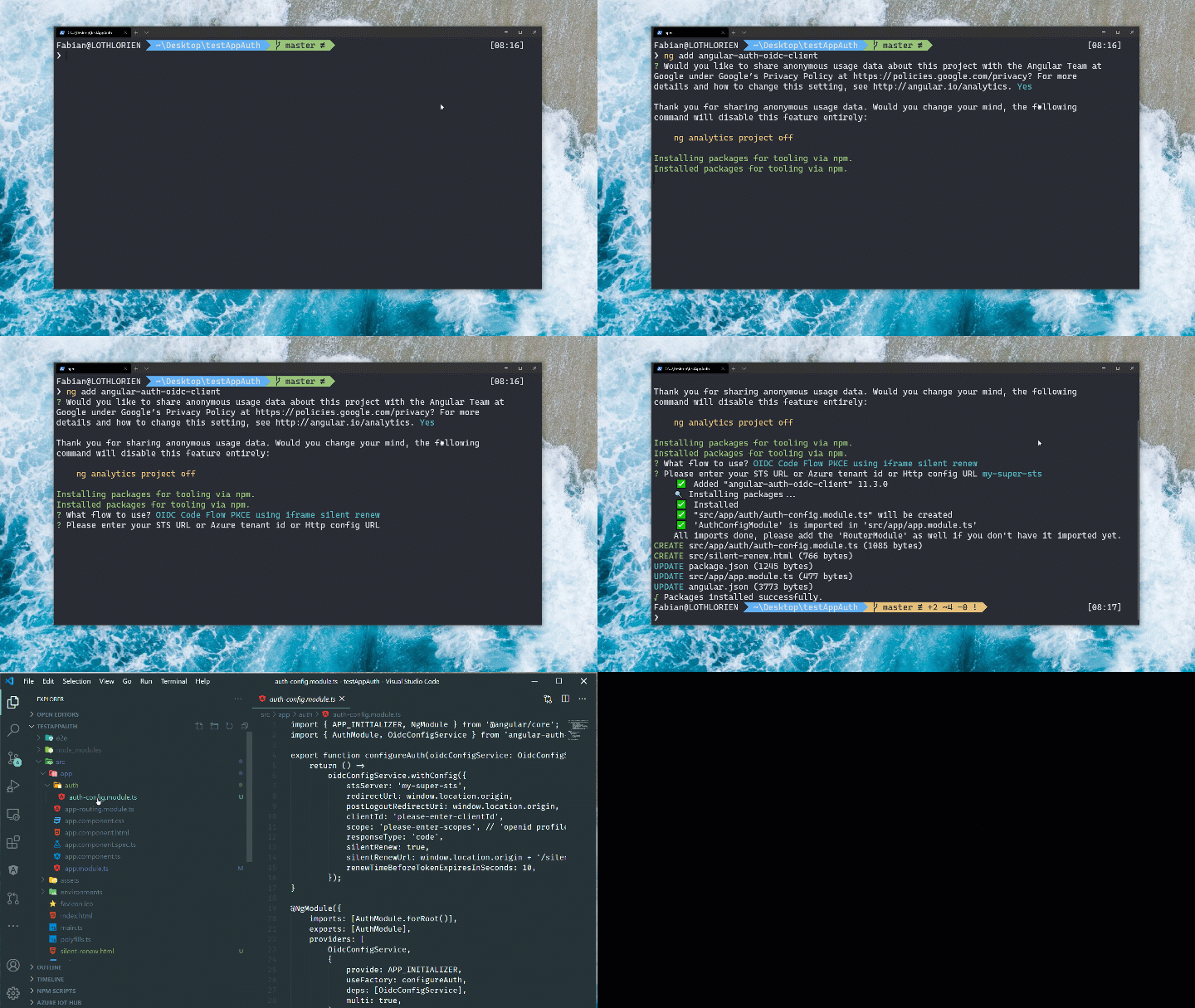
Navigate to the level of your package.json and type
npm install angular-auth-oidc-client
or with yarn
yarn add angular-auth-oidc-client
Read the docs here
Explore the Samples here
For the example of the Code Flow. For further examples please check the Samples Section.
If you have done the installation with the schematics, these modules and files should be available already!
Import the AuthModule in your module.
import { NgModule } from '@angular/core';
import { AuthModule, LogLevel } from 'angular-auth-oidc-client';
// ...

@NgModule({
  // ...
  imports: [
    // ...
    AuthModule.forRoot({
      config: {
        authority: '<your authority address here>',
        redirectUrl: window.location.origin,
        postLogoutRedirectUri: window.location.origin,
        clientId: '<your clientId>',
        scope: 'openid profile email offline_access',
        responseType: 'code',
        silentRenew: true,
        useRefreshToken: true,
        logLevel: LogLevel.Debug,
      },
    }),
  ],
  // ...
})
export class AppModule {}
When using silentRenew together with useRefreshToken, requesting the
offline_access scope is common and remains the default recommendation.
Some providers support refresh token renewal in the browser without
offline_access. In those cases, you can suppress the configuration warning
with disableRefreshTokenOfflineAccessScopeWarning: true.
And call the method checkAuth() from your app.component.ts. The method checkAuth() is needed to process the redirect from your Security Token Service and set the correct states. This method must be used to ensure the correct functioning of the library.
import { Component, OnInit, inject } from '@angular/core';
import { LoginResponse, OidcSecurityService } from 'angular-auth-oidc-client';

@Component({
  /*...*/
})
export class AppComponent implements OnInit {
  private readonly oidcSecurityService = inject(OidcSecurityService);

  ngOnInit() {
    this.oidcSecurityService.checkAuth().subscribe((loginResponse: LoginResponse) => {
      const { isAuthenticated, userData, accessToken, idToken, configId } = loginResponse;

      /*...*/
    });
  }

  login() {
    this.oidcSecurityService.authorize();
  }

  logout() {
    this.oidcSecurityService.logoff().subscribe((result) => console.log(result));
  }
}You can get the access token by calling the method getAccessToken() on the OidcSecurityService
this.oidcSecurityService.getAccessToken().subscribe((token) => {
  /* ... */
});
And then you can use it in the HttpHeaders
import { HttpHeaders } from '@angular/common/http';

this.oidcSecurityService.getAccessToken().subscribe((token) => {
  const httpOptions = {
    headers: new HttpHeaders({
      Authorization: 'Bearer ' + token,
    }),
  };
});
You can use the built in interceptor to add the accesstokens to your request
AuthModule.forRoot({
  config: {
    // ...
    secureRoutes: ['https://my-secure-url.com/', 'https://my-second-secure-url.com/'],
  },
}), providers: [
{ provide: HTTP_INTERCEPTORS, useClass: AuthInterceptor, multi: true },
],Current Version is Version 22.x
MIT
Maintained by offering.solutions.

