

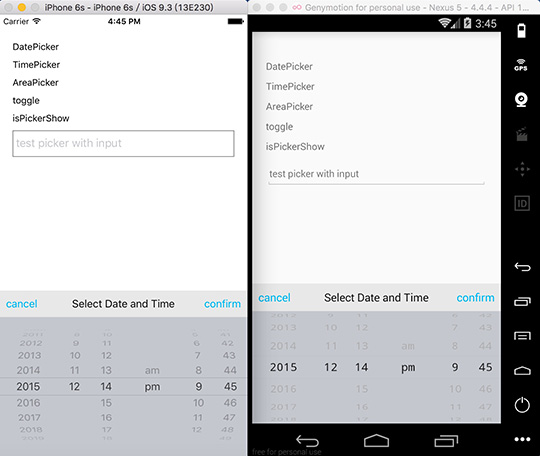
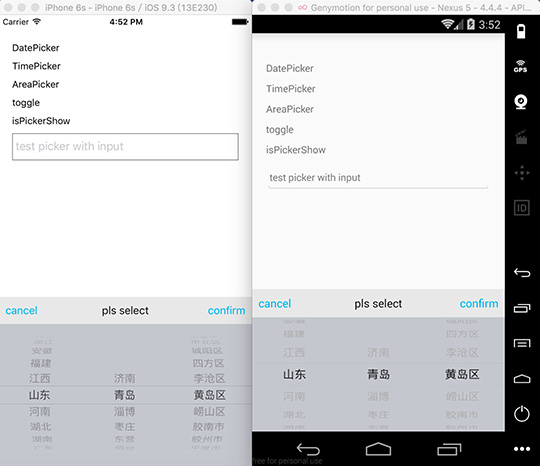
| Key |
Type |
Default |
Support |
Description |
| isLoop |
Boolean |
false |
Android |
|
| pickerTextEllipsisLen |
number |
6 |
Android |
|
| pickerConfirmBtnText |
string |
confirm |
iOS/Android |
|
| pickerCancelBtnText |
string |
cancel |
iOS/Android |
|
| pickerTitleText |
string |
pls select |
iOS/Android |
|
| pickerConfirmBtnColor |
array |
[1, 186, 245, 1] |
iOS/Android |
|
| pickerCancelBtnColor |
array |
[1, 186, 245, 1] |
iOS/Android |
|
| pickerTitleColor |
array |
[20, 20, 20, 1] |
iOS/Android |
|
| pickerToolBarBg |
array |
[232, 232, 232, 1] |
iOS/Android |
|
| pickerBg |
array |
[196, 199, 206, 1] |
iOS/Android |
|
| pickerToolBarFontSize |
number |
16 |
iOS/Android |
|
| wheelFlex |
array |
[1, 1, 1] |
iOS/Android |
|
| pickerFontSize |
number |
16 |
iOS/Android |
|
| pickerFontColor |
array |
[31, 31, 31, 1] |
iOS/Android |
|
| pickerFontFamily |
string |
|
iOS/Android |
|
| pickerRowHeight |
number |
24 |
iOS |
|
| pickerData |
array |
|
iOS/Android |
|
| selectedValue |
array |
|
iOS/Android |
|
| onPickerConfirm |
function |
|
iOS/Android |
|
| onPickerCancel |
function |
|
iOS/Android |
|
| onPickerSelect |
function |
|
iOS/Android |
|
| Key |
Support |
Description |
| init |
iOS/Android |
init and pass parameters to picker |
| toggle |
iOS/Android |
show or hide picker |
| show |
iOS/Android |
show picker |
| hide |
iOS/Android |
hide picker |
| select |
iOS/Android |
select a row |
| isPickerShow |
iOS/Android |
get status of picker, return a boolean |
npm install react-native-picker --save
Step 3 - import and use in project
import Picker from 'react-native-picker';
let data = [];
for(var i=0;i<100;i++){
    data.push(i);
}

Picker.init({
    pickerData: data,
    selectedValue: [59],
    onPickerConfirm: data => {
        console.log(data);
    },
    onPickerCancel: data => {
        console.log(data);
    },
    onPickerSelect: data => {
        console.log(data);
    }
});
Picker.show();
Integration With Existing Apps (iOS)
The Podfile will like below:
platform :ios, '8.0'
target 'YourTarget' do
    pod 'React', :path => '../YOUR_REACT_NATIVE_PROJECT/node_modules/react-native', :subspecs => [
    'Core',
    ...
    ]
    pod 'Picker', :path => '../YOUR_REACT_NATIVE_PROJECT/node_modules/react-native-picker'
end
After you have updated the Podfile of the existing app, you can install react-native-picker like below:
1. parallel: such as time picker, wheels have no connection with each other
2. cascade: such as date picker, address picker .etc, when front wheel changed, the behind wheels will all be reset
pickerData = [1,2,3,4];
selectedValue = 3;
pickerData = [
    [1,2,3,4],
    [5,6,7,8],
    ...
];
selectedValue = [1, 5];pickerData = [
{
a: [1, 2, 3, 4]
},
{
b: [5, 6, 7, 8]
},
...
];
selectedValue = ['a', 2];pickerData = [
{
a: [
{
a1: [1, 2, 3, 4]
},
{
a2: [5, 6, 7, 8]
},
{
a3: [9, 10, 11, 12]
}
]
},
{
b: [
{
b1: [11, 22, 33, 44]
},
{
b2: [55, 66, 77, 88]
},
{
b3: [99, 1010, 1111, 1212]
}
]
},
{
c: [
{
c1: ['a', 'b', 'c']
},
{
c2: ['aa', 'bb', 'cc']
},
{
c3: ['aaa', 'bbb', 'ccc']
}
]
},
...
]For pure javascript version -> v3.0.5


