This package is no longer maintained. TSLint is deprecated,
and v2.3.0 is the final release of tslint-react-hooks. Use
eslint-plugin-react-hooks with
typescript-eslint instead. See
Migrating to ESLint.


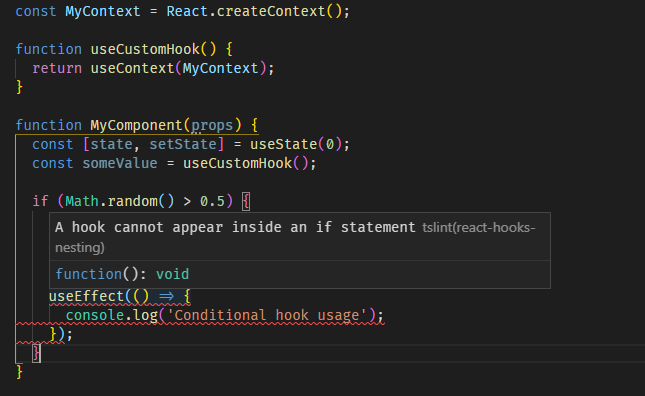
A TSLint rule that enforces the Rules of Hooks for
React hooks.
The rule is based on an ESLint plugin for react hooks.
- detects using React hooks inside potentially-conditional branches:
- if statements
- short-circuit conditional expressions (
&&, ||)
- ternary expressions
- loops (
while, for, do ... while)
- functions that themselves are not custom hooks or components
- detects using React hooks in spite of an early return
- support for detecting hooks from namespaces other than
React (e.g. MyHooks.useHook) (optional)
The rules-of-hooks rule in the official
eslint-plugin-react-hooks
checks the same Rules of Hooks as this package, and the plugin also ships exhaustive-deps, which
checks effect dependency arrays and has no equivalent here.
-
Set up ESLint for TypeScript by following the
typescript-eslint Getting Started guide.
typescript-eslint supports a narrower range of TypeScript versions than this package (see its
dependency versions), so you may need
to upgrade TypeScript first.
-
Optionally, convert the rest of your tslint.json with
tslint-to-eslint-config:
npx tslint-to-eslint-config
It writes a legacy .eslintrc.js file, which ESLint 10 no longer reads. Convert it to a flat
config with @eslint/migrate-config
(npx @eslint/migrate-config .eslintrc.js), then delete .eslintrc.js. To also convert
tslint:disable comments, run npx tslint-to-eslint-config --comments 'src/**/*.{ts,tsx}'
(adjust the glob to your sources). It drops rule names it can't map, so a
tslint:disable-next-line:react-hooks-nesting comment becomes a bare eslint-disable-next-line
that disables every rule; add react-hooks/rules-of-hooks to those.
It has no ESLint equivalent for react-hooks-nesting, so it keeps the rule running through
TSLint inside a @typescript-eslint/tslint/config rule and asks you to install
@typescript-eslint/eslint-plugin-tslint. Delete that rule and that plugin: the next steps
replace them, and they stop working once TSLint is removed.
-
Install the plugin:
npm install eslint-plugin-react-hooks --save-dev
-
Enable the rules in your ESLint config, next to the typescript-eslint config. If step 2 created
a config file (such as eslint.config.js), add the rules there; ESLint loads only one config
file, so don't create a second one. A complete config looks like this:
// eslint.config.mjs
import js from '@eslint/js';
import { defineConfig } from 'eslint/config';
import reactHooks from 'eslint-plugin-react-hooks';
import tseslint from 'typescript-eslint';

export default defineConfig(
  {
    files: ['**/*.{js,jsx,ts,tsx}'],
    extends: [js.configs.recommended, tseslint.configs.recommended],
  },
  {
    files: ['**/*.{js,jsx,ts,tsx}'],
    plugins: { 'react-hooks': reactHooks },
    rules: {
      'react-hooks/rules-of-hooks': 'error',
      'react-hooks/exhaustive-deps': 'warn',
    },
  },
);
This enables only the two classic hooks rules. The plugin's README recommends its preset,
reactHooks.configs.flat.recommended, which also turns on its React Compiler rules.
-
Remove tslint-react-hooks, TSLint and your tslint.json once ESLint covers your code.
A "warning" severity in tslint.json becomes 'warn' in ESLint. Rewrite
tslint:disable comments for react-hooks-nesting as ESLint disable comments for
react-hooks/rules-of-hooks, e.g. // eslint-disable-next-line react-hooks/rules-of-hooks.
The detect-hooks-from-non-react-namespace option has no direct equivalent. rules-of-hooks has
no option for it, and always treats Namespace.useSomething as a hook when the namespace starts
with an uppercase letter: MyHooks.useHook is checked, while myHooks.useHook is not.
The final release supports TSLint 5 and 6, and TypeScript 2.4 through 6.x. TypeScript 7 is not
supported: TSLint itself crashes on it.
First, install the rule:
npm install tslint-react-hooks --save-dev
Then, enable the rule by modifying tslint.json:
{
  "extends": [
    // your other plugins...
    "tslint-react-hooks"
  ],
  "rules": {
    // your other rules...
    "react-hooks-nesting": "error"
  }
}
To report rule violations as warnings instead of errors, set it to "warning".
While the rule works fine out-of-the-box, it can be customized. To specify options, use the
following syntax when modifying tslint.json:
{
  "extends": [
    // your other plugins...
    "tslint-react-hooks"
  ],
  "rules": {
    // your other rules...
    "react-hooks-nesting": {
      "severity": "error", // "error", "warning", "default" or "off"
      "options": {
        // options go here
      }
    }
  }
}
-
"detect-hooks-from-non-react-namespace" - when set to true, violations will be also reported
hooks accessed from sources other than the React namespace (e.g. MyHooks.useHook will be
treated as a hook).
By default, only direct calls (e.g. useHook) or calls from React namespace (e.g.
React.useState) are treated as hooks.
Have an idea for an option? Create a new issue.
For some arrow functions/function expressions, the rule has no way to determine whether those are a
component, a hook, both of which could contain hook calls, or a regular function that should not
contain hook calls.
const withHoc = <TProps extends object>(Component: ComponentType<TProps>) => (
  props: TProps,
) => {
  const [state] = useState();
  return <Component {...props} />;
};
The workaround in those cases is to use a named function expression:
const withHoc = <TProps extends object>(Component: ComponentType<TProps>) =>
  function WrappedComponent(props: TProps) {
    const [state] = useState();
    return <Component {...props} />;
  };
Naming the function like a component (in PascalCase) unambiguously lets the rule treat the
function as a component.
False positives and not-covered cases
There are some cases that seem hard to analyze and may result in false positives or false negatives.
In such cases, disable the rule for a specific line using the following comment:
// tslint:disable:react-hooks-nesting
useEffect(() => {});
Looping over static arrays
The rule may report false positives, for example in:
function MyComponent() {
  const array = [1, 2, 3];

  array.forEach(value => {
    React.useEffect(() => console.log(value));
    ~~~~~~~~~~~~~~~~~~~~~~~~~~~~~~~~~~~~~~~~~ [A hook cannot be used inside of another function]
  });
}
The useEffect hook will be called unconditionally and the call-order will be the same between
renders.
Using renamed hooks (that do not start with use)
The rule only treats functions that start with use as hooks. Therefore, renaming the hook will
result in avoiding the rule:
const renamedUseState = React.useState;

function MyComponent() {
  const [state, setState] = renamedUseState(0);
}
Unconditional nesting, for example:
function MyComponent() {
  if (true) {
    const variableThatCannotBeLeaked = useContext(SomeContext);
    useEffect(() => {
      console.log(variableThatCannotBeLeaked);
    });
  }

  return <div>Text</div>;
}
is treated as conditional nesting. It seems hard to verify if the condition is in fact a constant,
therefore such a situation will always result in a rule violation.
In situations where such an if statement was used to create an additional block scope, use the
block scope directly:
function MyComponent() {
  {
    const variableThatCannotBeLeaked = useContext(SomeContext);
    useEffect(() => {
      console.log(variableThatCannotBeLeaked);
    });
  }

  return <div>Text</div>;
}After pulling the repository, make sure to run
The source code for the rule is located in the src directory.
For more information about the developing custom TSLint rules, take a look at
TSLint's documentation.
Run
to compile the rule and run automatic TSLint tests.
They are located in the test directory.
The author of this rule is Grzegorz Rozdzialik.

